Repository navigation
Conversation


Unsloth Studio's MCP controls move to their own owner-only Settings > MCP tab:
the Agent access switch and per-agent setup snippet, plus a Tools list with
one switch per tool. A turned-off tool is hidden from tools/list and its calls
are refused with [tool_disabled]; prompts that read a turned-off tool are
hidden too. New tools start on. The Agents and API keys tabs show the access
status with a button that opens the MCP tab.
GET /api/settings/mcp-access gains tools[{name, area, enabled}]; PUT also
takes disabled_tools. The old {enabled} body still works, and
UNSLOTH_STUDIO_ENABLE_MCP now locks only the switch, not the tool list.


Codex Review SummaryThis comment shows the latest Codex review activity on this pull request.
ℹ️ About Codex in GitHubYour team has set up Codex to review pull requests in this repo. Reviews are triggered when you
Codex reacts with 👀 while any review is running, comments if it has suggestions, and reacts with 👍 once all reviews finish with no findings. |

|
Unsloth Studio's MCP server now has a Settings > MCP tab. It holds the Agent access switch and setup snippet, followed by a Tools list with one switch per tool. A tool that is turned off disappears from the agent's tool list, and calls to it are refused. Settings > Agents (at the end of the page) and Settings > API show the access status with a link to the tab. What changed
The MCP backend tests and the frontend suite pass on
|

…o the MCP snippet A read of the MCP settings that overlapped a write was reported as every tool off, so agents briefly saw an empty tools/list and the Tools list could save that view back. The read now retries, and the settings API sends tools: null when it really cannot read, which hides the list instead of showing it all off. A key created on Settings > API fills the MCP tab's setup snippet again, kept in memory until the key card is dismissed or Settings closes. The Unsloth Studio MCP row moves to the end of the Agents tab.
…cp-settings-tab # Conflicts: # studio/frontend/scripts/check-bundle-budget.ts
…cp-settings-tab # Conflicts: # studio/frontend/scripts/check-bundle-budget.ts


|
@codex security review |

This comment was marked as resolved.
This comment was marked as resolved.
Sorry, something went wrong.
This comment was marked as resolved.
This comment was marked as resolved.
Sorry, something went wrong.
# Conflicts: # studio/frontend/scripts/check-bundle-budget.ts [skip ci]
|
@codex review |
1 similar comment
|
@codex review |

There was a problem hiding this comment.
💡 Codex Review
Here are some automated review suggestions for this pull request.
Reviewed commit: 77eada0723
ℹ️ About Codex in GitHub
Your team has set up Codex to review pull requests in this repo. Reviews are triggered when you
- Open a pull request for review
- Mark a draft as ready
- Comment "@codex review".
If Codex has suggestions, it will comment; otherwise it will react with 👍.
Codex can also answer questions or update the PR. Try commenting "@codex address that feedback".
| def create_studio_mcp() -> FastMCP: | ||
| """Create the Unsloth MCP server and register the high-value tools.""" | ||
| mcp = FastMCP("Unsloth Studio", instructions = INSTRUCTIONS) | ||
| mcp.add_middleware(StudioToolAccess()) |
There was a problem hiding this comment.

When the owner disables a tool named by INSTRUCTIONS (for example studio_status), a fresh MCP client still receives the static initialization text telling it to call that tool first; StudioToolAccess only filters list/call/prompt operations. Clients that consume server instructions are therefore given an impossible workflow despite reconnecting to refresh the catalog, so initialization instructions should also be conditioned on the disabled set or avoid naming unavailable tools.
Useful? React with 👍 / 👎.

There was a problem hiding this comment.
Keeping as is: the instructions are fixed when the server is created, and a call to a turned-off tool gets an immediate [tool_disabled] refusal that names Settings > MCP, so the client is told what to do.
… other tool off [skip ci]

# Conflicts: # studio/frontend/scripts/check-bundle-budget.ts
… branding contract
|
Codex Review: Didn't find any major issues. 🚀 Reviewed commit: ℹ️ About Codex in GitHubYour team has set up Codex to review pull requests in this repo. Reviews are triggered when you
If Codex has suggestions, it will comment; otherwise it will react with 👍. Codex can also answer questions or update the PR. Try commenting "@codex address that feedback". |
# Conflicts: # studio/frontend/scripts/check-bundle-budget.ts
|
@codex review |
1 similar comment
|
@codex review |
There was a problem hiding this comment.
💡 Codex Review
Here are some automated review suggestions for this pull request.
Reviewed commit: 20d1488292
ℹ️ About Codex in GitHub
Your team has set up Codex to review pull requests in this repo. Reviews are triggered when you
- Open a pull request for review
- Mark a draft as ready
- Comment "@codex review".
If Codex has suggestions, it will comment; otherwise it will react with 👍.
Codex can also answer questions or update the PR. Try commenting "@codex address that feedback".
| f"Unreadable {MCP_DISABLED_TOOLS_SETTING_KEY} ({type(value).__name__}); every MCP tool counts as off." | ||
| ) | ||
| return None | ||
| return frozenset(name for name in value if isinstance(name, str)) |
There was a problem hiding this comment.
If the on-disk setting is malformed as a JSON list containing non-string values (for example [1], as can happen after corruption or a bad migration), this parser silently drops those values and returns an empty denylist. The middleware then advertises and permits every MCP tool instead of applying the documented fail-closed behavior; treat the entire list as unreadable when any entry is not a string.
Useful? React with 👍 / 👎.
There was a problem hiding this comment.
Not reachable: the only writer of this setting (set_mcp_settings) stores names already validated against the tool list, and a non-string entry names no tool, so dropping it disables nothing that was meant to be off. A value that is not a list already fails closed.

# Conflicts: # studio/frontend/scripts/check-bundle-budget.ts # studio/frontend/src/features/settings/tabs/api-keys-tab.tsx
# Conflicts: # studio/frontend/scripts/check-bundle-budget.ts
# Conflicts: # studio/frontend/scripts/check-bundle-budget.ts
… dialog
Drops the separate Settings > MCP tab so the MCP name stays free for a
future tab that manages MCP servers. The Agent access (MCP) card now ends
the Agents page: the on/off switch, a Tools row ("20 of 23 on") that opens
a dialog, and the setup snippet. The dialog groups the tools (Models,
Generate, Training and export, Data and library, Jobs) with one-line rows
whose name toggles the switch, a switch per group, and Turn all on. Every
change sends only the tools it flips as tool_states, so the server keeps
merging concurrent toggles. The API tab keeps a one-line status row that
jumps to the card.
…io/mcp-settings-tab # Conflicts: # studio/frontend/scripts/check-bundle-budget.ts # studio/frontend/src/features/settings/components/mcp-access-section.tsx # studio/frontend/src/features/settings/tabs/api-keys-tab.tsx # studio/frontend/tests/mcp-access-section.test.ts
|
Replaced by #15629, with the same final code as one commit on current main. The MCP settings now sit at the end of Settings > Agents, as discussed on Discord, and Daniel's fixes from this PR are included. |


Replaces #14348, with the same final code as one commit on current main. It includes the fixes Daniel made there, and he is credited as co-author. ## Summary Unsloth Studio's MCP server serves 23 tools. With all of them on, an agent spends about 18k tokens on tool definitions before it does anything. This PR lets the owner choose which tools agents can see. Everything lives at the end of Settings > Agents, under an "Unsloth MCP" heading, so the name "MCP" stays free for a future tab that manages MCP servers: - The "Agent access (MCP)" switch and the setup snippet, which used to sit in Settings > API. - A new **Tools** row ("20 of 23 on") with a **Choose tools** button that opens the tools dialog. - Settings > API keeps a one-line "Agent access (MCP)" row in "Access & monitoring". It shows On or Off and has an **Open in Agents** link that jumps to the section.   ### The tools dialog The first version had a switch per tool and per group, 28 in all. It read as a wall of switches, and a group switch showed off when only some of its tools were off. The dialog now works like the Hub filter: - Each tool is a pill with an icon and a name. On is the stronger fill with a tick; off is the lighter fill with muted text and no tick, so the tick carries the state, not color. Clicking the pill toggles the tool. - Each group, and the whole list under **All tools**, gets one row that reads "7 of 8 on" and ends in **Select all**, or **Select none** once every tool in it is on. The whole row is the button. - The description says why to turn tools off: every tool left on adds to what agents read before they start. - Hovering a tool says what it does, with the raw tool name under it. - Three columns fit every group without scrolling at a normal window height. On a short window the list scrolls between a fixed header and footer, and a rule shows above **Done** while more is below. Narrow windows drop to two columns, then one. - A change shows at once. The dialog no longer greys out while each save runs; a reply that arrives after a newer change is ignored, and a rejected change still resyncs and shows the error.   <details><summary>Short window and phone width</summary>  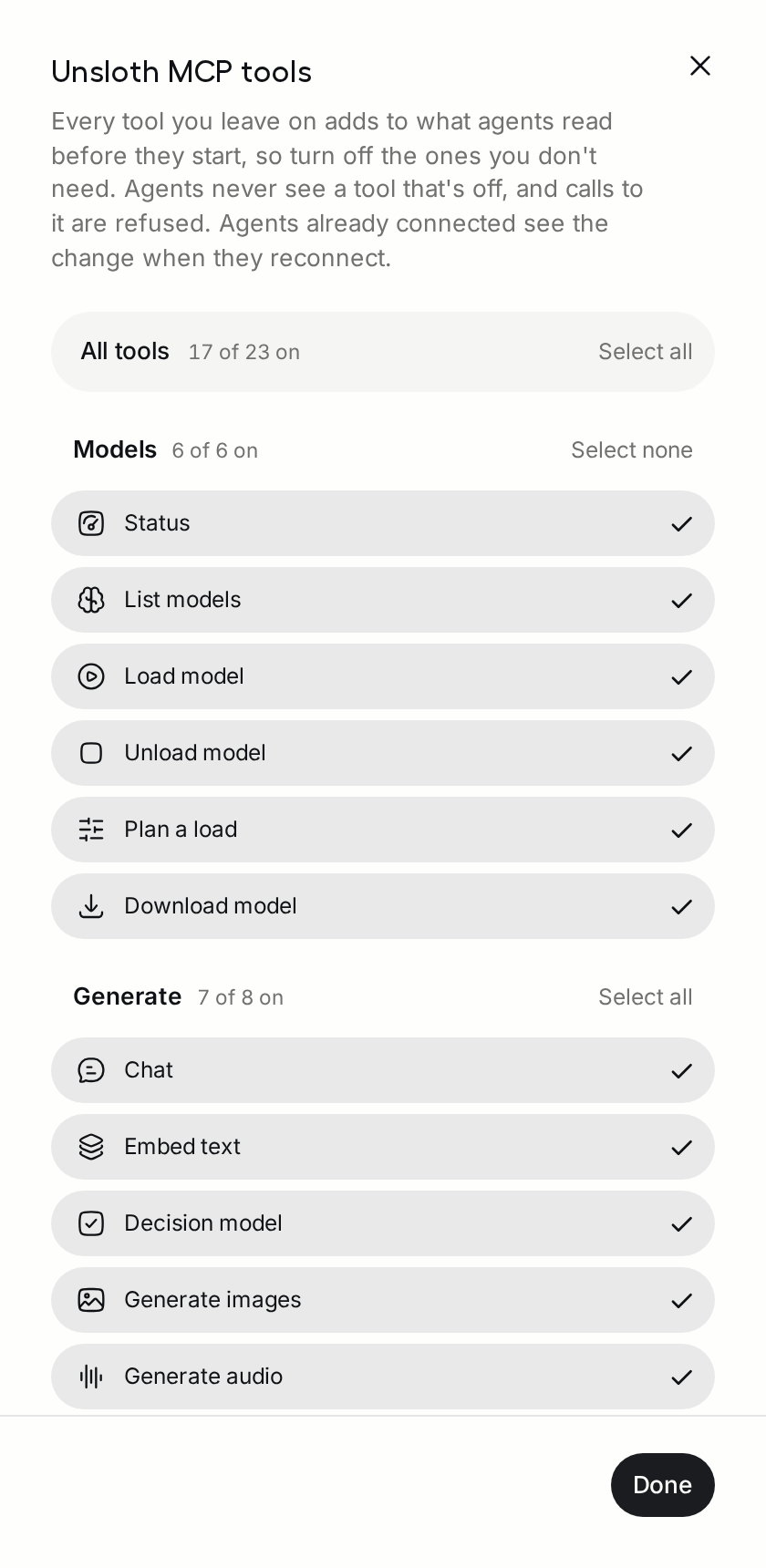 </details> ## Behavior - Every tool is on by default, including tools added by a later update. The choice covers the whole installation and every API key. - A tool that is off is left out of `tools/list`. A call to it fails with `[tool_disabled] <tool> is turned off in Unsloth Studio. The owner can turn it on in Settings > Agents.` - The `make_short_film` and `build_dataset_and_train` prompts are hidden while a tool they read (`studio_status` or `list_models`) is off. - `GET /api/settings/mcp-access` adds `tools: [{name, area, enabled}]`. - `PUT` accepts `{tool_states: {"<tool>": true|false}}`. The server merges that into the stored list, so two windows toggling different tools both keep their change. The dialog only ever sends the tools that change. `{disabled_tools: [...]}` still replaces the whole list. An unknown tool name returns 422. - `UNSLOTH_STUDIO_ENABLE_MCP=1` locks only the access switch, not the tool choice. - If the stored list can't be read, every tool counts as off, the same way the access switch fails closed. - Agents read the tool list when they connect. An agent that is already connected keeps showing a tool that was turned off until it reconnects, but its calls to that tool are refused right away. `studio/MCP.md` documents the tool choice, and `unsloth doctor` now points at Settings > Agents. ## Testing ```bash cd studio/backend python -m pytest tests/test_mcp_*.py tests/test_settings*.py cd ../.. && python -m pytest unsloth_cli/tests/test_doctor_mcp.py cd studio/frontend npm run typecheck && npm run i18n:check:strict && npm test && npm run build && npm run bundle:check ``` - **Backend:** unchanged by the dialog redesign. 2,146 passed. 3 tests in `test_mcp_images.py` fail here and also fail on main at a595688. - **CLI:** `test_doctor_mcp.py`, 30 passed. - **Frontend, on this head:** typecheck clean, `i18n:check:strict` passes for every locale, and the MCP, settings, API-key and agents tests pass (175). Each of the four redesign commits typechecks and passes those tests on its own. - **Bundle:** within budget (168.7 KB transfer to spare). The new strings are in the eager English catalog; the Agents panel and the dialog load lazily. - **In the browser:** a group row goes "0 of 3 on · Select all" → "3 of 3 on · Select none" → back; All tools does the same for every tool; Tab and Space work on the chips, and the dialog opens without focusing a control, so Enter can't flip a group by accident. The tool descriptions and the new dialog strings in the 24 non-English locales were written without a native speaker and would benefit from a native read. <!-- studio-regress:start --> ### Studio UI regression check Base `073f6e0cc` vs head `069a35528`. Functional: **NO_REGRESSION**, UI coverage 82%, 1 visual change(s), 2 text-only change(s). Only steps whose screenshots differ are shown. **settings/s06_tab_api**: | reproduced on confirm (VISUAL_DIFF)  | Step | Text / structure change | |---|---| | `settings/s10_tab_agents` | {'removed': [], 'added': ['Unsloth MCP', 'Agent access (MCP)', 'Let coding agents […] use Unsloth over MCP.', '23 of 23 on', 'Choose t | | `crawl/r_export` | | <!-- studio-regress:end --> --------- Co-authored-by: Daniel Han <[email protected]> Co-authored-by: Etherl <[email protected]> Co-authored-by: LeoBorcherding <[email protected]>




Summary
Unsloth Studio's own MCP server now has its own Settings > MCP tab. The tab holds the "Allow agent connections" switch and the per-agent setup snippet, which move out of Settings > API, plus a Tools list with one switch per tool. The list uses the same row style as the chat composer menu. Settings > Agents and Settings > API both get an "Unsloth Studio MCP" row that shows On or Off and opens the MCP tab. The tab is also in settings search, the command palette and the desktop app's Settings menu.
Behavior
tools/list, and calls to it fail with[tool_disabled] <tool> is turned off in Unsloth Studio. The owner can turn it on in Settings > MCP.make_short_filmandbuild_dataset_and_trainprompts readstudio_statusandlist_models, so they are hidden while either tool is off.GET /api/settings/mcp-accessaddstools: [{name, area, enabled}]in registration order.PUTaccepts{enabled?, disabled_tools?}and still accepts the old{enabled}body. An unknown tool name returns 422.UNSLOTH_STUDIO_ENABLE_MCP=1now locks only the access switch. APUTwithenabledstill returns 409, but aPUTwith onlydisabled_toolsgoes through./mcpis stateless, so an agent that is already connected keeps showing a turned-off tool until it reconnects. Its calls to that tool are refused right away.studio/MCP.mddocuments the tool choice, andunsloth doctornow points at Settings > MCP.A follow-up PR, stacked on this one, adds an "Unsloth Studio" row to the chat MCP dropdown.
Testing
Backend:
cd studio/backend
python -m pytest tests/test_mcp_access_setting.py tests/test_mcp_access_route.py tests/test_mcp_gate.py tests/test_mcp_server.py tests/test_mcp_prompts.py tests/test_mcp_upgrade_compat.py tests/test_mcp_tool_contract.py
367 passed (317 on main).
From the repo root:
30 passed.
Frontend:
typecheckis clean andi18n:check:strictpasses for all 14 locales.npm test: 12,908 passed, 0 failed.buildandbundle:checkare within budget. The budget is raised by the measured +1,966 B raw / +738 B transfer, which is the tab's strings in the eager English catalog plus the tab, search and palette entries. The tab panel itself is lazy.The new tests fail on main: GET has no
toolsfield, a{disabled_tools}PUT is rejected socancelstays intools/list, and underUNSLOTH_STUDIO_ENABLE_MCP=1every PUT returns 409.I also ran Unsloth Studio from the branch and checked the MCP tab, the Agents row and the API row in light and dark themes, including turning tools off and on.
Screenshots
Before (main at fee26fe) and after (this branch at 9a51d6d), from two separate installs. Before, agent access lives at the foot of Settings > API and there is no per-tool choice;
PUT {"disabled_tools": ["cancel"]}is rejected with 422. After, Settings > MCP holds the switch and one switch per tool; the samePUTreturns 200 and Cancel work shows as off.The tool switches now send one tool at a time (
PUT {"tool_states": {"<tool>": true|false}}), merged into the stored list on the server, so two Settings windows toggling different tools both keep their change.{"disabled_tools": [...]}still replaces the whole list.Studio UI regression check
Base
d95472002vs head9c30ea884. Functional: NO_REGRESSION, UI coverage 88%, 29 visual change(s), 1 text-only change(s). Only steps whose screenshots differ are shown.settings/s00_open

settings/s01_tab_general

settings/s02_tab_profile

settings/s03_tab_appearance

settings/s04_tab_system: masks cover 18% of the shot

settings/s05_tab_chat

settings/s06_tab_api: masks cover 6% of the shot

settings/s07_tab_remote_lan

settings/s08_tab_connections

settings/s09_tab_accounts

settings/s10_tab_agents: masks cover 11% of the shot

settings/s11_tab_voice

settings/s12_tab_data

settings/s13_tab_shortcuts

settings/s14_tab_logs: masks cover 44% of the shot

settings/s15_tab_about

settings/s20_toggle_persist

crawl/r_chat

crawl/r_hub: masks cover 37% of the shot

crawl/r_projects

crawl/r_images

crawl/r_video

crawl/r_audio

crawl/r_export

crawl/r_data_recipes

desktop/s02_backend_ready

desktop/s05_route_images

desktop/s06_route_studio

Facts:
path: {'before': '/chat', 'after': '/studio'}desktop/s07_route_export

desktop/s01_boot