Repository navigation
[Android] When keyboard with InputScope=CurrencyAmount is displayed, it can break the status bar. #6216

Description

Current behavior
When I remove the status bar natively by adding those 4 lines in the style.xml
<item name="android:windowTranslucentStatus">false</item>
<item name="android:windowTranslucentNavigation">true</item>
<item name="android:windowDrawsSystemBarBackgrounds">true</item>
<item name="android:statusBarColor">@android:color/transparent</item>
And that I use a TextBox with InputScope=CurrencyAmount inside a grid that has toolkit:VisibleBoundsPadding.PaddingMask="Bottom", Something like this:
<Grid Background="White"
		  toolkit:VisibleBoundsPadding.PaddingMask="Bottom">
		<Grid.RowDefinitions>
			<RowDefinition Height="*" />
			<RowDefinition Height="Auto" />
		</Grid.RowDefinitions>

		<TextBox InputScope="CurrencyAmount"
				 Grid.Row="0" />

		<Grid Background="Red"
			  Grid.Row="1"
			  Height="50" />
	</Grid>
The status bar become black.

Expected behavior
The status bar shouldn't change its color.

How to reproduce it (as minimally and precisely as possible)
Sample
Download this sample KeyboardStatusBarSample.zip
Deploy on Android
Tap on the TextBox
Workaround
N/A
Environment
Nuget Package:
- Uno.UI / Uno.UI.WebAssembly / Uno.UI.Skia
- Uno.WinUI / Uno.WinUI.WebAssembly / Uno.WinUI.Skia
- Uno.SourceGenerationTasks
- Uno.UI.RemoteControl / Uno.WinUI.RemoteControl
- Other:
Nuget Package Version(s): 3.8.0-dev.475
Affected platform(s):
- iOS
- Android
- WebAssembly
- WebAssembly renderers for Xamarin.Forms
- macOS
- Skia
- WPF
- GTK (Linux)
- Tizen
- Windows
- Build tasks
- Solution Templates
IDE:
- Visual Studio 2017 (version: )
- Visual Studio 2019 (version: 16.8.4)
- Visual Studio for Mac (version: )
- Rider Windows (version: )
- Rider macOS (version: )
- Visual Studio Code (version: )
Relevant plugins:
- Resharper (version: )
Anything else we need to know?
@Iguins and I were able to isolate the version that introduced the regression (in Uno.Ui 3.2.0-dev.388). We were able to retrace the PR related to the build and I'm not sure if it even make sense #4433. Hopefully it can make sense for anyone that worked on it.
Activity
CesarRabelo commentedon Mar 23, 2022
Executing more tests on this issue I verified that the behavior is not related to InputScope=CurrencyAmount or toolkit:VisibleBoundsPadding.PaddingMask="Bottom"
This sample is using Grid
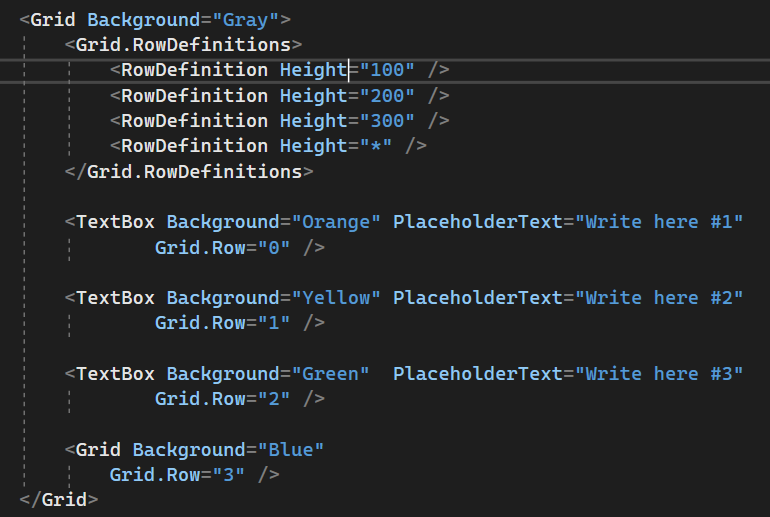
This another sample is using StackPanel

CesarRabelo commentedon Mar 23, 2022
But if exist an element before the TextBox for example a TextBlock the StatusBar is not affected.
CesarRabelo commentedon Mar 23, 2022
Does anyone have any suggestions on what I should do to resolve this?
francoistanguay commentedon Apr 1, 2022
@carldebilly ?
[-][Android] When keyboard with InputScope=CurrencyAmount is displayed, it can break the status bar.[/-][+][Android] When keyboard with `InputScope=CurrencyAmount` is displayed, it can break the status bar.[/+]MartinZikmund commentedon Jul 17, 2025
No longer relevant, works correctly in Skia renderer targets
github-actions commentedon May 5, 2026
This issue has been automatically locked since there has not been any recent activity after it was closed. Please open a new issue for related bugs or feature requests.