You signed in with another tab or window. Reload to refresh your session.You signed out in another tab or window. Reload to refresh your session.You switched accounts on another tab or window. Reload to refresh your session.Dismiss alert
{{ message }}
Repository navigation
[Eclipse] js syntax highlight disabled by STS4 #702
I can reproduce this issue, thanks for reporting this. I do not immediately see the reason why this breaks, so this needs some deeper investigation. My initial guess is that this is related to newer versions of the tm4e bundles being installed when the Spring Tools 4 get installed and maybe causing some incompatibility here, but this is just initial guesswork. I will continue the investigations here.
Hello, the issue persists both in a fresh installation of Spring Tool Suite 4 (4.17.2.RELEASE) and as a plugin (4.17.2.202301311045) of latest Eclipse (2022-12). TextMate Core installation in Eclipse case did not help either.
@cdiama Can you share a few more details here? I have a fresh STS 4.17.2.RELEASE running, created a JS file and it looks like I get syntax highlighting just fine. Do you open the JS files with the Generic Editor? And is there anything showing up in the Error Log view maybe?
As you I have a fresh latest STS as fetched from here.
After starting it and without any single configuration I import a project using the very basic Import... -> General -> Projects From Folder or Archive. For the sake of the issue reproduction let's take this sample project.
I double click the file /Chapter01/CompletedCode/src/scripts.js and it opens in the Generic Text Editor by default.
... then, an interesting sequence follows ...
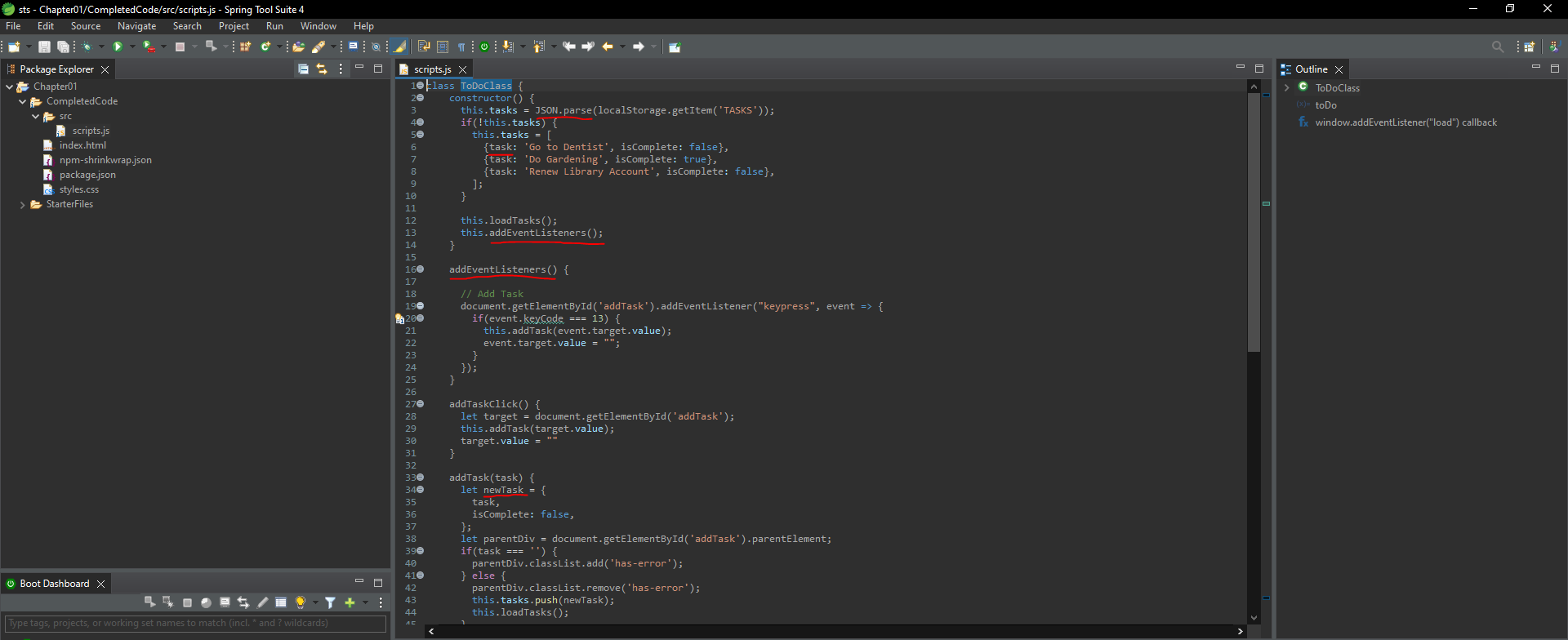
The file opens with its syntax highlighted as expected, while Outline view tries to "calculate the symbols..."
After that, syntax highlighting is getting lost for functions, vars, properties and so on, and we are left with the reserved words properly shown only.
Thanks a lot @cdiama for the detailed description, this helps a lot to actually see the issue in action. That is great. I can reproduce this with the latest STS builds as well. I also tried the latest Eclipse WWD release, which does NOT have the issue. The latest Eclipse JEE 2023-03 milestone builds also do NOT show the issue, so it seems to be very specific for the STS builds.
Based on the error log, it might be related to the snapshot version of lsp4e that we use and ship (to include a number of important fixes), so let's see if we can get to the root cause of this.
Thanks again @cdiama for the detailed report, this is now fixed in the latest lsp4e snapshot builds, will be included in the upcoming STS 4.18.0 release (scheduled for next week).

Activity
cypher256 commentedon Nov 12, 2021
STS 4.12.1 Plugin
eclipse-jee-2021-12-M2-win32-x86_64 (Wild Web Developer Generic Text Editor)
The above also causes problems.
It does not occur in STS 4.12.0 Plugin.
nexodex-dev commentedon Nov 26, 2021
eclipse-wildwebdeveloper/wildwebdeveloper#750
martinlippert commentedon Nov 26, 2021
I can reproduce this issue, thanks for reporting this. I do not immediately see the reason why this breaks, so this needs some deeper investigation. My initial guess is that this is related to newer versions of the tm4e bundles being installed when the Spring Tools 4 get installed and maybe causing some incompatibility here, but this is just initial guesswork. I will continue the investigations here.
martinlippert commentedon Nov 29, 2021
This works out-of-the-box in the Spring Tools 4 for Eclipse distributions that you can download from https://spring.io/tools or even the latest nightly builds on Eclipse 2021-12 milestones from https://dist.springsource.com/snapshot/STS4/nightly-distributions.html, but I can reproduce this after installing the Spring Tools into an existing Eclipse JEE package.
Now need to find out why this breaks when the Spring Tools are installed as an extension to an existing Eclipse JEE package.
martinlippert commentedon Nov 29, 2021
The solution to this is to install the latest TM4E via:
Install New Softwaredialoghttps://download.eclipse.org/tm4e/releases/latest/to theWork WithfieldTextMate Corefeature from theTextMatecategoryThis should bring back the syntax highlighting for JavaScript files.
This problem doesn't seem to occur in the latest Eclipse 2021-12 RC1 when installing the latest Spring Tools 4 extension from https://dist.springsource.com/snapshot/TOOLS/sts4/nightly/e4.22 - if you want to use the latest for the upcoming Eclipse 2021-12 release.
bettasplenden commentedon Mar 3, 2023
Hello, the issue persists both in a fresh installation of Spring Tool Suite 4 (4.17.2.RELEASE) and as a plugin (4.17.2.202301311045) of latest Eclipse (2022-12).
TextMate Coreinstallation in Eclipse case did not help either.martinlippert commentedon Mar 6, 2023
@cdiama Can you share a few more details here? I have a fresh STS 4.17.2.RELEASE running, created a JS file and it looks like I get syntax highlighting just fine. Do you open the JS files with the
Generic Editor? And is there anything showing up in theError Logview maybe?bettasplenden commentedon Mar 6, 2023
Hello Martin (@martinlippert),
Thanks for your prompt reply!
Let me share the steps I went through:
As you I have a fresh latest STS as fetched from here.
After starting it and without any single configuration I import a project using the very basic
Import... -> General -> Projects From Folder or Archive. For the sake of the issue reproduction let's take this sample project.I double click the file
/Chapter01/CompletedCode/src/scripts.jsand it opens in theGeneric Text Editorby default.... then, an interesting sequence follows ...
The file opens with its syntax highlighted as expected, while Outline view tries to "calculate the symbols..."

After that, syntax highlighting is getting lost for functions, vars, properties and so on, and we are left with the reserved words properly shown only.
Exported Error Logs:
ErrorLog.log
martinlippert commentedon Mar 8, 2023
Thanks a lot @cdiama for the detailed description, this helps a lot to actually see the issue in action. That is great. I can reproduce this with the latest STS builds as well. I also tried the latest Eclipse WWD release, which does NOT have the issue. The latest Eclipse JEE 2023-03 milestone builds also do NOT show the issue, so it seems to be very specific for the STS builds.
Based on the error log, it might be related to the snapshot version of lsp4e that we use and ship (to include a number of important fixes), so let's see if we can get to the root cause of this.
martinlippert commentedon Mar 8, 2023
Let's track this in a separate issue: #993
martinlippert commentedon Mar 8, 2023
Thanks again @cdiama for the detailed report, this is now fixed in the latest lsp4e snapshot builds, will be included in the upcoming STS 4.18.0 release (scheduled for next week).