Repository navigation
Declare web component in solid typescript #616
Description

have been tried implement web component in solid typescript but i dont really know how to declare the component name, it show an error like this.

i have tried to declare it on file declaration.d.ts like this.

is there any way to declare web component name in solid typescript ?, thanks!.
Activity
ryansolid commentedon Aug 23, 2021
I think the problem is that works on the global namespace and it needs to work on Solid's. I've done it the way posted above in the past but that was back when we were too polluting the global namespace like React.
So perhaps:
nemixe commentedon Aug 23, 2021
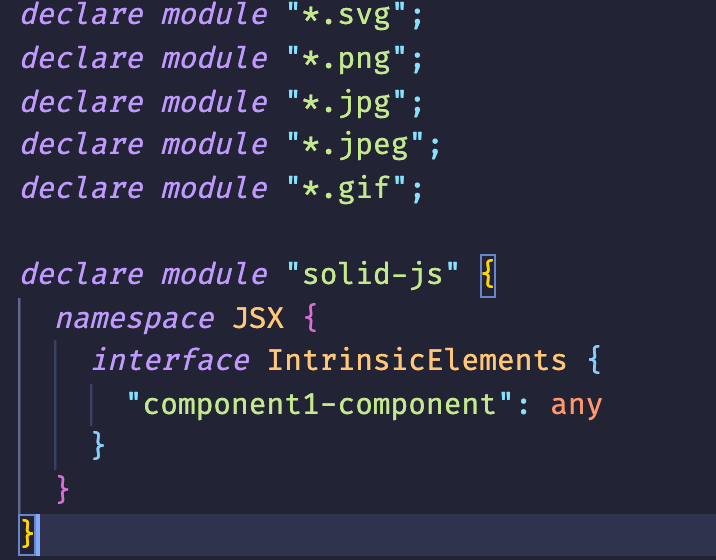
thanks for your reply. so i've implement it and now it shows different error like this.
this is my declaration.d.ts file look like.
nemixe commentedon Aug 23, 2021
but i found out if i declare it on component file like this.
this works, but i dont know if this is a good practice or not.
ryansolid commentedon Aug 23, 2021
Honestly, TypeScript differentiating between this confuses me. Anyone with TS experience with custom elements can chime in. @trusktr maybe.
rturnq commentedon Aug 23, 2021
You should be able to perform this module augmentation in a declaration file (.d.ts) which will make it available everywhere in your app. The trick is to also import 'solid-js' in that declaration file. Without the import, the new module declaration clobbers the existing one instead of extending it. Here is an example: https://codesandbox.io/s/solid-counter-forked-ulhhj?file=/my-web-components.d.ts
Please also note codesandbox falls down sometimes dealing with this stuff - reloading usually fixes it.
nemixe commentedon Aug 24, 2021
works perfectly, thanks!.
hawkticehurst commentedon Jun 1, 2022
Chiming in with a potential improvement on the ideas/code snippets in this thread:
There was a discussion/thread in a WC library called Shoelace on how to use the components in Solid.
As part of that discussion, @justinfagnani (a member of the Lit team at Google) offered the below declaration file snippet as a way to get even better type annotations on web components used in Solid.
^(Link to Justin's comment for more context)
It's also worth noting, however, that this will only work for web component libraries that add their components to the global
HTMLElementTagNameMapinterface as demonstrated in the above Solid playground link. This is something that Shoelace does for its components, but you'll want to check your desired component library for this addition.Hope it helps anyone still passing by on this thread!
AlexErrant commentedon Aug 17, 2022
If you extend
'solid-js'.Component(instead ofHTMLElementas above), here's some half-working code:Unfortunately this code does not error if you pass props to a component that has no props, like
function MyComp(): JSX.Element { ... }. Unfortunately I'm not good enough at TypeScript to figure out the solution. Some thoughts on where I gave up:The default generic on Component is
{}, which I can't differentiate from a populated prop using conditional types. In other words:For now I think I'll just have two
HTMLElementTagNameMaps - one for Components with props, and one for Components without props. I haven't tried it yet though.refactor: move ambient module extension into global type.d.ts file
nilshelmig commentedon Jul 24, 2024
@ryansolid Any plans or information to support this in solidjs? Or at least a documentation note, that using web components with typescript requires this?
ryansolid commentedon Jul 24, 2024
There was a documentation note at one point about what I posted above. But, looking now it doesn't seem to have made it to the new Docs. So I think there could be a note about how to declare web components in the TS section.
Opened an issue: solidjs/solid-docs#823