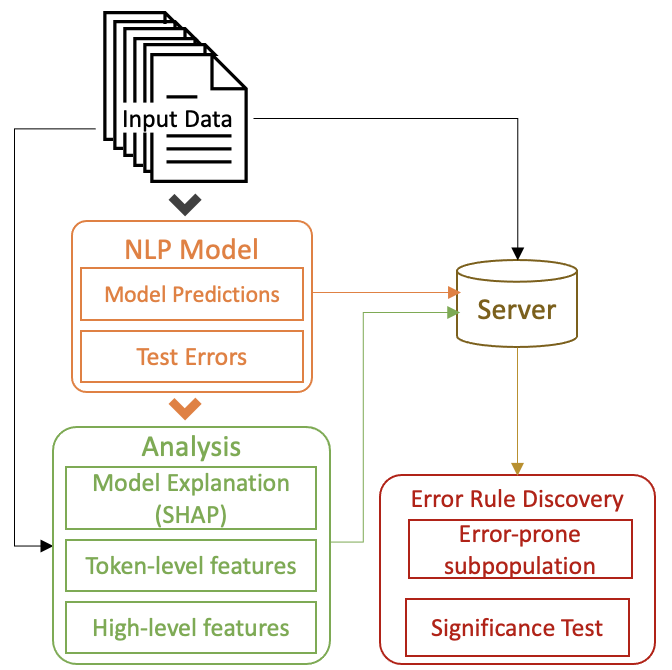
The data process for iSEA consists of the following three main parts:
-
Model Output, including the model prediction for given input data, as well as whether the predictions are correct or not (yerror).
-
Precomputed Data Analysis Information, including the model explanation for each instance (SHAP values, document embedding vectors), the generation of token-level features and high-level features.
-
Error Rule Discovery. With the precomputed features and the error labels (yerror), we then run the functions for error rule discovery, which are included in the
debug_rule.py
In this folder, we use the multiNLI data as an example. Specifically, we include code in the following notebooks:
-
01-model_output+shap.ipynb: save model predictions, errors, and SHAP values to disk, will be used in later rule generation and actual error analysis. -
02-doc_process (train+test).ipynb: process the test data for error analysis, compress the input data for real-time queries, and get some statistics of training data. -
03-doc_embedding_projection.ipynb: generate the high-dimensional document embeddings, and tranform them into 2D space. The output file of this notebook will only be used in the user interface for error analysis. -
04-token_rule.ipynb: discover error-prone subpopulations based on token-level features, which are extracted in the02-doc_processnotebook. -
05-high_level_feat: extract high-level features and discover error-prone subpopulations based on these high-level features.
The notebooks of 01-model_output+shap.ipynb and 03-doc_embedding_projection.ipynb run in Colab to access the GPU for the used NLP models. The rest of the notebooks can either run locally or with Colab. For the Colab notebooks, we have included the pip install steps in the notebook. To run the other notebooks locally, we list the dependency in the requirements.txt.
Given the processed data generated by the first three notebooks, we then run the last two notebooks which extracts high-level features and generates error rules for both high-level features and token-level features.
In the ui/ folder, we describe how the output files are orgnized for the user interface.