Repository navigation
Emojis used on Linux are inconsistent and probably not what's expected #8373
Description

System details
RStudio Edition : Desktop
RStudio Version : 1.3.1093 and 1.4.1025
OS Version      : Red Hat 8.2 and Ubuntu 20.04.1
R Version       : 3.6.3
Steps to reproduce the problem
- Paste the following in a markdown document:
😀 Grinning Face

🙂 Slightly Smiling Face

🙃 Upside-Down Face

😊 Smiling Face with Smiling Eyes
- Paste the code into the Console.
- Paste it in other applications for comparison.
Describe the problem in detail
On MacOS 11.0.1 and Windows 10: RStudio Desktop and Server are accurate
On Red Hat 8.2, comparing the following, the emojis aren't the same:
- RStudio Desktop or Firefox to connect to RStudio Server
- Source mode vs. visual mode (1.4)
- The source pane vs. the console
- The visual editor mode's emoji insert menu (1.4)
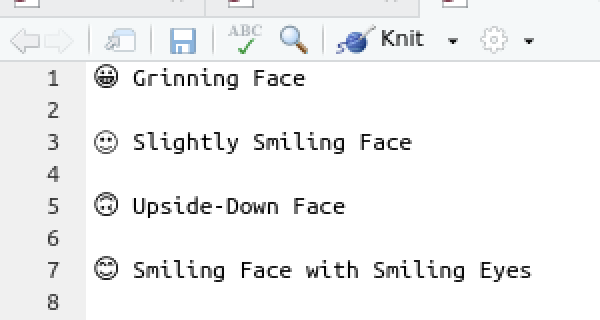
- Desktop, editor, source mode: mixture of yellow and black

- Desktop, editor, visual mode: mixture of yellow and white

- Desktop console: yellow and black (or matching theme)

- Firefox, editor, source mode: yellow

- Firefox, editor, visual mode: yellow and white

- Firefox console: yellow

- Firefox and Desktop, visual mode's insert menu: yellow and white

For comparison, see the display in:
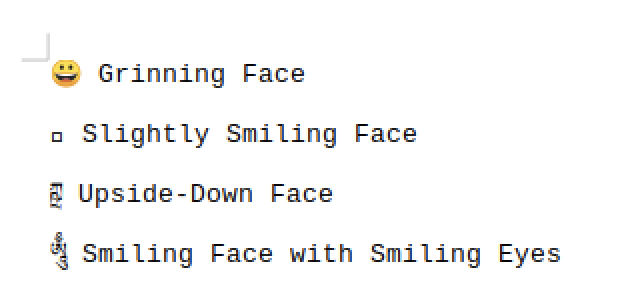
- LibreOffice Writer

- Text Editor

- Terminal

Emojis are always available. However, which emoji set is shown is inconsistent. Also, Ubuntu is similar to Red Hat, though not identical.
Describe the behavior you expected
Either:
- The emojis by default are the common yellow ones.
- The emojis are not yellow, but they're at least consistent.
- This is expected behavior.
Note: This isn't just a visual editor issue, but I'm tagging it as "visual markdown editing" because the visual editor is affected. Also, this is an issue in 1.3.1093, so it's not a regression.
- I have read the guide for submitting good bug reports.
- I have installed the latest version of RStudio, and confirmed that the issue still persists.
- If I am reporting a RStudio crash, I have included a diagnostics report.
- I have done my best to include a minimal, self-contained set of instructions for consistently reproducing the issue.
Activity
ronblum commentedon Nov 13, 2020
Addendum: This is an example on Ubuntu, which uses the white, outlined emojis.
It's at least better than LibreOffice Writer:
Text Editor has the expected emojis, though:

mikebessuille commentedon Nov 16, 2020
Not a regression. Bug triage team (Jonathan, Mario, Mike) agreed this is not worth fixing right now.
kevinushey commentedon Nov 16, 2020
(This is the sort of issue that would most likely be fixed via an update to Chromium, whenever we're able to take the next update)