
A powerful Discord bot that provides real-time stock and cryptocurrency information, 30-day price trends, and AI-powered news summaries through slash commands. Built on Cloudflare Workers for global edge deployment.

- 💰 Real-Time Stock Prices: Live current prices when market is open, previous close when market is closed
- ₿ Cryptocurrency Support: Bitcoin, Ethereum, and major cryptocurrencies with 24/7 trading
- 🕐 Market Status Detection: Automatically detects market hours using real-time quote freshness
- 📉 30-Day Trend Visualization: Beautiful ASCII sparkline charts showing price movement
- 🤖 AI News Summaries: OpenAI
gpt-5.6-terrawith web search, summarizing recent news with sentiment analysis (Perplexity SONAR available as an alternate provider) - ⚡ Smart Caching: Reduces API costs with intelligent multi-tier caching (1min/5min/1hr/8hr)
- 🛡️ Rate Limiting: Built-in rate limiting (1 query every 60 seconds per user) prevents abuse
- 🎨 Rich Embeds: Color-coded Discord embeds (green/red/gray) with detailed information
- 🌍 Edge Deployment: Runs on Cloudflare's global network for ultra-low latency
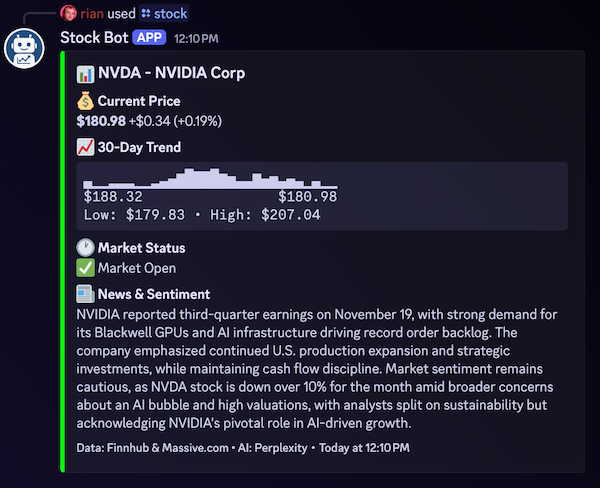
Get comprehensive stock information for a ticker symbol.
Example:
/stock AAPL
Response includes:
- 💰 Current Price (when market open) or Previous Close (when market closed)
- 🕐 Market Status (Open/Closed with real-time detection)
- 📈 30-Day price trend (ASCII sparkline chart)
- 📰 AI-generated news summary with sentiment
Get comprehensive cryptocurrency information for a crypto symbol.
Example:
/crypto BTC
Response includes:
- 💰 Current Price (live from Binance)
- 🌐 24/7 Trading Status
- 📈 30-Day price trend (ASCII sparkline chart)
- 📰 AI-generated news summary with sentiment
Supported Symbols:
- Use short symbols:
BTC,ETH,DOGE,SOL,ADA, etc. - Or full names:
BITCOIN,ETHEREUM,DOGECOIN - Supports 25+ major cryptocurrencies
Display bot usage instructions, rate limits, and data sources.
Stock Example:
User: /stock NET
Bot: 📊 NET - Cloudflare Inc.
     💰 Current Price: $85.50 (+1.2%)
     📈 30-Day Trend: ▁▃▅▆█
     $84.00 → $85.50
     🕐 Market Status: ✅ Market Open

     📰 News & Sentiment
     Cloudflare reported strong Q3 earnings...
Crypto Example:
User: /crypto BTC
Bot: ₿ BTC - Bitcoin
     💰 Current Price: $42,500.50 (+2.9%)
     📈 30-Day Trend: ▁▃▅▇█
     $41,300 → $42,500
     🌐 Market Status: ✅ 24/7 Trading • Exchange: BINANCE

     📰 News & Sentiment
     Bitcoin surged past $42,000 amid institutional adoption...
- Node.js 18+ (for local development)
- Cloudflare Account (free tier works great)
- Discord Bot Token (from Discord Developer Portal)
- Massive.com API Key (for historical stock data, free tier: 5 calls/min)
- Finnhub API Key (fallback live quotes, free tier: 60 calls/min. Yahoo Finance is the primary source and needs no key)
- OpenAI API Key (for AI summaries with web search — the default provider)
- Perplexity API Key (optional; only needed if you set
AI_SUMMARY_PROVIDERto'perplexity')
-
Clone the repository
git clone <repository-url>
cd discord-stock-bot
-
Install dependencies
npm install
-
Set up Discord Bot
- Go to Discord Developer Portal
- Create a new application
- Go to "Bot" section and create a bot user
- Copy the Bot Token and Public Key
- Copy the Application ID
- See Discord Bot Setup Guide for detailed instructions
-
Get API Keys
- Massive.com: Sign up at https://massive.com/ (formerly Polygon.io) for historical data
- Finnhub: Sign up at https://finnhub.io/ for real-time quotes
- OpenAI: Get API key from https://platform.openai.com/api-keys (default AI summary provider)
- Perplexity (optional): Get API key from https://www.perplexity.ai/settings/api
-
Configure Local Development
Create a
.dev.varsfile in the project root (⚠️ never commit this file):DISCORD_BOT_TOKEN=your_bot_token_here DISCORD_PUBLIC_KEY=your_public_key_here MASSIVE_API_KEY=your_massive_api_key_here FINNHUB_API_KEY=your_finnhub_api_key_here OPENAI_API_KEY=your_openai_api_key_here PERPLEXITY_API_KEY=your_perplexity_api_key_here # optional, only for AI_SUMMARY_PROVIDER='perplexity' DEV_MODE=true -
Create KV Namespaces
wrangler kv:namespace create RATE_LIMITS
wrangler kv:namespace create CACHE
Update
wrangler.tomlwith the generated namespace IDs. -
Run Tests
npm testYou should see 398 tests passing ✅
-
Start Local Development
npm run dev
-
Login to Cloudflare
wrangler login
-
Set Production Secrets
wrangler secret put DISCORD_BOT_TOKEN
wrangler secret put DISCORD_PUBLIC_KEY
wrangler secret put MASSIVE_API_KEY
wrangler secret put FINNHUB_API_KEY
wrangler secret put OPENAI_API_KEY
-
Deploy to Cloudflare Workers
npm run deploy
-
Configure Discord Interaction Endpoint
- Copy your deployed Worker URL (e.g.,
https://discord-stock-bot.your-subdomain.workers.dev) - Go to Discord Developer Portal → Your Application → General Information
- Set "Interactions Endpoint URL" to your Worker URL
- Discord will send a PING to verify the endpoint
- Copy your deployed Worker URL (e.g.,
-
Register Slash Commands
DISCORD_TOKEN=<bot_token> DISCORD_APP_ID=<app_id> node scripts/register-commands.js
For detailed deployment instructions, see DEPLOYMENT_GUIDE.md.
┌─────────────────────────────────────────────────────┐
│                  Discord Platform                    │
└────────────────────┬────────────────────────────────┘
                     │ Slash Command
                     ↓
┌─────────────────────────────────────────────────────┐
│         Cloudflare Worker (Main Handler)            │
│  ┌──────────────────────────────────────────────┐  │
│  │  1. Command Router                           │  │
│  │  2. Rate Limiter (KV Check)                  │  │
│  │  3. Cache Layer (KV Read)                    │  │
│  │  4. Data Orchestrator                        │  │
│  │     - Stock Price Service (Massive.com)     │  │
│  │     - Live Quotes (Yahoo → Finnhub)         │  │
│  │     - Historical Data Service               │  │
│  │     - AI Summary Service                    │  │
│  │  5. Response Formatter                       │  │
│  │  6. Error Handler                            │  │
│  └──────────────────────────────────────────────┘  │
└─────────────────────────────────────────────────────┘
         │          │          │              │
         ↓          ↓          ↓              ↓
    ┌──────────┐ ┌────────┐ ┌────────┐ ┌──────────┐
    │ Massive  │ │Finnhub │ │ OpenAI │ │Cloudflare│
    │   .com   │ │  API   │ │ 5.6-   │ │    KV    │
    │   API    │ │        │ │ terra  │ │ Storage  │
    └──────────┘ └────────┘ └────────┘ └──────────┘
- Runtime: Cloudflare Workers (V8 isolates)
- Language: JavaScript (ES Modules)
- APIs:
- Discord Interactions API (slash commands)
- Massive.com API (historical stock data)
- Yahoo Finance chart API (live quotes, company names, session windows)
- Finnhub API (fallback live quotes)
- OpenAI Responses API (AI summaries —
gpt-5.6-terrawith theweb_searchtool). Default provider. - Perplexity API (alternate AI summary provider, SONAR model with web search)
- Storage: Cloudflare KV (caching & rate limiting)
- Testing: Vitest (398 tests, comprehensive coverage)
discord-stock-bot/
├── src/
│   ├── index.js                 # Main Worker entry point
│   ├── config.js                # Configuration constants
│   ├── commands/
│   │   ├── stock.js             # /stock command handler
│   │   ├── crypto.js            # /crypto command handler
│   │   └── help.js              # /help command handler
│   ├── services/
│   │   ├── massive.js           # Massive.com API client (stocks)
│   │   ├── massiveCrypto.js     # Massive.com API client (crypto)
│   │   ├── quote.js             # Live-quote router (Yahoo → Finnhub)
│   │   ├── yahooFinance.js      # Yahoo Finance chart client (primary)
│   │   ├── finnhub.js           # Finnhub API client (fallback, stocks)
│   │   ├── finnhubCrypto.js     # Finnhub API client (crypto)
│   │   ├── ai-summary.js        # Provider router (OpenAI | Perplexity)
│   │   ├── openai-responses.js  # OpenAI Responses API client (default)
│   │   ├── perplexity.js        # Perplexity API client (alternate)
│   │   └── discord.js           # Discord API utilities
│   ├── middleware/
│   │   ├── rateLimit.js         # Rate limiting logic
│   │   └── cache.js             # Cache management
│   └── utils/
│       ├── chartGenerator.js    # ASCII sparkline generator
│       ├── embedBuilder.js      # Discord embed formatter
│       ├── errorHandler.js      # Centralized error handling
│       ├── validator.js         # Stock ticker validation
│       └── cryptoValidator.js   # Crypto symbol validation
├── tests/                       # Test suites (350+ tests)
├── scripts/
│   └── register-commands.js     # Discord command registration
├── instructions/                # Development guides
├── package.json
├── wrangler.toml               # Cloudflare Workers config
└── vitest.config.js            # Test configuration
npm test              # Run all tests once
npm run test:watch    # Run tests in watch mode
npm run dev           # Start local development server
npm run deploy # Deploy to Cloudflare Workers# Run all tests
npm test
# Run specific test file
npm test -- tests/commands/stock.test.js
# Run tests in watch mode (auto-rerun on changes)
npm run test:watch
# Run tests with coverage
npm test -- --coverageCurrent test results: 398 tests passing ✅
- 269 unit tests
- 11 integration tests
-
Start the development server:
npm run dev
-
The worker will be available at
http://localhost:8787 -
For Discord testing, use a tool like ngrok to expose your local server:
ngrok http 8787
Then set the ngrok URL as your Discord Interaction Endpoint.
The bot uses a four-tier caching strategy to optimize API costs and response times:
| Data Type | TTL | Rationale |
|---|---|---|
| Market Status | 1 minute | Real-time detection needs frequent updates |
| Stock Prices | 5 minutes | Balance between real-time data and API costs |
| Historical Data | 1 hour | Changes infrequently, safe to cache longer |
| AI Summaries | 8 hours | Most expensive, news doesn't change minute-to-minute |
Cache Hit Rates (Target):
- Market status: >50%
- Stock prices: >60%
- Historical data: >80%
- AI summaries: >90%
The bot includes comprehensive performance instrumentation:
Automated Metrics:
- [PERF] API response times (Massive.com & the active AI summary provider) with attempt tracking
- [CACHE HIT/MISS] Cache operations with duration and data size
- [INFO] End-to-end request duration tracking
- [WARN/ERROR] Performance issues and bottlenecks
Monitoring in Production:
# Watch real-time logs
wrangler tail

# Look for performance metrics
wrangler tail | grep PERF
wrangler tail | grep CACHE
Performance Targets:
- Cached requests: <1 second
- Uncached requests: <3 seconds (with deferred responses)
- Cache operations: <50ms
- API calls: Massive.com <2s, AI summary provider <15s
Set via wrangler secret put <NAME>:
DISCORD_BOT_TOKEN- Discord bot tokenDISCORD_PUBLIC_KEY- Discord application public keyMASSIVE_API_KEY- Massive.com API key (historical data)FINNHUB_API_KEY- Finnhub API key (real-time quotes)OPENAI_API_KEY- OpenAI API key (AI summaries — default provider)PERPLEXITY_API_KEY- Perplexity API key (only needed ifAI_SUMMARY_PROVIDERis'perplexity')DEV_MODE- Set to "true" to skip signature verification in local dev
See src/config.js for configurable constants:
export const CONFIG = {
  RATE_LIMIT_SECONDS: 60,              // Rate limit window
  CACHE_TTL_MARKET_STATUS: 60,         // 1 minute
  CACHE_TTL_PRICE: 300,                // 5 minutes
  CACHE_TTL_HISTORY: 3600,             // 1 hour
  CACHE_TTL_SUMMARY: 28800,            // 8 hours
  DEFAULT_PERIOD_DAYS: 7,              // Historical data period
  MASSIVE_TIMEOUT: 10000,              // Massive.com API timeout (ms)
  FINNHUB_TIMEOUT: 5000,               // Finnhub API timeout (ms)
  OPENAI_TIMEOUT: 30000,               // OpenAI timeout (ms)
  PERPLEXITY_TIMEOUT: 30000,           // Perplexity timeout (ms)
  AI_SUMMARY_PROVIDER: 'openai',       // 'openai' or 'perplexity' — one line to switch
  EMBED_COLOR_POSITIVE: 0x00ff00,      // Green
  EMBED_COLOR_NEGATIVE: 0xff0000,      // Red
  EMBED_COLOR_NEUTRAL: 0x808080,       // Gray
};Bot not responding to commands
- Verify the Interactions Endpoint URL is set correctly in Discord Developer Portal
- Check that the endpoint returns a 200 OK with
{"type":1}for PING requests - Ensure all secrets are set:
wrangler secret list
"Invalid request signature" errors
- Make sure
DISCORD_PUBLIC_KEYis set correctly - In local development, set
DEV_MODE=truein.dev.vars
Rate limit errors
- Users can only make 1 query every 60 seconds
- This is by design to prevent API quota exhaustion (Cloudflare KV minimum TTL)
- Wait 60 seconds before trying again
Stock data not found
- Verify the ticker symbol is correct (uppercase, no spaces)
- Some tickers may not be available in Massive.com's database
- Check Massive.com API status: https://massive.com/
AI summary unavailable
- The AI provider API may be rate limited or experiencing issues
- Check the API key for the active provider (
OPENAI_API_KEYby default) is valid and has credits - Confirm
CONFIG.AI_SUMMARY_PROVIDERmatches the key you've set — anopenaiprovider with only a Perplexity key will fail - The bot will still show stock data even if AI summary fails
View Worker Logs:
wrangler tailCheck KV Storage:
wrangler kv:key list --binding=CACHE
wrangler kv:key get --binding=CACHE "stock:price:AAPL"
Test Individual Components:
# Test a specific service
npm test -- tests/services/massive.test.js

# Test with verbose output
npm test -- --reporter=verboseWith the free tiers:
Cloudflare Workers
- Free: 100,000 requests/day
- KV: 100,000 reads/day, 1,000 writes/day
Massive.com
- Free: 5 API calls/minute (historical data)
Yahoo Finance (primary live quotes)
- No key, no signup, no published quota
Finnhub (fallback live quotes)
- Free: 60 API calls/minute on the key, but requests leaving Cloudflare's shared egress IPs are throttled independently of it — see CLAUDE.md
OpenAI (default provider)
- Pay per token with
gpt-5.6-terra - Web search dominates input cost: ~8.5k input tokens per call (the injected search results) against only ~40-250 output tokens
- Smart caching (8h TTL on summaries) reduces costs significantly
Perplexity (alternate provider)
- Pay per request (~$0.005-0.01 per request with SONAR model)
Estimated Monthly Cost:
- The $3-10/month (small server) and $15-50/month (medium server) figures below the AI line were measured against Perplexity SONAR and have not been re-measured since the move to OpenAI. Treat them as a rough order of magnitude only.
- ✅ All API keys stored as Cloudflare Workers secrets (never in code)
- ✅ Discord request signature verification
- ✅ Input validation and sanitization
- ✅ Rate limiting prevents abuse
- ✅ Error messages don't expose internal details
- ✅
.dev.varsin.gitignore
Contributions are welcome! Please follow these guidelines:
- Fork the repository
- Create a feature branch (
git checkout -b feature/amazing-feature) - Write tests for your changes
- Ensure all tests pass (
npm test) - Commit your changes (
git commit -m 'Add amazing feature') - Push to the branch (
git push origin feature/amazing-feature) - Open a Pull Request
- Follow existing code patterns
- Write clear, self-documenting code
- Add comments for complex logic
- All exported functions should have JSDoc comments
- Keep functions small and focused
ISC
- Massive.com (formerly Polygon.io) for historical stock market data
- Yahoo Finance for live quotes, company names, and exchange session windows
- Finnhub for fallback live quotes
- OpenAI for AI-powered summaries with web search using
gpt-5.6-terra - Perplexity for the alternate AI summary provider (SONAR model with web search)
- Cloudflare for edge computing platform
- Discord for the bot platform
- Deployment Guide - Step-by-step deployment instructions
- Technical Specification - Detailed technical documentation
- Development Plan - Implementation roadmap
- Manual Testing Guide - Testing checklist
For issues, questions, or suggestions:
- Open an issue on GitHub
- Check existing issues for solutions
- Review the troubleshooting section above
Built with ❤️ using Cloudflare Workers