Repository navigation
Conversation


|
really useful! Thanks |
|
I guess one thing that could be improved is avoiding this jumping behavior. Maybe scroll/jump back to the clicked on comment, so users don't get confused? |

|
@sgr-amboss 👍 We've already done something similar to keep the scrolled position sane in #748 when collapsing long files in diffs |

|
Could you also add it to the Readme (probably with a link to this animation) and mention the shortcut keys? |
|
@hkdobrev, thanks for that tip. I might actually need a little help here, as I am a bit new to Promises, async, etc. Basically, I added: // how can I make this work without a hardcoded timeout?
setTimeout(() => {
const offsetTop = $(e.target).parent().offset().top;
window.scrollTo(0, offsetTop);
}, 500);after triggering the How can I make this work with |
|
I tried to make it work for a few hours with await, but I couldn't figure it out. The problem is that there doesn't seem to be any event that is triggered after all I committed my changes with a hacky I updated the gif at the top to reflect the current state. |
|
Removing the |

requestAnimationFrame(() => {
    const offsetTop = $(parentElement).offset().top - viewportOffset;
    window.scroll(0, offsetTop);
});
should work the same as the one with I've tested with single rAF, and it works as expected. If it doesn't work for some reason, we can even try double rAF. |
|
@ramlmn, thanks! That works great and was exactly what I was looking for! |

 ramlmn
left a comment
ramlmn
left a comment
There was a problem hiding this comment.
This is able to merge unless there is any more cleaning to do!
|
Added that feature to the readme, linking to the latest gif. Not sure if that was the correct place, so feel free to change that. You might want to test this in both browsers on a Mac to be sure, as I don't have one nearby at the moment. Can anything else be improved here, @hkdobrev @bfred-it @sindresorhus ? |


There was a problem hiding this comment.
There was also an old feature request for the same feature but for files in PRs, it’d be great if this is modified to cover both. If its too hard, it’s alright, we’ll just add a link to this file on that issue.
Edit: I was referring to #212 (comment), but perhaps the implementation can be simpler there (just delegate click triggers the i keyboard shortcut)
|
|
||
| export default () => { | ||
| const showOutdatedButtons = select.all('.show-outdated-button, .hide-outdated-button'); | ||
| showOutdatedButtons.forEach(button => { |
There was a problem hiding this comment.
Replace all forEach with for-of
| button.click(); | ||
| } | ||
| }); | ||
| } |
There was a problem hiding this comment.
Reduce this duplicate loop to one, e.g.
if current is open
items = ...
else
Items = ...
And then loop and click items
| requestAnimationFrame(() => { | ||
| const offsetTop = $(parentElement).offset().top - viewportOffset; | ||
| window.scroll(0, offsetTop); | ||
| }); |
There was a problem hiding this comment.
Is this wait required or does it work without?
There was a problem hiding this comment.
I ask because even if “rendering takes some time” as you mentioned in a comment, the offset value should be updated in the same loop (relayout is synchronous)
There was a problem hiding this comment.
Hey, I made a small demo here without rAF, and here with rAF. Both of them work the same as you described (relayout as synchronous).
But in case of GitHub (both in Chrome and Firefox), the scroll has to be done as a microtask, because GitHub has its own methods to run in the mean time (which are run as microtasks)
Without rAF:

With rAF:
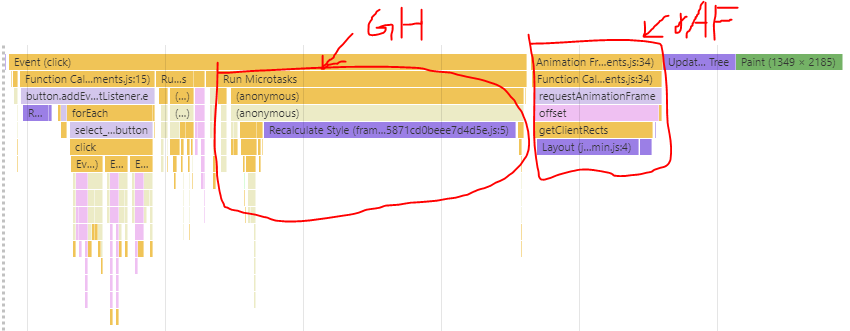
GH's code that runs async (promise on line 8057):

| import select from 'select-dom'; | ||
| import {isMac, metaKey} from '../libs/utils'; | ||
|
|
||
| const keyName = isMac ? 'Alt' : 'Ctrl'; |
There was a problem hiding this comment.
On Mac metaKey is actually CMD, not alt

There was a problem hiding this comment.
I would actually expect to be Alt on both Windows and Mac. Ctrl/Cmd+Click imply open in a new tab. Alt + Click on MacOS is alternative behaviour which makes sense here. What do you guys think?
|
|
||
| function addTooltip(button) { | ||
| button.setAttribute('aria-label', keyName + ' + click to expand/collapse all outdated comments'); | ||
| button.classList.add('tooltipped', 'tooltipped-n'); |
There was a problem hiding this comment.
I think you’ll also need the rgh-tooltip here otherwise they’re hidden
There was a problem hiding this comment.
I saw you added more selectors to the exclusion CSS. This class here would remove the need to make that selector longer.
| const showOutdatedButtons = select.all('.show-outdated-button, .hide-outdated-button'); | ||
| showOutdatedButtons.forEach(button => { | ||
| addTooltip(button); | ||
| button.addEventListener('click', e => { |
There was a problem hiding this comment.
I’d like this listener to be applied via jQuery delegates, so it works on all AJAX-loaded comments too.
| .show-outdated-button:before, | ||
| .show-outdated-button:after, | ||
| .hide-outdated-button:before, | ||
| .hide-outdated-button:after, |

There was a problem hiding this comment.
This should be added as a separate block and not inside here.
There was a problem hiding this comment.
Wait, why a separate block? Anyway I already suggested to add rgh-tooltip on the elements which is already picked up.

| const keyName = isMac ? 'Alt' : 'Ctrl'; | ||
|
|
||
| function addTooltip(button) { | ||
| button.setAttribute('aria-label', keyName + ' + click to expand/collapse all outdated comments'); |
There was a problem hiding this comment.
Use template literal for the second argument.
|
Thanks for the great suggestions! Implemented all of them, except the following:
I didn't have time to do this today, but either we treat this as a separate issue, or I'll take a look in a couple of days. In the interest of finishing this, I'd vote for the first option 😉
Didn't change anything here, as I am not sure if I should or not. Whenever I tried to make it work without waiting, collapsing the elements again didn't jump to the correct position. So I'd vote for leaving it as it is right now. But maybe I'm misunderstanding? Once this is ready to merge, I'd like to finalize the GIF and link it to the README. Right now it's slightly outdated (the tooltip still says "Ctrl" instead of "Alt") |
 ghost
changed the title
|
|
||
| export default () => { | ||
| const showOutdatedButtons = select.all('.show-outdated-button, .hide-outdated-button'); | ||
| $('.js-discussion').on('click', '.show-outdated-button, .hide-outdated-button', e => { |

 sindresorhus
changed the title
|
@sindresorhus, @bfred-it please review again. I recorded another GIF of the feature with the latest changes and linked to it in the readme. |
|
|
||
| ### New Features | ||
|
|
||
| - [Collapse/expand all outdated pull request comments by pressing <kbd>Alt</kbd> while clicking](https://user-images.githubusercontent.com/25818354/33240033-3e271588-d2af-11e7-93af-13b6e325f65d.gif) |
There was a problem hiding this comment.
@sindresorhus, I saw that commit and it made me realize that I need to update the readme:
- The key combination is now only Alt + click for both Mac and Windows/Linux, which was suggested in the discussion: Alt+click to expand/collapse all outdated pull request comments #821 (comment)
- I linked to the newest version of the GIF (which I also linked at the top of this pull request)
- I kept your other wording changes
ghost
changed the title

 ?


`this` in jQuery events is the element with the event listener, while event.target might be a descendent of that, like the a>svg in this case
It was necessary for .forEach but not in for-of


|
This feature doesn't expand "hidden" conversations. |

|
Can you link to such a conversation? |
|
This issue has plenty (if you are lucky to not get a Unicorn opening it, hehe), search "hidden" on page |
|
What's the expected behavior? "Show outdated" works correctly on the un-hidden items as well.
If this is not what you mean, open a feature request with more info about what you expect to happen. |

|
It would be ideal if Alt+Click automatically loaded those hidden conversations. |


|
Someone obliterated automatic hiding of outdated comments. Now I'd have to write a JS snippet to remove them automatically. So dumb. |

Please open a new issue if you're having problems, resurrecting a three year old PR isn't the best way for us to help. |


Closes #781
I tested this on Ubuntu/Linux in Chrome and Firefox.
(edit: updated gif to reflect the latest changes)

How does it work?
Suggestions very welcome. I am not a JS developer, but I tried my best to write clean code.
Edit: Replaced "Ctrl" with "Alt" in the original description