rector php install PhpStorm or Visual Studio Code #7683


-
|
Hello A specific question. I came across rector php because you can update php code to version 8. Now my problem is how do I install this in PhpStorm or Visual Studio Code. |
Beta Was this translation helpful? Give feedback.
Replies: 7 comments 2 replies

-
|
iirc, phpstorm only provide command shortcut, you can install it via composer, you can follow the doc https://getrector.org/documentation After installed, the phpstorm shortcut command will work. |
Beta Was this translation helpful? Give feedback.
-
|
In PhpStorm I can do this under Tools/Composer/Install. What do I choose from the menu there? I'm new and not very familiar with PhpStorm. |

Beta Was this translation helpful? Give feedback.
-
|
You need to install composer first: https://getcomposer.org/ if you are not familiar with composer, you can read the composer documentation https://getcomposer.org/doc/00-intro.md then, install phpstorm then, install rector on your project
|

Beta Was this translation helpful? Give feedback.
-
|
Okay thanks. I installed PHP8.2 on Windows. Composer installed. Installed PhpStorm and then rector php. However, there are a few reports. _PS C:\Users\marco\PhpstormProjects\untitled1> composer require rector/rector --dev
In GitDownloader.php line 82: git was not found in your PATH, skipping source download require [--dev] [--dry-run] [--prefer-source] [--prefer-dist] [--prefer-install PREFER-INSTALL] [--fixed] [--no-suggest] [--no-progress] [--no-update] [--no-install] [--no-audit] [--audit-format AUDIT-FORMAT] [--update-no-dev] [-w|- |
Beta Was this translation helpful? Give feedback.

-
|
Looking at you composer command ouput, that means you need to install/enable zip or unzip/7z php extension. You can google for that to lookup the solution based on your platform: Type in Google search: |
Beta Was this translation helpful? Give feedback.
-
|
I simply installed Php 8 on Windows 11. What do you mean by platform? When I search for the error in Google I find the following code: `(sudo) yum install zip unzip php-zip sudo apt-get install zip unzip php8.0-zip sudo apt-get install zip unzip php7.0-zip` No idea... |
Beta Was this translation helpful? Give feedback.
-
|
Yes, you can search on specific OS to do, documentation possibly help https://www.php.net/manual/en/install.pecl.windows.php You can't learn all things in 1 night, just be slow :), keep up 💪 |
Beta Was this translation helpful? Give feedback.
-
|
Thank you, I am searching and slowly learning. |
Beta Was this translation helpful? Give feedback.
-
|
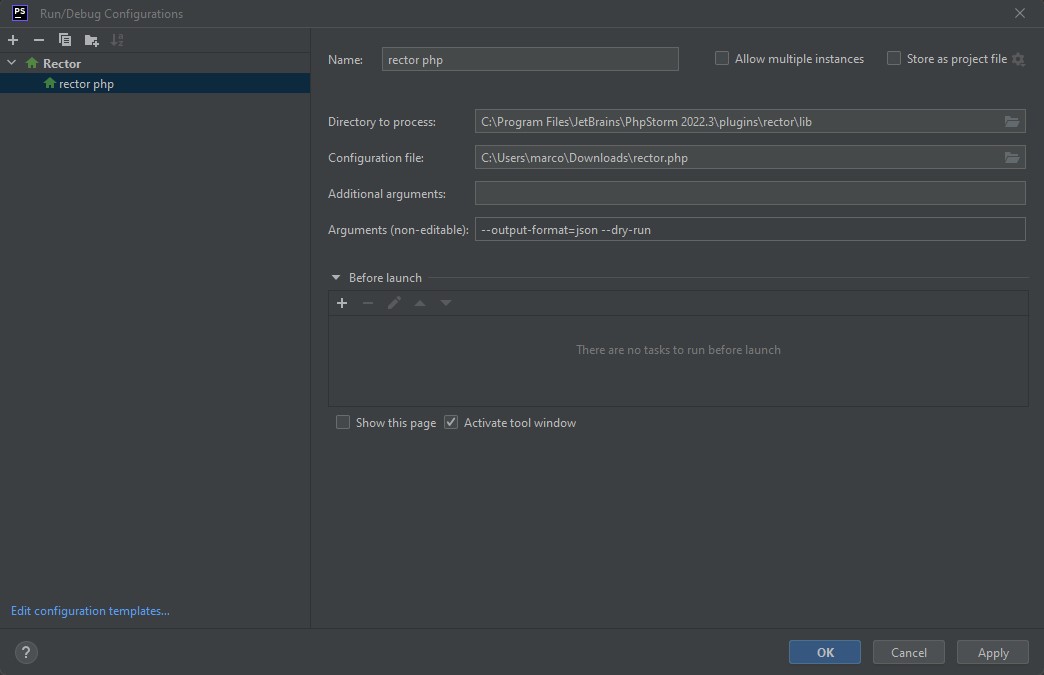
Rector cannot be installed under PhpStorm because it is already installed as a plugin (Rector Support) from version 2022.3. Now maybe someone knows how I use it now? The plugin is installed under C:\Program Files\JetBrains\PhpStorm 2022.3\plugins\rector. Is this correct that I can create a rector application under Run/Debug Configurations?
|
Beta Was this translation helpful? Give feedback.


You need to install composer first:
https://getcomposer.org/
if you are not familiar with composer, you can read the composer documentation https://getcomposer.org/doc/00-intro.md
then, install phpstorm
then, install rector on your project
then, you can see the menu under more -> run -> debug, on right click directory: