RGBA Image.resize is lossy because of RGBa conversion #4516

Description

What did you do?
I have a RGB-D image (RGB plus depth channel). I load it as a RGBA image in PIL for image processing. However after the Image.resize operation, the values in the RGB channels that correspond to A==0 are set to zero.
What did you expect to happen?
I would expect the RGB values to stay the same, and only the size of the image to change.
What actually happened?
Any pixels where the alpha channel was zero, became zero in all channels.
Here's an example visualization. The code to reproduce it is below.
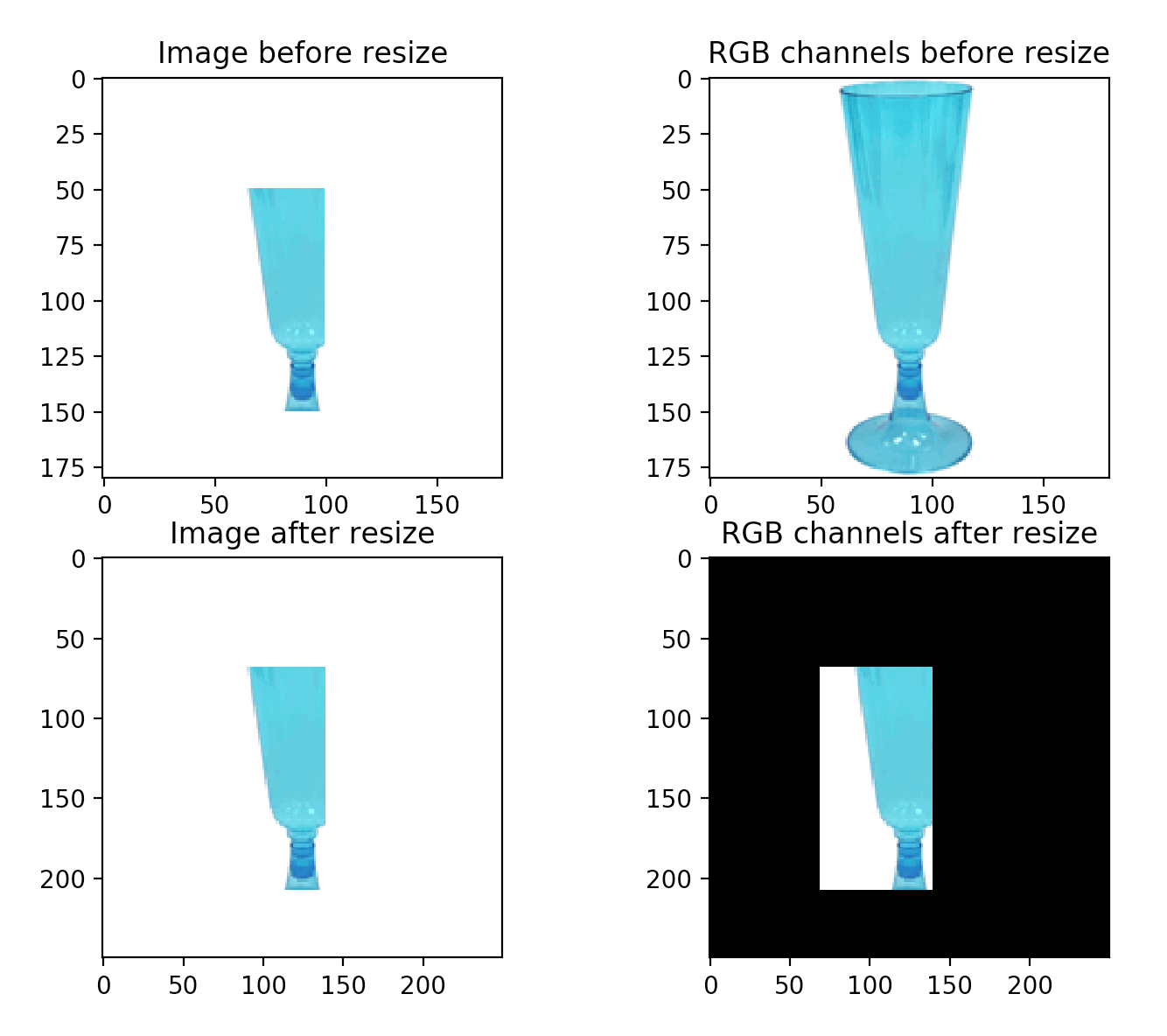
Why did this happen?
It appears this is because the Image.resize function calls self.convert('RGBa') and after resizing the image then converts back to RGBA. RGBa is "true color with premultiplied alpha" while RGBA is "true color with transparency mask" 1. It appears to be a lossy operation.
What are your OS, Python and Pillow versions?
- OS: MacOSX 10.14
- Python: 3.7
- Pillow: 6.2.1
MCVE
I'm using this example image as a stand in for my RGB image.

The depth channel is stored as a seperate png image, but for this MCVE I've used a numpy array
from PIL import Image
import matplotlib.pyplot as plt
import numpy as np

img_path = 'glass.png'
img = Image.open(img_path).convert('RGB')

# Load depth from file
#depth_path = 'glass_d.png'
#depth = Image.open(depth_path).convert('L')

# Toy depth for code example
depth_arr = np.zeros((180,180))
depth_arr[50:150, 50:100] = 255
depth = Image.fromarray(depth_arr).convert('L')

# Add the depth as alpha channel
img.putalpha(depth)

# Make a copy and resize to demonstrate problem
img_resize = img.copy()
img_resize = img_resize.resize((250, 250), Image.NEAREST)

# Visualization of result
plt.figure()
plt.subplot('221')
plt.imshow(img)
plt.title('Image before resize')

plt.subplot('222')
plt.imshow(np.array(img)[:, :, :3])
plt.title('RGB channels before resize')

plt.subplot('223')
plt.imshow(img_resize)
plt.title('Image after resize')

plt.subplot('224')
plt.imshow(np.array(img_resize)[:, :, :3])
plt.title('RGB channels after resize')

plt.show()