Repository navigation
Devanagari font not rendered correctly #3191
Description

What did you do?
I am trying to print Devanagari text on the image. The text is printing on the image. But, it is not appearing the way it supposed to be. Devanagari is not like ordinary language script. In UTF-8 standard some particular characters when appear together show different character(The new character that formed is not define in UTF-8). Take a look at this doc for reference look this doc : https://www.unicode.org/versions/Unicode6.0.0/ch09.pdf#G12284 and variant shape section of this https://www.unicode.org/standard/where/.
Python Code :
from PIL import Image, ImageDraw, ImageFont

img = Image.new('RGB', (100, 30), color = (73, 109, 137))

fnt = ImageFont.truetype('NotoSans-Regular.ttf', 15)
d = ImageDraw.Draw(img)
d.text((10,10), "यात्रा", font=fnt, fill=(255, 255, 0))
img.save('pil_text_font.png')
Eventually Ubuntu also suffer from the same problem.
Please try to rectify this issue. Since otherwise it will changing whole spelling of words which is not fair to any Devanagari reader(Devanagari is the script for languages such Hindi, Marathi, Nepali).
Yatra shouldn't be like.

It should be like

Activity
[-]Library does not interpreting Devanagari font the way it should. [/-][+]Library does not interpreting Devanagari font the way it should[/+][-]Library does not interpreting Devanagari font the way it should[/-][+]Library is not interpreting Devanagari font the way it should[/+][-]Library is not interpreting Devanagari font the way it should[/-][+]Devanagari font not rendered correctly[/+]radarhere commentedon Aug 23, 2018
Just a link to NotoSans-Regular - https://fonts.google.com/specimen/Noto+Sans
shubhampateliitm commentedon Aug 23, 2018
@radarhere I don't get it. What do you mean by link of NotoSans Regular ??
radarhere commentedon Aug 23, 2018
Apologies, I wasn't trying to give you advice, I was trying to assist any future people looking at this issue by providing a link to the font that you were using, in order to help them to replicate your issue.
To try and be helpful now though, is raqm a possible solution to your problem? https://pillow.readthedocs.io/en/5.2.x/releasenotes/4.2.0.html#added-complex-text-rendering
https://pillow.readthedocs.io/en/5.2.x/reference/ImageFont.html?highlight=raqm#PIL.ImageFont.truetype
shubhampateliitm commentedon Aug 23, 2018
@radarhere This guy @ldo has some implementation of harfbuzz along with Cairo and Freetype, which worked for me. https://github.com/ldo/harfpy .
Maybe it can be helpful in resolving this issue.
ldo commentedon Aug 23, 2018
Just to clarify, the issue is that the writing system in question has mandatory contextual substitutions, so a simple character-to-glyph mapping is insufficient for correct text rendering. The way to deal with this is to support OpenType text shaping, which is what HarfBuzz does for you.
This may be sufficient for the Indic scripts, which I believe are all left-to-right. Then you may want to support bidirectional scripts as well (Hebrew, Arabic). This will require FriBidi. Then there are other complications, like Thai...
HinTak commentedon Oct 26, 2018
Give this a try - it has a devanagari example, https://github.com/HinTak/harfbuzz-python-demos .
bipul21 commentedon Dec 21, 2018
Hi,
I am not sure if this is related.
I am trying some devanagari font text (hindi) with python 2.7.15, Pillow 3.5.0 and ubuntu 16 with harbuff, freebid and raqm setup.
The problem i am facing is that with "NotoSans-Bold" font type output is clipped but with Lohit Devnagari (https://www.fontsc.com/font/lohit-devanagari) it returns a correct output.
A sample script
With NotoSans-Bold (Incorrect)
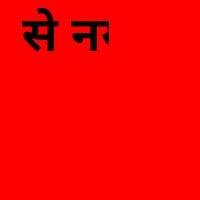
With Lohit-Devanagari (Correct)
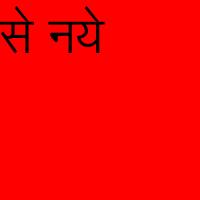
I would like to use "NotoSans-Bold" 💯
ldo commentedon Dec 21, 2018
@bipul21 When I try your example text with Noto Sans Bold on my system, it just shows up as empty blocks, while Lohit Devanagari renders fine.
Is there some kind of substitution going on with another font? And the clipping could be happening because the wrong font metrics are being used?
bipul21 commentedon Dec 22, 2018
Thanks for checking it out.
I just tried the same, by downloading the fonts from here. https://www.google.com/get/noto/
I think the support for hindi is not there anymore.
https://www.google.com/get/noto/#sans-deva
But the same is happening by using Noto Devanagari font as well.
If it is a font issue, Can any anyone confirm ?
ldo commentedon Dec 22, 2018
Noto Sans Devanagari and Noto Serif Devanagari both work for me. On my Debian system if I ask for “Noto Devanagari”, it falls back to DejaVu Sans, which doesn’t work.
3 remaining items
ldo commentedon Dec 23, 2018
The specific example raised by @bipul21 is slightly different. That particular text seems to render OK without contextual substitutions, but I think the clipping is occurring because of a confusion between advance width and glyph bounds.
The glyph bounds indicate where the glyph will appear relative to the current position. The advance width indicates how to update the current position for placing the next glyph. So the glyph bounds comprise a rectangle, while the advance width is a vector. Advance width might typically have a zero y-component for horizontal text, and a zero x-component for vertical text. (Right-to-left text is typically reordered during the rendering phase and drawn left-to-right, i.e. in the opposite of reading/storage order.)
Note that the glyph can appear just about anywhere in relation to the current position; it might hang a little to the left or below (e.g. kerning, descenders), or may be offset to the right or above, or some combination of these. For example, “combining forms” have a zero advance width and hang entirely to the left of the current position, so that they will appear on top of the previous glyph. By not updating the advance width, you can overprint any number of these combining forms at once. But they still have nonempty glyph bounds.
Conversely, a space character can have empty glyph bounds, since nothing needs to be drawn. But it still has an advance width, in order to take up space between words.
So any worthwhile text API needs to allow the caller to keep track of all these metrics.
HinTak commentedon Dec 23, 2018
Shameless plug - there is a devanagari example towards the bottom. Using harfbuzz's gobject binding (maintained within harfbuzz itself):
https://github.com/HinTak/harfbuzz-python-demos
ldo commentedon Dec 23, 2018
@HinTak Well, at least your example illustrates why PyCairo is such a pain to use, and why I created Qahirah.
chintal commentedon Aug 31, 2019
Vanilla pillow (PIL) (Image, ImageDraw, and ImageFont) seems to still have the same rendering problems. However, with libraqm also installed, pillow's renders are correct, or much closer to correct.
radarhere commentedon Feb 10, 2022
I agree with @chintal that the code from the original post works when using Pillow with libraqm.
As for @bipul21, testing, I find that the clipping problem was fixed by #3787
swag2716 commentedon Jun 11, 2024
I have used ffmpeg-python for text overlaying, and I am on windows.
Are there any solutions on windows?
radarhere commentedon Jun 11, 2024
So you aren't using Pillow at all, but are just asking in case anyone who uses Devanagari fonts has also tried to use such a font with ffmpeg-python?
swag2716 commentedon Jun 11, 2024
no, I was thinking of using pillow, as was facing the same issue with ffmpeg-python but then found out with this github issue that pillow also doesn't render the non-latin languages in correct way. So was asking if anyone can help me with that.
ps: I am using windows
radarhere commentedon Jun 11, 2024
This issue is closed because Pillow should now be able to render correctly with raqm. You can check if you have raqm setup by running this code.
If raqm is not detected, then take a look at the Windows tab of https://pillow.readthedocs.io/en/stable/installation/basic-installation.html#basic-installation
swag2716 commentedon Jun 11, 2024
I can't find FriBiDi installation for windows
radarhere commentedon Jun 11, 2024
Take a look at https://stackoverflow.com/questions/62939101/how-to-install-pre-built-pillow-wheel-with-libraqm-dlls-on-windows/77694899#77694899
harhit22 commentedon Aug 5, 2025
pip install uharfbuzz freetype-py pillow numpy opencv-python
import uharfbuzz as hb
Thank me later