Repository navigation
Connection reset by peer when sending POST #4937
Description

Client code that uses Requests module to send data via HTTP POST encounters a ConnectionResetError. The entire operation (composed of multiple POST requests to a small set of service endpoints) can sometimes succeed, but most of the time, it fails with this error.
Expected Result
Operation succeeds (or fails) without connection issues.
Actual Result
The operation fails with ConnectionResetError.
Additional Information
It's a little difficult to provide basic reproduction for the issue as we're running into this problem with a test payload that's specific to our system. The server (peer) is a Java application that's configured to terminate/reset connection after a given time of no use (idle). The client sends multiple one-off POST requests, but it seems like internally, the connections are being reused similar to issue #4506, and the operation eventually runs into a connection that's already been reset and raises the error. However, unlike #4506, we are not using Sessions.
Here are some tracebacks that could hopefully describe the problem better:
Traceback (most recent call last):
  File "/usr/local/lib/python3.7/site-packages/urllib3/connectionpool.py", line 600, in urlopen
    chunked=chunked)
  File "/usr/local/lib/python3.7/site-packages/urllib3/connectionpool.py", line 384, in _make_request
    six.raise_from(e, None)
  File "<string>", line 2, in raise_from
  File "/usr/local/lib/python3.7/site-packages/urllib3/connectionpool.py", line 380, in _make_request
    httplib_response = conn.getresponse()
  File "/usr/local/lib/python3.7/http/client.py", line 1321, in getresponse
    response.begin()
  File "/usr/local/lib/python3.7/http/client.py", line 296, in begin
    version, status, reason = self._read_status()
  File "/usr/local/lib/python3.7/http/client.py", line 257, in _read_status
    line = str(self.fp.readline(_MAXLINE + 1), "iso-8859-1")
  File "/usr/local/lib/python3.7/socket.py", line 589, in readinto
    return self._sock.recv_into(b)
ConnectionResetError: [Errno 104] Connection reset by peer

During handling of the above exception, another exception occurred:

Traceback (most recent call last):
  File "/usr/local/lib/python3.7/site-packages/requests/adapters.py", line 449, in send
    timeout=timeout
  File "/usr/local/lib/python3.7/site-packages/urllib3/connectionpool.py", line 638, in urlopen
    _stacktrace=sys.exc_info()[2])
  File "/usr/local/lib/python3.7/site-packages/urllib3/util/retry.py", line 367, in increment
    raise six.reraise(type(error), error, _stacktrace)
  File "/usr/local/lib/python3.7/site-packages/urllib3/packages/six.py", line 685, in reraise
    raise value.with_traceback(tb)
  File "/usr/local/lib/python3.7/site-packages/urllib3/connectionpool.py", line 600, in urlopen
    chunked=chunked)
  File "/usr/local/lib/python3.7/site-packages/urllib3/connectionpool.py", line 384, in _make_request
    six.raise_from(e, None)
  File "<string>", line 2, in raise_from
  File "/usr/local/lib/python3.7/site-packages/urllib3/connectionpool.py", line 380, in _make_request
    httplib_response = conn.getresponse()
  File "/usr/local/lib/python3.7/http/client.py", line 1321, in getresponse
    response.begin()
  File "/usr/local/lib/python3.7/http/client.py", line 296, in begin
    version, status, reason = self._read_status()
  File "/usr/local/lib/python3.7/http/client.py", line 257, in _read_status
    line = str(self.fp.readline(_MAXLINE + 1), "iso-8859-1")
  File "/usr/local/lib/python3.7/socket.py", line 589, in readinto
    return self._sock.recv_into(b)
urllib3.exceptions.ProtocolError: ('Connection aborted.', ConnectionResetError(104, 'Connection reset by peer'))

...

Traceback (most recent call last):
  ...
  File "../client-code.py", line 322, in createFile
    r = requests.post(fileSubmissionsUrl, data=json.dumps(fileToCreateObject), headers=self.headers)
  File "/usr/local/lib/python3.7/site-packages/requests/api.py", line 116, in post
    return request('post', url, data=data, json=json, **kwargs)
  File "/usr/local/lib/python3.7/site-packages/requests/api.py", line 60, in request
    return session.request(method=method, url=url, **kwargs)
  File "/usr/local/lib/python3.7/site-packages/requests/sessions.py", line 533, in request
    resp = self.send(prep, **send_kwargs)
  File "/usr/local/lib/python3.7/site-packages/requests/sessions.py", line 646, in send
    r = adapter.send(request, **kwargs)
  File "/usr/local/lib/python3.7/site-packages/requests/adapters.py", line 498, in send
    raise ConnectionError(err, request=request)
requests.exceptions.ConnectionError: ('Connection aborted.', ConnectionResetError(104, 'Connection reset by peer'))
System Information
$ python -m requests.help
{
  "chardet": {
    "version": "3.0.4"
  },
  "cryptography": {
    "version": "2.3.1"
  },
  "idna": {
    "version": "2.6"
  },
  "implementation": {
    "name": "CPython",
    "version": "3.7.1"
  },
  "platform": {
    "release": "4.14.42-61.37.amzn2.x86_64",
    "system": "Linux"
  },
  "pyOpenSSL": {
    "openssl_version": "1000211f",
    "version": "18.0.0"
  },
  "requests": {
    "version": "2.20.1"
  },
  "system_ssl": {
    "version": "20000000"
  },
  "urllib3": {
    "version": "1.24.1"
  },
  "using_pyopenssl": true
}
Activity
evahteev commentedon Jan 24, 2019
+1 same issue here
OneDrawer commentedon Feb 18, 2019
test
lucas03 commentedon May 12, 2019
We are also experiencing a lot of errors (14%) on some servers. POST call is not retried by requests as it's not idempotent.
After installing
requests[security], error changed to('Connection aborted.', OSError("(104, 'ECONNRESET')",)).lucas03 commentedon May 24, 2019
I can reproduce single
ECONNRESETerror. If there is no connection in 10 minutes, next first connection will raiseECONNRESET.lucas03 commentedon Jul 3, 2019
I've got more info here.
here is message from our internal gitlab:
When I moved initialization of session to method that is doing requests, connection errors disappeared. though that will not use session and will consume more resources.
Shouldn't requests lib be aware of these closed connections and retry them automatically?
jeicoo commentedon Jul 23, 2019
Been experiencing this issue as well. In my case, session is being used and we are doing the actual request inside a coroutine (
loop.run_in_executor)shankari commentedon Aug 21, 2019
I ran into this as well, and I can provide a way to reproduce 😄
To reproduce
Run any of the notebooks in
https://github.com/e-mission/e-mission-eval-public-data
The notebooks can be launched using binder:Update: The issue does not occur on notebooks launched via binder, only on my laptop.
Update 2: The issue is intermittent even on notebooks launched on my laptop. When it works, it works consistently. When it fails, it fails for hours at a time.
Update 3: The issue does not occur on binder, but occurs 90% of the time on my laptop
Current code
The current code is in https://github.com/e-mission/e-mission-eval-public-data/blob/master/emeval/input/spec_details.py#L24 and uses the quickstart version without any sessions
Workarounds tried
I have tried multiple workarounds, none of which have worked:
stream=False(as you can see above) DOES NOT WORKwith requests.post(...) as responseDOES NOT WORKresponse.closeDOES NOT WORKkeep_alive = FalseDOES NOT WORKI haven't tried using sessions, but I am not sure why I need to. If I use the quickstart version and ensure that the response is closed, shouldn't the pooling be effectively disabled (as hinted at #4937 (comment))At this point, I am tempted to give up on requests and drop down to urllib directly
shankari commentedon Aug 21, 2019
Also, I control both the client and the server, and I can confirm that the request that fails never makes it to the server.
On the client:
On the server, last call to
/datastreams/find_entriesis as below. Note that this is from the 11 entry successful call. The call generating theConnectionResetErroris not even making it to the server.shankari commentedon Aug 21, 2019
ok, so after poking around a bit more, I actually see an error on the server
This seems to imply that the client is dropping the connection to the server. But I am no longer sure that dropping directly to urllib is going to solve the problem.
shankari commentedon Aug 21, 2019
A workaround that did work was to simply catch the error and retry. I am still not sure whether the client or the server is dropping the connection, and why they are doing so, but hopefully this workaround helps somebody else.
Note that both the request creation (
requests.post) and the response read/parse (response.json()) are within the try block.arondeparon commentedon Aug 27, 2019
Experiencing this same issue as well. It seems to be happening 50% of the time.
isaiah-lyra commentedon Sep 9, 2019
+1, experiencing ~35% of the time and I am using urllib3 directly.
loic-bellinger commentedon Nov 13, 2019
Experiencing this issue as well. Made an exponential backoff to bypass it but, that seems somewhat hacky.
azin634 commentedon Nov 16, 2019
I'm having the same issue. What version is it happening on? Im using 2.21.0
Hackeron commentedon Nov 21, 2019
@LouisBellinger: Can you eleborate your exponential backoff mechanism to bypass the issue?
Struggling to solve this issue while doing ETL. Loosing 5-10% of the files in movement.
vlade-rc commentedon Apr 15, 2020
Hi to everyone, Any update to this issue? I'm having the same problem. Do you known any hotfix?
eliuha commentedon Jun 4, 2020
Is there a workaround?
shankari commentedon Jun 5, 2020
for me, a single retry has worked pretty reliably:
https://github.com/MobilityNet/mobilitynet-analysis-scripts/blob/master/emeval/input/spec_details.py#L18
For exponential backoff, you would just catch the exceptions multiple times, sleeping longer every time.
hedza06 commentedon Jan 14, 2021
Any solutions?
jakermx commentedon Feb 4, 2021
Hello... The Persistent Connectionts features are not handling the client side when it requested a Connection Keep Alive, because at lease for Linux based OS the TCP Keep Alive Feature is not enabled, or when Enabled it is set to 2 start working after 2 hours, so I found that the problem iis because the OS is not handling the flo control correctly you can fix it in some ways...
For Python in Linux
import requests
import socket
from urllib3.connection import HTTPConnection
HTTPConnection.default_socket_options = HTTPConnection.default_socket_options + [
(socket.SOL_SOCKET, socket.SO_KEEPALIVE, 1) #Enables the feature
,(socket.SOL_TCP, socket.TCP_KEEPIDLE, 45) #Overrides the time when the stack willl start sending KeppAlives after no data received on a Persistent Connection
,(socket.SOL_TCP, socket.TCP_KEEPINTVL, 10) #Defines how often thoe KA will be sent between them
,(socket.SOL_TCP, socket.TCP_KEEPCNT, 6) #How many attemps will your code try if the server goes down before droping the connection.
now you can Instanciate your Sessions or Requests..
Without TCP Keep Alive
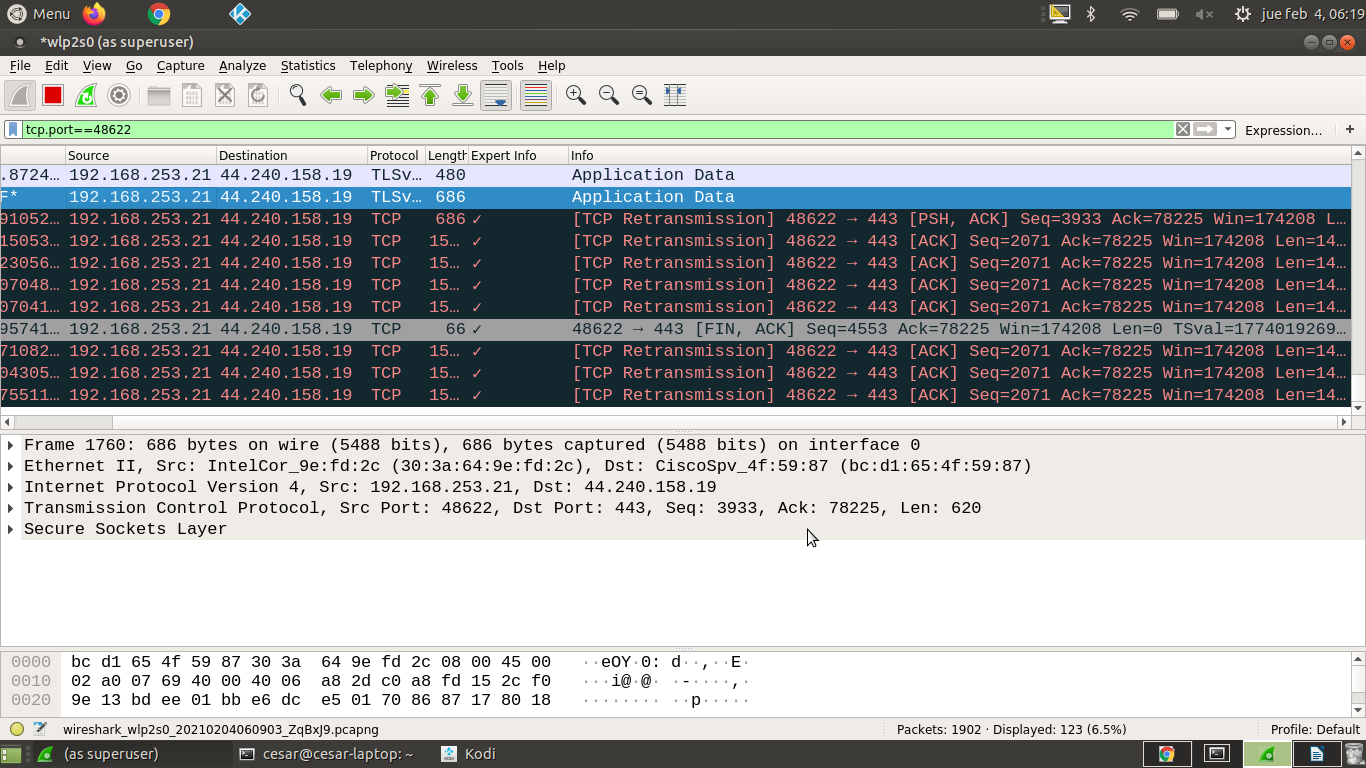
With TCP Keep Alive
If the client reach the unhandled session timeout by the server...now the server will close the connection , releasing the connection back to the pool insteadd of dropoing it....
There are some other ways to handle it.. depending on your OS and in your needs...
I hope it solve some of your issues
jakermx commentedon Feb 4, 2021
I found this but I dont how to handle setsockopt and requests... maybe you know. and will fix ti for all OSs
https://gist.github.com/shi-yan/611cc0221eeff1644797
jakermx commentedon Mar 10, 2021
By defautl, OS TCP/IP stack defines that the app will stack sending TCP Keep-Alives packes after 2 hours of idle activity, this will only work on OOTB Web Servers Installations, but, if your Content provider set lower limits, the TCP L5/L4 Connection willbe dropped off before 2 hours....and when your app try to used the "persistent" connection it will fail due Connection Reset by RemotePeer...caus it is not a valid connection, setting the tcp options will avoind someerrorsm but not all....not matter is you set the connection keep alive header at L7-L4....if the OS dont send KA packets at TCP layer....the only header that will avoid this conditions is Connection:Close
this is a app, http friendly API, url m api and IETFissue
elv1z commentedon Mar 11, 2021
@jakermx you are my hero. Thank you for solution.
I killed almost 2 days trying to fix it.
jakermx commentedon Mar 11, 2021
there is no heros pal,,,,just a great community workforce
nateprewitt commentedon Aug 28, 2021
There are several issues that have been tacked onto the original problem here because people are conflating multiple exceptions. I believe @jakermx has explained what is happening at the TCP level and the urllib3 issue #944 discussing that we're not able to distinguish between a dropped connection and RST has been linked. I'm going to resolve this as there isn't more information to provide at this point.