Expected Behavior
I expected that TaskTearDown blocks would have access to $psake.build_succeeded and, since 4.7.4, also to $psake.error_message so that the teardown logic can switch on a success or a failure of the task it is tearing down.
Current Behavior
it appears that TaskTearDown completes in the finally block of Invoke-Task before $psake.build_succeeded and $error_message are set in Invoke-Psake so doesn't have reliable access to those variables from the current invocation or any way to know if the task it is tearing down has failed.
Possible Solution
Would it be possible to expand the try/catch block in Invoke-Task such that the TaskTearDown has access to the exception thrown inside Invoke-Task?
perhaps even adding $psake-level variables like $psake.current_task_succeeded and $psake.current_task_error_message
or possibly adding it to $psake.context.Peek() so that in addition to $psake.context.Peek().currentTaskName we could access $psake.context.Peek().currentTaskSucceeded and $psake.context.Peek().currentTaskErrorMessage?
Steps to Reproduce (for bugs)
- Given this
psakefile.ps1
properties {
    $will_fail = $should_fail
}

Task default -depends ConditionalTask

Task ConditionalTask {
   if ($will_fail) {
       throw 'the task itself has failed'
   } else {
       Write-Host "the task itself has passed"
   }
}


FormatTaskName {} # silence the natural task naming

TaskSetup {
    $taskName = $psake.context.Peek().currentTaskName;

    $psake.error_message = $null
}

TaskTeardown {
    $taskName = $psake.context.Peek().currentTaskName;

    if (-not ($psake.build_success)) {
        Write-Warning "$taskName failed: $($psake.error_message)"
    } else {
        Write-Host "$taskName passed"
    }
}
- when run like this:
PS C:\dev\psake-testl> Invoke-psake -parameters @{"should_fail" = $false}
psake version 4.7.4
Copyright (c) 2010-2017 James Kovacs & Contributors

the task itself has passed
WARNING: ConditionalTask failed:

psake succeeded executing psakefile.ps1

Name            Duration
----            --------
ConditionalTask 00:00:00.028
Total:          00:00:00.034
the task completes but TaskTearDown inspecting $paske.build_success reports a failure; I would expect it to report a pass.
- similarly when run like this:
PS C:\dev\psake-test> Invoke-psake -parameters @{"should_fail" = $true}
psake version 4.7.4
Copyright (c) 2010-2017 James Kovacs & Contributors

ConditionalTask failed:
Error: 3/19/2019 8:08:00 PM:
 +        ~~~~~~~~~~~~~~~~~~~~~~~~~~~~~~~~~~ [<<==>>] Exception: the task itself has failed
the task throws an exception but TaskTearDown inspecting $paske.error_message does not have any content; I would expect it to say:
ConditionalTask failed: the task itself has failed.
Context
I am trying to write TaskSetup and TaskTearDown blocks to standardize the way that my psake tasks report their start and end, so that I can do things like:
- notify a github PR that a task has started and finished successfully or with errors;
- post a slack notification when a specific task fails;
without having to put explicit exception handling inside every task body.
Your Environment
PS C:\dev\psake-test> get-host

Name             : ConsoleHost
Version          : 5.1.17763.316
InstanceId       : cf5e4b3b-1d00-42e4-9bc7-3a84c02aa881
UI               : System.Management.Automation.Internal.Host.InternalHostUserInterface
CurrentCulture   : en-US
CurrentUICulture : en-US
PrivateData      : Microsoft.PowerShell.ConsoleHost+ConsoleColorProxy
DebuggerEnabled  : True
IsRunspacePushed : False
Runspace         : System.Management.Automation.Runspaces.LocalRunspace

Expected Behavior
I expected that
TaskTearDownblocks would have access to$psake.build_succeededand, since4.7.4, also to$psake.error_messageso that the teardown logic can switch on a success or a failure of the task it is tearing down.Current Behavior
it appears that
TaskTearDowncompletes in thefinallyblock ofInvoke-Taskbefore$psake.build_succeededand$error_messageare set inInvoke-Psakeso doesn't have reliable access to those variables from the current invocation or any way to know if the task it is tearing down has failed.Possible Solution
Would it be possible to expand the
try/catchblock inInvoke-Tasksuch that theTaskTearDownhas access to the exception thrown insideInvoke-Task?perhaps even adding
$psake-level variables like$psake.current_task_succeededand$psake.current_task_error_messageor possibly adding it to
$psake.context.Peek()so that in addition to$psake.context.Peek().currentTaskNamewe could access$psake.context.Peek().currentTaskSucceededand$psake.context.Peek().currentTaskErrorMessage?Steps to Reproduce (for bugs)
psakefile.ps1the task completes but
TaskTearDowninspecting$paske.build_successreports a failure; I would expect it to report a pass.the task throws an exception but
TaskTearDowninspecting$paske.error_messagedoes not have any content; I would expect it to say:Context
I am trying to write
TaskSetupandTaskTearDownblocks to standardize the way that my psake tasks report their start and end, so that I can do things like:without having to put explicit exception handling inside every task body.
Your Environment
Module version used:
psake 4.7.4Operating System:
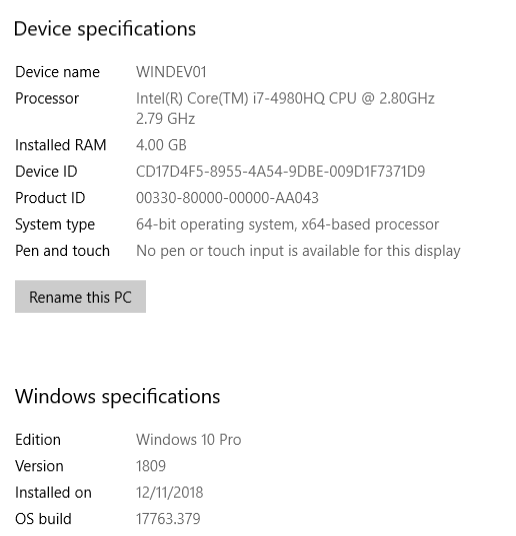
PowerShell version: