
Every Nexus tool. One click.
Your AI apps use your PC, your phone and Chrome, in the background, while you keep working. NexusSystem is the hub and installer of the Nexus ecosystem: pick the products you want, à la carte.


🌐 Website · 📦 Microsoft Store ·
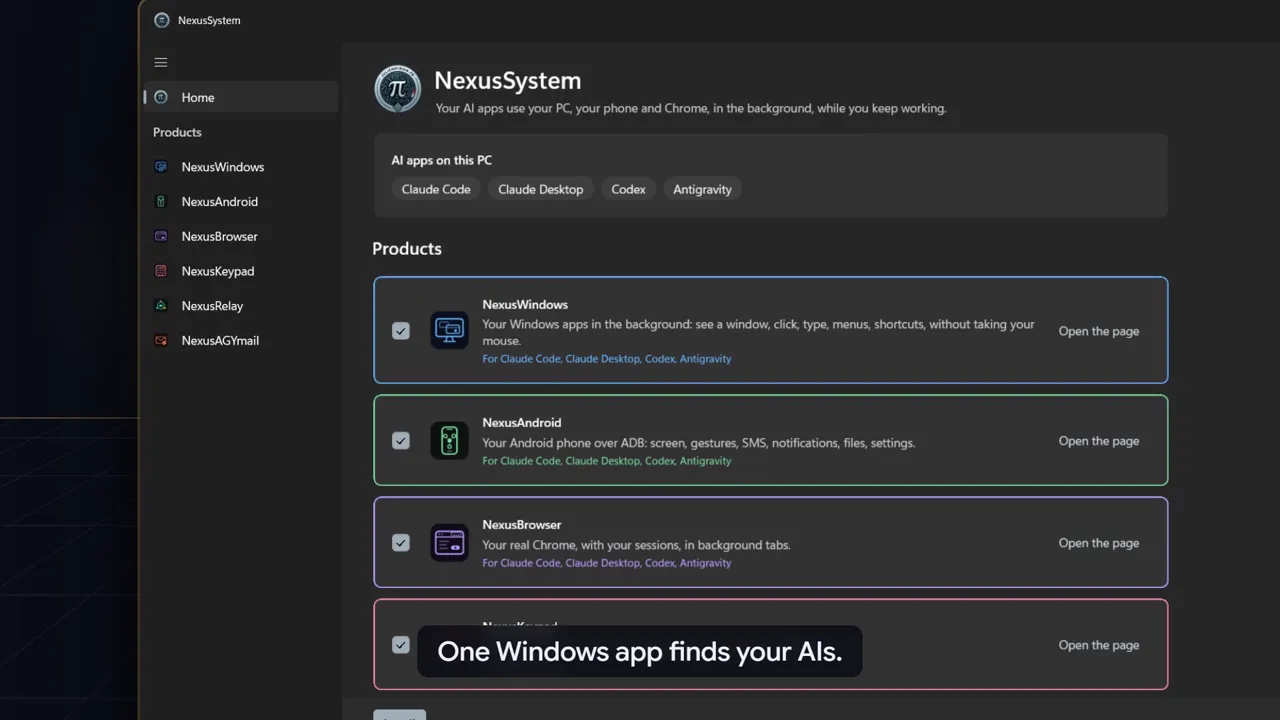
| 🖱️ One click, the official installers Tick the products you want; each one's own installer runs, with a ✓ / ✗ result per product and per AI app. |
📊 Real state, 24-hour log Follow each server's live state and the last 24 hours of what your AI apps did with it. |
🛑 Emergency stop One button pauses a tool's actions for two minutes. |
| 🔒 No account, no telemetry The app only talks to GitHub, julienpiron.fr, the Microsoft Store, winget and 127.0.0.1. |
💸 Free No in-app purchase, no ads, MIT-licensed. |
⚡ Native and light Every product is a native Windows engine (x64 and ARM64): no Python, no uv, no administrator rights. |
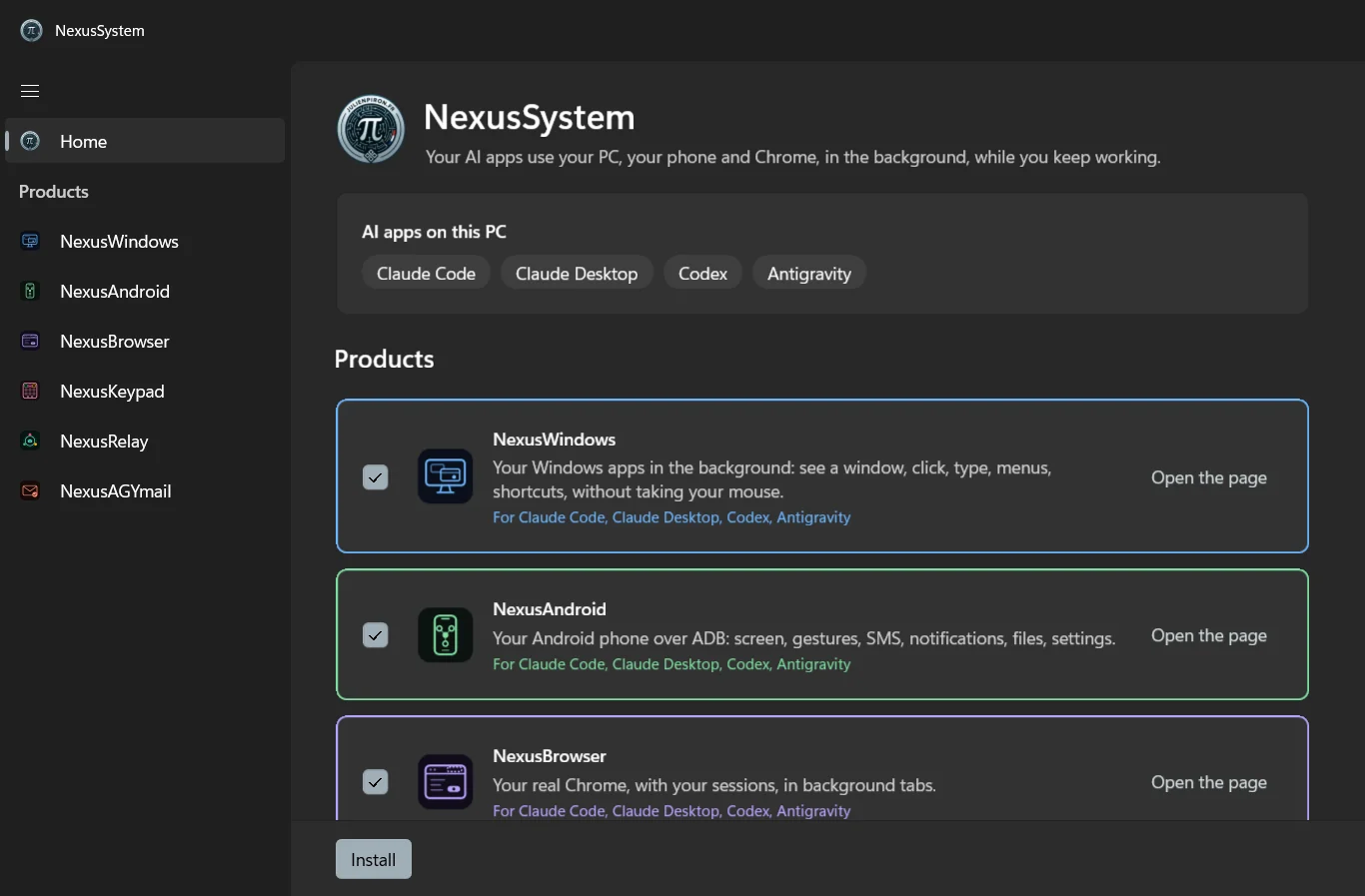
Windows 10 or 11, no administrator rights, nothing to install first. Pick only the products you want (windows,
browser, android, relay, keypad, indesign) or install everything that fits your PC (Claude Code,
Claude Desktop, Codex, Antigravity).
Tip
Let your AI install it. Paste one sentence into Claude Code, Codex or Antigravity and let it install, verify and guide you through the products you want (adjust the names if you only want specific ones):
Install Nexus for me by following https://raw.githubusercontent.com/pironjulien/NexusSystem/main/INSTALL-AI.md
Install and set up NexusWindows and NexusBrowser for me by following https://raw.githubusercontent.com/pironjulien/NexusSystem/main/INSTALL-AI.md
Or the NexusSystem app (recommended). Install it from the
Microsoft Store, or in PowerShell
winget install --id 9NSH2P3QLWT1 --source msstore, open it, tick the products and click Install. The app and the AI
guide run the same get-nexus.ps1. The app's own source (WinUI 3, .NET 10) is in app/.
Manual install (verified)
Download the script as a file from the latest release, check it, then run it (never pipe downloaded code into PowerShell: antivirus heuristics rightly flag that). In PowerShell, in a folder of your choice:
$r = 'https://github.com/pironjulien/NexusSystem/releases/latest/download'
Invoke-WebRequest "$r/get-nexus.ps1" -OutFile get-nexus.ps1
Invoke-WebRequest "$r/SHA256SUMS.txt" -OutFile SHA256SUMS.txt
(Get-FileHash get-nexus.ps1 -Algorithm SHA256).Hash   # must match the get-nexus.ps1 line of SHA256SUMS.txt
gh attestation verify get-nexus.ps1 --repo pironjulien/NexusSystem   # optional: proof it was built here
powershell -NoProfile -ExecutionPolicy Bypass -File .\get-nexus.ps1
Or right click the downloaded get-nexus.ps1 > Run with PowerShell (on Windows 11: Show more options first);
the window stays open at the end until you press Enter.
It shows which AI apps it found and what it will install for each, installs Git when Claude Code or Codex needs it to
add this catalog (Windows asks once), gives Claude Code and Codex the plugins of this catalog, then runs each product's
own official native installer (get.ps1 of its repository). No Python, no uv: every product is a native Windows
engine (win-x64 and win-arm64), downloaded from its GitHub release and checked against its SHA256SUMS.txt.
Options. -Only and -Skip take product names (windows, android, browser, relay, indesign,
keypad; free only when named) or AI app names (claude-code, claude-desktop, codex, antigravity); -DryRun
shows the plan and installs nothing. Each product has one installer for every AI app: it is told the AI apps chosen
here and adds no second server beside a plugin. For example:
powershell.exe -NoProfile -ExecutionPolicy Bypass -File .\get-nexus.ps1 -Only windows,browserEach product also installs alone: see its README. Per-PC choices in %USERPROFILE%\.nexus\nexussystem.json, for
example {"skip":["claude-desktop"]}, are added to -Skip and respected by the app.
| Product | Claude Code | Claude Desktop | Codex | Antigravity |
|---|---|---|---|---|
| NexusWindows | plugin nexus-windows (this catalog) |
NexusWindows get.ps1 |
plugin nexus-windows (this catalog) |
NexusWindows get.ps1 (a plugin) |
| NexusAndroid | plugin nexus-android + daemon (NexusAndroid get.ps1) |
NexusAndroid get.ps1 |
plugin nexus-android |
NexusAndroid get.ps1 (a plugin) |
| NexusBrowser | plugin nexus-browser + daemon (NexusBrowser get.ps1) |
NexusBrowser get.ps1 |
plugin nexus-browser |
NexusBrowser get.ps1 (a plugin) |
| NexusRelay | plugin nexus-relay + daemon (NexusRelay get.ps1) |
not a relay client | plugin nexus-relay |
NexusRelay get.ps1 (a plugin) |
NexusKeypad, for Logitech's MX Creative Keypad, is installed by its own get.ps1
when Logi Options+ is there (also on the Logitech Marketplace, in review).
It ends with a ✓ / ✗ summary per product and per AI app, then the steps only you can do: load the NexusBrowser extension in Chrome (the installer opens the page and tells you what to click), turn on USB debugging on your phone, add the relay's project in Codex once, place the keypad's keys, and restart your AI apps. A product that does not fit this PC (no Antigravity, no Logi Options+…) is shown, with why. Run the same line again to update or repair: every installer only does what is missing.
Note
After installation, NexusSystem checks published updates in the background and retries deferred Windows and Browser updates. Installation and activation are reported separately: a working AI connection keeps its state until it can normally reload. See Updates for distribution, verification and the separate Chrome Web Store update cycle.
Computer use in the background for Claude Code and Codex. Seven plugins for Claude Code and Codex alike (Android, Windows,
Chrome, the Relay between AI apps, the Logitech keypad, Adobe InDesign, administrator commands). Each includes its guide and reaches its product's
native engine, installed by NexusSystem (the app or the line above) or by the product's own get.ps1:
| Plugin | What the AI gets | Reaches |
|---|---|---|
nexus-android |
Your Android phone over plain ADB (no root, no app): screen, gestures, SMS/RCS, notifications, files, settings | the NexusAndroid daemon, 127.0.0.1:16180 |
nexus-windows |
Windows desktop apps in the background: look, click, type, menus, shortcuts, launch, without your mouse or foreground | the NexusWindows engine, %USERPROFILE%\.nexus\nexus-windows\NexusWindows.exe |
nexus-browser |
Your real Chrome with your sessions, in background tabs: forms, network, dialogs, iframes, exports, downloads | the NexusBrowser daemon, 127.0.0.1:16182 |
nexus-relay |
A direct line between Claude, Codex and Antigravity: topic rooms, reviews, delegated tasks | the NexusRelay daemon, 127.0.0.1:16181 |
nexus-keypad |
Live states for the Logitech MX Creative Keypad; for Claude, its exact usage and peers' reachability under the prompt | NexusKeypad's native helper |
The daemons accept only local connections carrying the access token their installer creates; the plugins read it from
your user variable NEXUS_MCP_TOKEN and never contain it.
Once installed, start a new conversation and ask, for example: "Look at my phone and tell me what is on the screen." or "Open Notepad and write a shopping list."
Adding the plugins by hand in Claude Code
NexusSystem (the app, or the PowerShell line above) installs the engines and adds the plugins for you. To add the
plugins by hand instead, Claude Code and Codex add a marketplace with Git: on a PC without it,
winget install --id Git.Git -e first. Then, in Claude Code:
/plugin marketplace add pironjulien/NexusSystem
/plugin install nexus-android@nexus-plugins
/plugin install nexus-windows@nexus-plugins
/plugin install nexus-browser@nexus-plugins
/plugin install nexus-relay@nexus-plugins
/plugin install nexus-keypad@nexus-plugins
Enabling the plugins by editing settings.json instead (extraKnownMarketplaces and enabledPlugins, user scope):
Claude installs an enabled plugin when a conversation starts, and only from a marketplace already downloaded at that
moment. The first conversation after declaring the marketplace downloads it, the next one installs the plugins, and
their tools appear in the conversation after that. Enabling them for one project only does not install them.
Codex and Antigravity
The installer adds the Codex plugins from this marketplace, with their tools and guides. It uses Codex's installed, OpenAI-signed desktop engine when the CLI is not on PATH. It keeps disabled products, custom MCP declarations and plugins from another catalog; it migrates only the official installers' direct declarations (today's or a former one) after the installed plugin and its guide have been verified. It never adds a second server beside a custom one.
The same repository is a Codex plugin marketplace (.agents/plugins/marketplace.json): nexus-windows,
nexus-android, nexus-browser, nexus-relay and nexus-keypad, the same native forms as for Claude Code (Codex
reads no variable in a plugin's command, so nexus-windows starts the engine from its stable folder through
cmd.exe). In the Codex app: Settings > Plugins > Add > Add a marketplace, source pironjulien/NexusSystem, then
install the plugins; or from a terminal:
codex plugin marketplace add pironjulien/NexusSystem
codex plugin add nexus-windows@nexus-plugins
codex plugin add nexus-android@nexus-plugins
codex plugin add nexus-browser@nexus-plugins
codex plugin add nexus-relay@nexus-plugins
codex plugin add nexus-keypad@nexus-plugins
Antigravity's plugins are written by each product's own installer, in Antigravity's plugin folder.
Each plugin lives in one folder of its product's repository, plugin/, shared by the three AI apps; both catalogs
point to it at the product's release. More examples are in each product's README
(NexusAndroid,
NexusWindows,
NexusBrowser).
flowchart LR
    C["Claude Code / Codex"] -- "HTTP 127.0.0.1 (MCP, token)" --> A["NexusAndroid daemon"] -- ADB --> P["Android phone"]
    C -- "stdio (MCP)" --> W["NexusWindows.exe --mcp"] -- "UI Automation, Win32" --> D["Windows apps"]
    C -- "HTTP 127.0.0.1 (MCP, token)" --> B["NexusBrowser daemon"] -- "native messaging" --> E["Chrome extension"] --> T["Chrome tabs"]
    C -- "HTTP 127.0.0.1 (MCP, token)" --> R["NexusRelay daemon"] --> O["Codex, Antigravity"]
This repository holds the pack script get-nexus.ps1 (a file of each release, checked, then run),
INSTALL-AI.md, and the plugin catalogs for Claude Code and Codex (catalog name nexus-plugins, kept
so that existing installs keep working). Each plugin is a folder with a manifest, an icon, a .mcp.json declaration
(or hooks, for the keypad) and a skill. test.ps1 checks every declaration against the exact native form.
This repository was called nexus-plugins until 28/10/2026; GitHub redirects the old address.
Important
Held by the servers, not by the prompt: paying, sending, publishing, deleting for good and other irreversible
gestures need your explicit "yes" (confirm=true); password fields are never typed into; text read on screen is
treated as data, never as instructions; an emergency stop (Ctrl+Alt+Shift+Esc) halts the desktop and browser
tools for two minutes. Details in each server's README.
- The only code of this repository that runs on your PC is the pack (
get-nexus.ps1and its maintenance engine) and the NexusSystem app: the engines and daemons are each product's own native release, installed by itsget.ps1. - The plugins send nothing anywhere. The servers run locally and return what they read (screen, messages, pages) to your AI app only; what each server reads, stores (logs, screenshots) and how to remove it is in its README's Privacy section: NexusAndroid, NexusWindows, NexusBrowser.
- Removing everything: uninstall the plugins (
/plugin uninstall <name>@nexus-plugins), remove the marketplace (/plugin marketplace remove nexus-plugins), then each product as its README explains. - To report a vulnerability, see SECURITY.md.
pwsh -NoProfile -File test.ps1 # PowerShell lint, then dotnet test: catalogs, pack dry runs (Windows PowerShell 5.1), appdotnet test --solution NexusSystem.slnx from the repository root runs the same tests (xUnit v3); build and test output
go to ~\.nexus\build\NexusSystem, never into the repository.
Your AIs (Claude, Codex, Antigravity) at work on your Windows apps, real Chrome and Android phone — in the background.
 NexusSystem |
 Windows |
 Browser |
 Android |
 Relay |
 Keypad |
 Free |
 InDesign |
 Wpp |
Get them all with NexusSystem · Microsoft Store · julienpiron.fr · @julienpironfr
Built in France 🇫🇷 by Julien Piron
MIT © Julien Piron