Repository navigation
Field labels on richText and custom-component fields are cached in the first admin language rendered #18583
Description

Describe the Bug
Field labels in the admin panel are shown in the wrong language for some users. Labels defined as a LabelFunction (label: ({ t }) => t('custom:key')) on richText fields and on fields with a custom Field component come out in whatever admin language the first request to that process used. Other labels in the same form are in the right language, so one document mixes two languages.
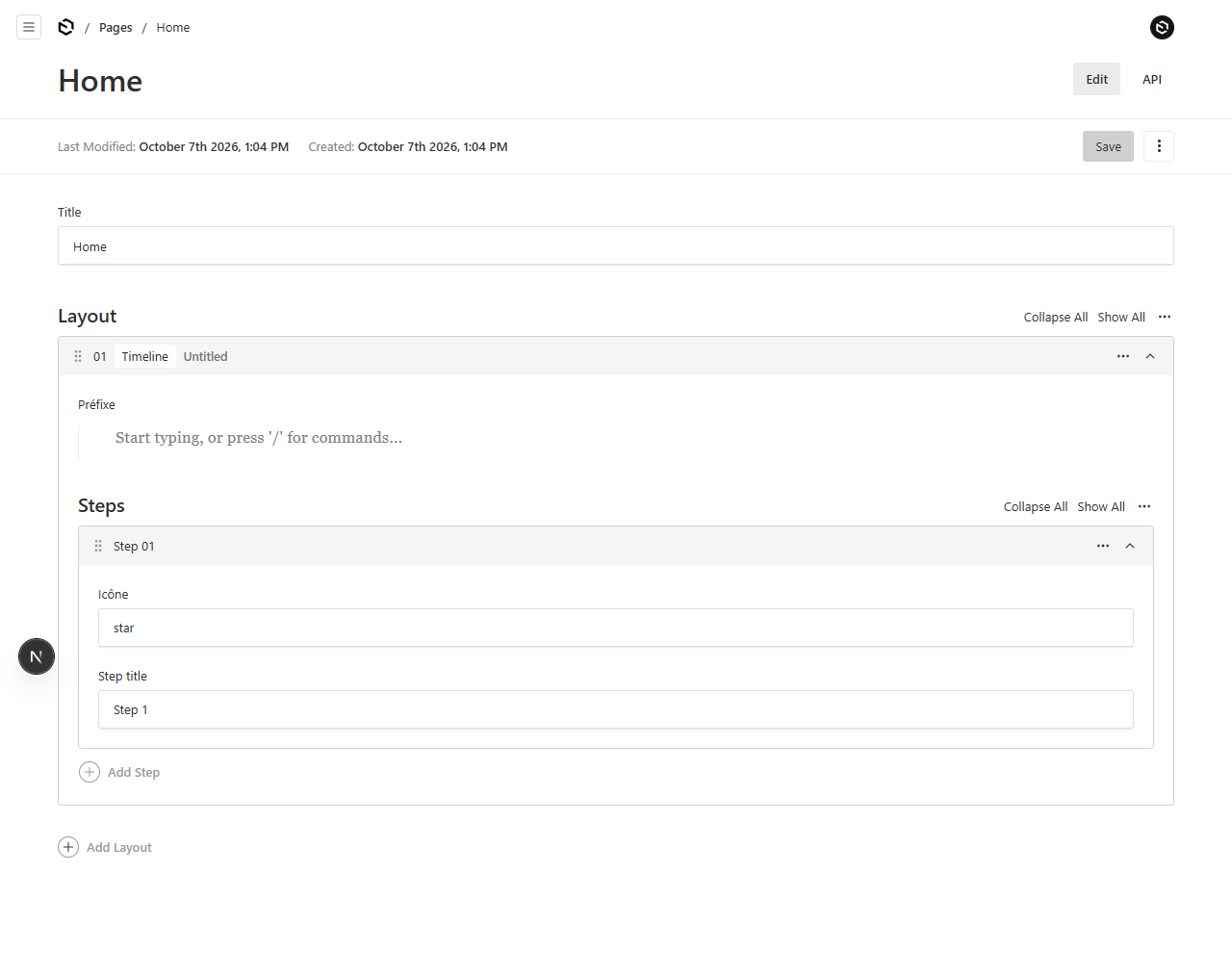
The admin language is English. Title and Step title are correct, but Préfixe (richText) and Icône (custom Field component) come from a request made earlier in French.
Cause
getClientSchemaMap (packages/ui/src/utilities/getClientSchemaMap.ts) stores the client field schema map in a process-wide cache. The cache key is just the entity slug:
const cacheKey = collectionSlug || globalSlug || `widget:${widgetSlug}`buildClientFieldSchemaMap → createClientField runs LabelFunctions (and labels.singular/plural) with the i18n of the request that fills the cache. Those translated strings are then served to every user, whatever their language, until the process restarts.
renderField (packages/ui/src/forms/fieldSchemasToFormState/renderField.tsx) reads clientFieldSchemaMap.get(schemaPath) for every field it renders on the server through form state. That includes richText and any field with a custom Field component, which is why those are the ones affected. Fields rendered on the client take their label from getClientConfig, which is cached per language (cachedClientConfigs[i18n.language]), so they are correct.
In production with several instances, each process fixes its labels in whichever language reaches it first. The bug then looks random: a reload "fixes" it whenever the request hits a different instance. In dev, HMR clears the cache (_payload_doNotCacheClientSchemaMap), which hides the bug further.
Label objects ({ en: '…', fr: '…' }) are not affected because the client translates them.
Suggested fix: include the language in the cache key, the same way getClientConfig does:
const cacheKey = `${i18n.language}:${collectionSlug || globalSlug || `widget:${widgetSlug}`}`Related: #18168 changes the same cache key to separate authenticated and unauthenticated maps (#18162). The language belongs in that key as well.
Link to the code that reproduces this issue
Reproduction Steps
- Clone the branch,
pnpm install, thenpnpm dev. The process must be fresh so the cache is empty.payload.dbalready contains aHomepage with atimelineblock. - Log in (auto-login), open Account and set Language → Français (or set the cookie
payload-lng=fr). - Open Pages → Home. All labels are French, which is correct. This request fills the cache.
- In Account, set Language → English and open Pages → Home again.
Expected: Title, Prefix, Steps, Icon, Step title
Actual: Title, Préfixe, Steps, Icône, Step title
The reverse also happens: if an English request fills the cache first, French users see Prefix / Icon.
The config is small:
src/payload.config.ts:i18n.supportedLanguages: { en, fr }and customrepro:*translationssrc/collections/Pages.ts: every label is({ t }) => t('repro:…').prefixis arichTextfield andiconhas a customFieldcomponent (src/components/IconField.tsx).
Which area(s) are affected?
area: core, area: ui
Environment Info
Binaries:
  Node: 25.8.1
Relevant Packages:
  payload: 3.90.2
  next: 15.4.11
  @payloadcms/db-sqlite: 3.90.2
  @payloadcms/next/utilities: 3.90.2
  @payloadcms/richtext-lexical: 3.90.2
  @payloadcms/translations: 3.90.2
  @payloadcms/ui/shared: 3.90.2
  react: 19.2.0
  react-dom: 19.2.0
Operating System:
  Platform: win32
  Arch: x64
  Version: Windows 11 Pro
Activity
kaanisthatyou commentedon Oct 7, 2026
@VeiaG are you planning to open the PR for this yourself? If not, I can send one with the language added to the cache key and a unit test for
getClientSchemaMap.VeiaG commentedon Oct 7, 2026
@kaanisthatyou you can create PR if you want. I think you can also add change from #18168 ,as that PR changes same line, but fixes different issue
fix(ui): cache client schema maps per language (payloadcms#18585)
github-actions commentedon Oct 7, 2026
🚀 This is included in version v4.0.0-canary.38