Repository navigation
Avoid duplicating files #819

Description

Based on #346, this summarizes all ideas to get a clean idea how to implement this long awaiting feature.
I will update the description when there is a new idea or something is unclear, so that this is up to date.
First the way to do is shown, then all possible problems or scenarios are described...
Desired behaviour:
When uploading a file through owncloud app the file get uploaded to the owncloud server and remains on the place on the device. In the database of the app an entry is created which stores the local path.
When opening/downloading a file the app first tries to open and verify the file in the local path that is stored in the database. If the file is there and up-to-date it will be shown. If it is not there, the file will be downloaded and be stored in the local owncloud folder structure.
TODO
The user needs to be informed that the file is shared with owncloud. This means that the original file keeps untouched, even if the remote file changes.
File gets deleted on server:
The file also get deleted from the database and from the local owncloud folder.
File gets deleted only on device (via ownCloud App):
This option deletes the file from local owncloud folder.
File gets changed on server:
When opening the file with owncloud app it is determined if the file is up to date. Otherwise it will be downloaded and be added to local owncloud folder.
File gets changed on device:
As now the file needs to be selected in owncloud app and choose "refresh file". This will upload the file change to the server --> nothing special here.
File is "kept-to-sync" on one account:
File is kept in local owncloud path on device, but gets updated as soon as the server file has been changed.
File is "kept-to-sync" on multiple accounts:
If there is a change on the server the local owncloud file will be updated. But none of the other files will be modified. Example: There are three distinct files to work with: $account1/test.txt, $account2/test.txt, and /data/test.txt. So if $account1/test.txt is updated on the server, then the update should be downloaded and displayed if the user opens $acount1/test.txt. However, if the user locally modifies /data/test.txt, neither the account1 nor account2 copy should be updated.
I hope I have summarized this correctly. If not, or something is unclear, please feel free to comment.
Please also comment if this should be done this way.
Activity
jancborchardt commentedon Dec 26, 2014
I’m a bit unsure about these scenarios:
This might be a bit confusing since I don’t necessarily expect the files to be linked. When I upload a picture to my ownCloud from the gallery, but then later remove it from the ownCloud server … I don’t expect it to be removed from the gallery as well. The connection just isn’t clear.
(Sure, if you really want to remove it fully, it’s tedious as you need to remove it on your device as well. But it’s better than removing it when people don’t really want to.)
Here, do you mean deletion via the ownCloud app, or via the original app it was uploaded by (e.g. Gallery). If via the ownCloud app, I see a similar problem as above – the connection is not necessarily clear.
What do you think @tobiasKaminsky? Do Dropbox (and/or Google Drive) actually follow this concept?
@davivel @MTRichards can you review this as well?
tobiasKaminsky commentedon Dec 26, 2014
@jancborchardt You are right. But if the files are not linked then you will end up with different versions of the same file like we have it now.
I think it must be handled the way I have described. But additionally when deleting the file (and selecting "on device") there should be an explanation: This will remove the file from its origin place on the device).
On your second question: Yes, deletion via ownCloud app.
As far as I have read Dropbox and Google Drive have a different approach:
When you upload a file to the cloud it is just in the cloud and is not linked to the original file on the device. Viewing/downloading the file creates a new copy in the cache of the app, which only can be used within the app.
With this they avoid the problems we have...
strugee commentedon Jan 3, 2015
This (IMHO, obviously) is the best behavior. Remember, the way that the user will generally be putting things into ownCloud on their Android device is the "Share" action. "Share" implies creating a copy. This is what basically all other apps do: if you share e.g. a picture over SMS, deleting the message doesn't delete the original image. If you share a picture on a social network, deleting the original photo won't delete the post on the social network. And vice versa.
Yes, this is correct. So if it avoids our problems, why aren't we doing it?
tobiasKaminsky commentedon Jan 4, 2015
@strugee
Ok. But then our app should not create a copy and waste the storage. Instead it uploads the file, leaves it in the original position.
When opening the file via ownloud app:
If the file exists in the "old" place -> use it
else: download it to cache
The cache size then should be adjustable in the settings.
@jancborchardt
@davivel
strugee commentedon Jan 5, 2015
Yes, this makes sense. The key difference between what I'm saying and what you're saying is that IMO, this should essentially be an internal optimization that the app does. To the user, it should seem as if there are two distinct files (one in ownCloud, one in the original location), even if those two distinct "files" are actually backed by the same file on the device. Does that make sense? I'm not sure if I've phrased it well.
jancborchardt commentedon Jan 5, 2015
Yeah, if I understand well what you (@tobiasKaminsky & @strugee) said last, this sounds like a good approach. Linking the files too strictly will result in the confusion and data loss that @strugee and I mentioned.
tobiasKaminsky commentedon Jan 10, 2015
I have changed the description in the first post.
But I am not happy with it after playing through the different cases.
My main problem is that no other other app can access the downloaded files as they are in a cache.
Maybe the files should not be in a cache but stay in the owncloud folder as they are now.
AND: We need to rethink how we handle the favourite (kept-to-sync) files..!
tobiasKaminsky commentedon Jan 11, 2015
I have updated the description again and removed the idea with the local cache.
Mainly it is the same as the app behaves now, but uploaded files are not being duplicated.
Instead when opening them the app tries to open them with the original path.
strugee commentedon Jan 15, 2015
So if I understand this correctly,
/data/test.txthas been created by some other app. Then the user uploads it to both account1 and account2, right? And iftest.txtis changed, then it changes in both accounts?Again, assuming I'm understanding correctly, this doesn't make sense. To the user, they've put a copy of
test.txtin ownCloud. Therefore, we should not update accounts if the local, original file is changed. The link simply isn't clear.Keep in mind that even if this doesn't make sense to you, this is how Google Drive and Dropbox both work. Users are used to having things work this way.
tobiasKaminsky commentedon Jan 15, 2015
It is late for me, so please do not assume a well thought through answer.
But isn't creating a copy and not updating it something that breaks the idea of favourite files?
(Please excuse if I am wrong)
strugee commentedon Jan 17, 2015
You're misunderstanding what I said. Using the
test.txtexample, let's assume that the user has uploaded it to account1 and account2. What I'm saying is that there are now three distinct files to work with:$account1/test.txt,$account2/test.txt, and/data/test.txt. So if$account1/test.txtis updated on the server, then the update should be downloaded and displayed if the user opens$acount1/test.txt. However, if the user locally modifies/data/test.txt, neither the account1 nor account2 copy should be updated.Likewise, let's assume that the user has updated the account1 copy on a separate computer, and it's now synced to ownCloud. If they open the Android app and select
test.txtfrom account1, it should show the changes, but if they opentest.txtfrom account2 or from/data, then it shouldn't show the changes.tobiasKaminsky commentedon Feb 13, 2015
@strugee Sorry for coming back so late to this.
Now I have understood what you mean and I agree.
I will adapt the description in the first post.
@ALL please have a look!
jancborchardt commentedon Feb 17, 2015
@davivel can you comment here ^
strugee commentedon Feb 18, 2015
@tobiasKaminsky seems like you haven't updated the "keep-to-sync on multiple accounts" scenario with what I've suggested. Was that intentional? (Don't want to sound bothersome, just want to make sure we're all on the same page.)
tobiasKaminsky commentedon Feb 18, 2015
@strugee This is a mistake. I have altered the description nearly 1:1 to your idea.
I will fix it this afternoon.
103 remaining items
Bugsbane commentedon Dec 5, 2015
Pull requests talk louder than comments. 'nuff said.
tobiasKaminsky commentedon Dec 13, 2015
Closing as #1168 is in master :)
jospoortvliet commentedon Dec 13, 2015
Congrats, @tobiasKaminsky - epic piece of work! I look forward to the next Android client release.
rperezb commentedon Jan 12, 2016
@carlaschroder new feature on Android, on the settings menu, when you enable instant uploads you may decide whether the original file is kept in the original folder or is moved to the app
This may be decided when you upload files within the app
lukass2000 commentedon Jan 16, 2016
How can i find this settings from the pictures above?
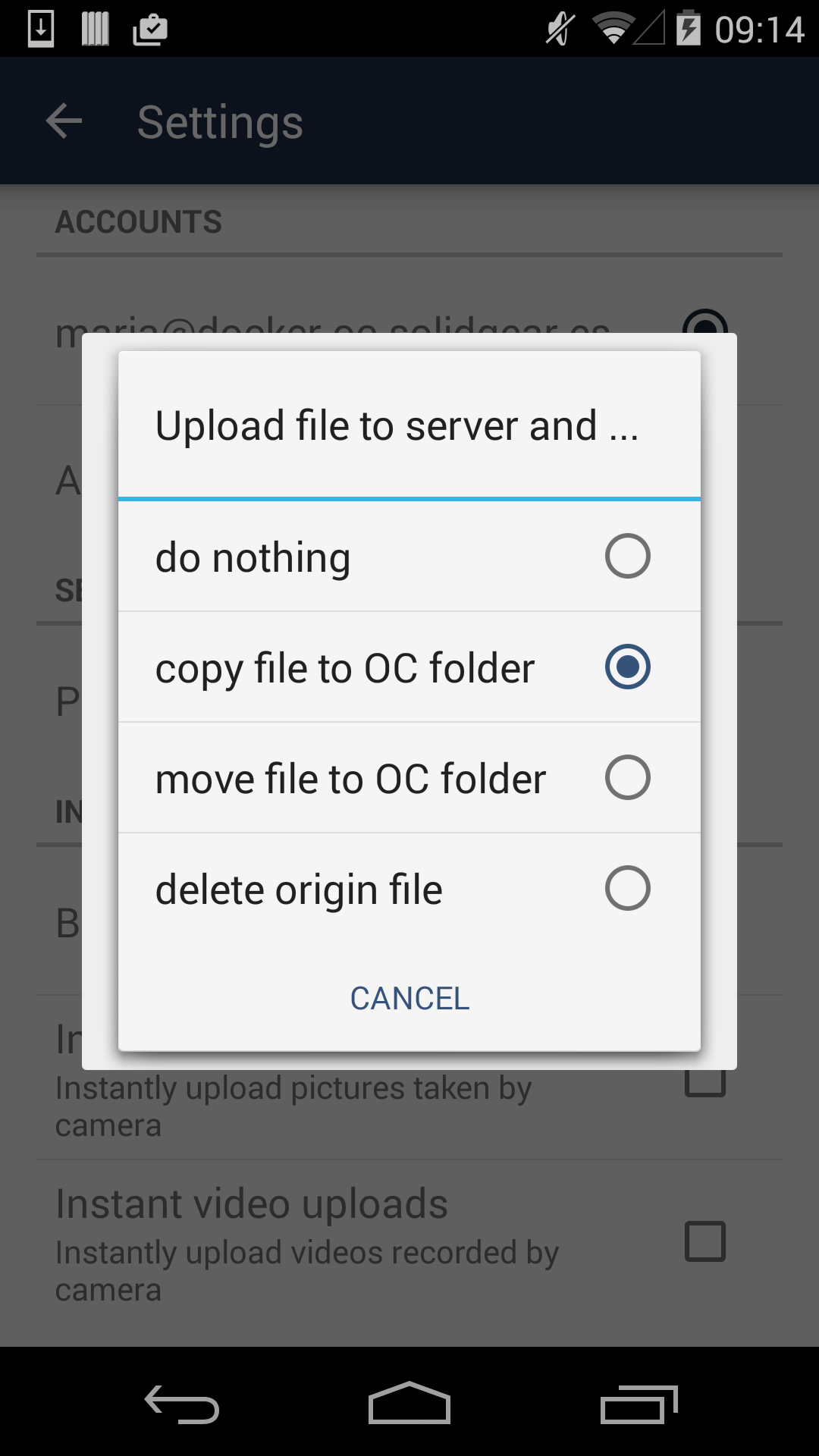
Can not see "Behaviour" in my Android App.
enoch85 commentedon Jan 16, 2016
@lukass2000 It's in the beta version of the owCloud app. @tobiasKaminsky Could you link the .apk please?
lukass2000 commentedon Jan 16, 2016
yes, link for download would great :)
tobiasKaminsky commentedon Jan 16, 2016
If you have already the beta app please go to settings and scroll to "download newest beta".
Otherwise: https://github.com/owncloud/android/tree/beta/apks
detly commentedon Nov 27, 2016
I've read through this whole thread and I'm not still not sure on what the final decision was, and what I should expect from the app, so excuse me if I'm repeating something that's already been covered.
I'm using the Android app on a 6.0.1 device, just installed the OwnCloud app. When I go to upload files to OwnCloud, I am presented with two options: copy or move. Copy seems to copy them to an
ownclouddirectory on internal storage (why can't I change this? internal storage is definitely the wrong choice on this device, where I have an SD card with several times more space, but there's no option for anything but/storage/emulated/0).The only difference with "move" is that these files are not duplicated. But they're not deleted from their original location either. This is actually fine by me, it's exactly what I wanted to happen in the first place, but to me it doesn't reflect the semantics of the word "move", so it took me ages to realise I needed to do this. Perhaps relabelling these as "keep synced copy" and "don't keep synced copy" or something would be less confusing?
Is the behaviour of the app about to change to reflect the usual meanings of "copy" and "move", or do the labels need to change, or have I totally misunderstood how this is meant to work?
davivel commentedon Dec 1, 2016
With "copy" the original file is copied into the "ownCloud" folder; therefore, after the copy, the file is both in the original location and in the "ownCloud" folder, so it's duplicated.
With "move" the original file is moved into the "ownCloud" folder; therefore, after the move, the file is not in the original location, it is only in the "ownCloud" folder, so not duplicated.
In both cases the file is in the "ownCloud" folder after the operation, so it's shown as downloaded in the ownCloud app UI (green arrow on the icon in the list).
I'm very sorry, I don't know what are the semantics of "move" you would expect. Could you explain this point a bit more?
detly commentedon Dec 2, 2016
davivel commentedon Dec 2, 2016
Oh, now I understand :)
That's a know bug, there are problems to delete contents in SD cards from Android 6, or maybe 5. I think there is an issue already open about that, though I can't find it right now. Feel free to open a new one if you can't find it either.
I understand. That option exists for instant uploads right now (see app settings). We considered it also for this case, but adding more radio buttons to select it is tricky.
The intention of copying/moving the file into the OC folder is prevent an extra transfer (download) if the user tries to use the file in OC right after uploading it.
There is another point of Dropbox / Drive that probably will be of your interest, given you have few space in internal storage. Handle the OC folder as a LRU cache, auto-deleting files when a size limit is reached. Take a look to #756.
jospoortvliet commentedon Dec 8, 2016
We've rewritten the auto-upload feature for version 1.4.0 for Nextcloud, you can give that a try too, if you like. It is free, will work with your ownCloud server too and might work better. See https://nextcloud.com/blog/nextcloud-android-client-1.4.0-has-been-released/
ag14774 commentedon May 26, 2022
So what was the conclusion? I am using the latest version and I am still getting the same behavior when doing instant upload. Owncloud is duplicating my files on my phone