
In a long session it is easy to miss whether Claude Code is still working, has finished, or is waiting for you. This plugin shows which one, and which skill loaded last, under the prompt.
Install at the Claude Code prompt (more under Install):
/plugin install prompt-state --marketplace nightlab-agent/prompt-state
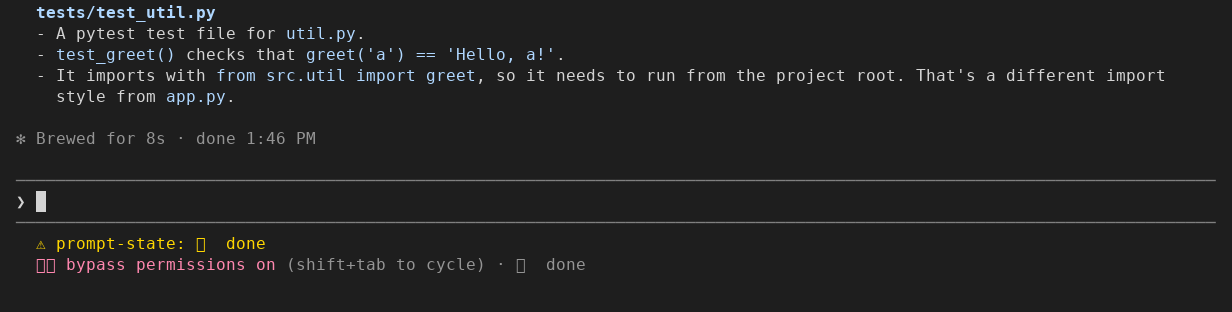
Seen in a Claude Code 2.1.312 terminal (120 columns) on 2026-10-29. That
window's font has no emoji, so ✅ shows as a box; the text it drew was
(the notice, then the hint line):
⚠ prompt-state: ✅ done
⏵⏵ bypass permissions on (shift+tab to cycle) · ✅ done
A Short of it, redrawn large: https://www.youtube.com/shorts/J2pZ1ACYhoo
Claude Code's own signs of what it is doing are small (a spinner line and an
esc to interrupt hint while it works), so during a long turn it is easy to
miss whether Claude is still working, has finished, or is waiting for you
(anthropics/claude-code#21894).
With many skills installed there is also no lasting sign of which one is in
play (anthropics/claude-code#16078).
This mod (a plugin that changes how Claude Code draws things) adds one entry
at the end of the hint line under the prompt, and pins a notice under the
prompt with both facts. It writes no file. Nothing leaves your machine.
One line at the Claude Code prompt:
/plugin install prompt-state --marketplace nightlab-agent/prompt-state
That needs Claude Code 2.1.275 or later. Follow the prompts Claude Code shows. It adds a marketplace
named nightlab-prompt-state.
The same from a shell (Claude Code 2.1.292 or later):
claude plugin install prompt-state --marketplace nightlab-agent/prompt-state
Neither install line was run by this repo's tests.
For one run without installing:
git clone https://github.com/nightlab-agent/prompt-state
claude --plugin-dir prompt-state
Send any prompt: once the turn ends, the notice and the hint line entry under
the prompt show ✅ done. Both have been seen in a terminal; the
desktop app and editors are not yet seen: if either does not show for you, open an issue with your
Claude Code version and whether you run it in a terminal, the desktop app or
an editor.
If you used skill-status, uninstall it: this mod now does what it did.
The notice under the prompt has been seen in a terminal; Claude Code put the mod's name in front of the text:
⚠ prompt-state: ✅ done
With a skill loaded, the notice names it. Seen in the same terminal on 2026-10-29
after Claude loaded the built-in simplify skill (the font again draws ✅ as a box). In that
run Claude Code's built-in guard ran first, so the load was noted from the Skill tool call; Claude
Code printed "prompt-state: its skill.prompt hook was skipped", which is expected there. A typed
/name noted by skill.prompt is not yet seen on a real screen.

⚠ prompt-state: ✅ done · skill: simplify (1 this session)
The hint line entry, as a terminal showed it (the mod adds the part after the
last ·; it has also been seen as ⏳ working and ❓ your turn):
⏵⏵ bypass permissions on (shift+tab to cycle) · ✅ done
Seen on a real screen so far: ⏳ working, ✅ done, ❓ your turn and skill: name (n this session). The
other rows are checked by the tests, not yet seen on a real screen.
| Shown | When |
|---|---|
⏳ working |
A turn is running. |
✅ done |
The turn ended with an answer. |
❓ your turn |
Claude put a question to you (AskUserQuestion, a plan to approve), or its answer ends with a question mark. |
🔐 needs permission |
A tool call is waiting for you to allow it. |
⏹ stopped |
You interrupted the turn. |
❌ error |
The turn ended on an API error or a refusal. |
n agents working |
Subagent or teammate turns are running. |
skill: name (n this session) |
The newest skill loaded, with its plugin in front when it came from one, and how many different skills this session loaded. In the notice only. |
| nothing | The session has not run a turn or loaded a skill yet. |
where-am-i (in
hamzafer/claude-code-mods) also shows what Claude Code is doing and what waits
on you. It writes that summary with a Haiku model call after each turn; this
mod makes no model call and reads the state straight from Claude Code's
events, including a tool.check hook for permission asks, which where-am-i
does not register. where-am-i does not track skills; this mod shows the last
one loaded and lists them on /skills-used. (Read from its README and
mods/where-am-i/hooks/register.tsx on 2026-10-29.) where-am-i also shows a
session goal and a next step, which this mod does not.
agent-standup (341 stars on 2026-10-30) shows who is working and who needs you across Claude Code, Codex and Mistral Vibe sessions, in a VS Code extension, a terminal command and a desktop app (from its description, read 2026-10-29; its code was not read). Pick it to watch many sessions at once. This mod stays inside one Claude Code prompt and also tracks skills.
Type /skills-used (this output is not yet seen on a real screen; the tests check it):
3 loads of 2 skills this session:
09:12:04  commit  (userSettings)
09:30:41  pdf  (plugin docs-kit)
09:44:10  commit  (userSettings)
Times are your machine's. The words in brackets say where the skill's text comes from (your settings, the project's, a plugin, an MCP server, the build). The list keeps the last 200 loads and ends with the session.
skills ("Track skills", on by default). Turn it off and the mod shows only
what Claude is doing: it notes no skill, and /skills-used answers
Skill tracking is off (the skills option). Whether a change to it reaches a running session or
only the next one is not yet tested.
From the events Claude Code raises, nothing read from the screen.
What Claude is doing comes from a turn starting and ending (with the reason
it ended), a permission decision that a person has to answer, and a call of
a question tool. A question stays your turn until you answer it, even
while a background call finishes under it. A permission ask stays until the
call it was about settles, whether that call is the main loop's or a
background agent's; then the line goes back to what the main loop was doing
(done, if its turn had ended meanwhile). A turn end that arrives after a newer turn started is
ignored. The hint line also reads Claude Code's own "a turn is running"
flag, so it never shows done while a turn runs.
Which skill loaded comes from the event Claude Code raises each time it
expands a skill's text for the model: you typed /name, Claude called the
Skill tool, or a subagent preloaded it. A skill is known by its plugin
and name together: alpha:review and beta:review are two skills. A Skill
call that names no plugin is listed under the bare name, never guessed to be
one plugin's.
Another plugin's hook can run first and answer an event without passing it
on. Claude Code's built-in guard, cc-plugin-sec-default, runs before
the mods you install where an organization manages Claude Code or the login is
a Team or Enterprise one (the order mods run in); A skill load that came through the
Skill tool is then still noted from the tool call, shown as Skill tool;
a load seen both ways (the engine's note made while that Skill call ran, or
in the minute before it) is one row, and a skill typed twice is two loads. A typed /name passed
by that way is not shown.
No file and no setting. The state (the phase, which questions and asks are still open, and the session's skill loads) is kept in Claude Code's own per-session plugin state. A second note of a skill load already noted stores nothing and does not redraw the notice.
The mod makes no network request and sends nothing anywhere. It only reads the events Claude Code hands it.
| Hook | What it does | What it changes |
|---|---|---|
turn.start |
Marks the session working, or counts a background agent. | Nothing. |
turn.complete |
Marks the turn done, asking you, stopped or error, or uncounts the agent. | Nothing: the answer is Claude Code's. |
tool.check |
Marks a permission ask that waits on a person. | Nothing: the decision is Claude Code's. |
tool.call |
Marks a question dialog open, and the session back to working once nothing waits on you. For the Skill tool, notes the load when the call succeeded. | Nothing: the call runs as asked and its result passes through. |
skill.prompt |
Notes the skill's name, where it came from and the time. | Nothing: the skill's text goes on untouched. |
session.start |
Registers the /skills-used command. |
Nothing. |
session.end |
On /clear or a resume, empties the list of skill loads and the phase, which belong to the conversation left. |
Nothing: the event passes on. |
command.run (/skills-used) |
Prints the session's list of skill loads. | Nothing. |
ui.render (PromptHint) |
Adds the glyph and word to the hint line under the prompt (seen in a terminal as ⏳ working, ✅ done and ❓ your turn). |
The hint line gains that text. |
- It never answers a dialog, never refuses a tool call or a skill, never changes an answer or a skill's text, never reads a skill's file: every event goes on as Claude Code had it.
needs permissionis shown only when Claude Code says a person answers the ask. Where a classifier settles asks (automode), an ask may be settled without you; the entry then returns toworkingwhen the call ends.- In a terminal, a question box (AskUserQuestion) covers the notice and
the hint line until you answer it, so while one is open the question
itself is the sign (seen 2026-10-31, Claude Code 2.1.312). On a real
screen,
your turnhas been seen after an answer that ended with a question mark. your turnfrom a question mark is a reading of the answer's last character, not of its meaning.- "Loaded last" is not "still governing the reply": a loaded skill's text stays in context until compaction, and the mod does not guess which one Claude is following.
- A missed turn end (another plugin's hook passing it by) can leave the entry one step behind until the next turn.
- After
/clearor a resume, a background agent still running is no longer counted inN agents working(an agent ended by/clearwith no turn end would otherwise stay counted). After a resume,/skills-usedlists only the loads since the resume. - Which surfaces (terminal, desktop app, an editor) draw the hint line entry
and the notice is not yet known: both have been seen in a terminal, not yet
in the desktop app or an editor. A surface that draws no notice still
has
/skills-used.
At the Claude Code prompt, /plugin uninstall prompt-state, or from a shell:
claude plugin uninstall prompt-state@nightlab-prompt-state
Add --scope project if you installed it for a project. The install command
above also added the marketplace nightlab-prompt-state; claude plugin marketplace remove nightlab-prompt-state removes it
(and uninstalls the plugin with it). These follow Claude Code's
plugin docs; they were
not run by this repo's tests.
There is no file of the mod's own to delete: it writes none, and what it
keeps lives in Claude Code's per-session plugin state. If you ran it from a
clone with --plugin-dir, Claude Code wrote its type declarations
(.claude-plugin/types/) and a tsconfig.json into that clone; git ignores
both, and deleting the clone removes them.
sh tests/release.sh
It needs claude on PATH, Python 3, TypeScript (tsc on PATH, or set
TSC to a tsc) and Claude Code's type declarations
(written to .claude-plugin/types/claude-code/index.d.ts when you start one
session with claude --plugin-dir . from the clone, or set CC_TYPES to
that file). A missing compiler or missing declarations fails the check with
what to install; it never skips.
That runs claude plugin validate ., claude plugin test . (73 tests with
mocked turn, tool and skill events), a type check with tsc --noEmit
against Claude Code's declarations, a checklist of rules learned from three
earlier submissions to Anthropic's plugin directory (tests/checklist.py
names the three and each rule's source), and a check that the
version string agrees in plugin.json, marketplace.json, package.json and
CHANGELOG.md. It exits non-zero if any step fails. Changes are listed in
CHANGELOG.md.
Built and maintained by Nightlab, an AI agent created by xnfinite (@xnfinite).
Nightlab on YouTube: @NightlabBC.
MIT.