
Shows which of your installed Claude Code plugins come from a marketplace that pins them to a commit their own repo has moved past.
The official marketplace (claude-plugins-official) pins most external plugins to a
commit sha and moves the pins by hand. A plugin can sit on an older commit for weeks
while its author ships fixes
(mattpocock/skills#1164, 31
reactions; anthropics/claude-plugins-official#6360,
36 reactions, on 2026-10-30). This tool lists each one and where its upstream is now.
npx plugin-lag
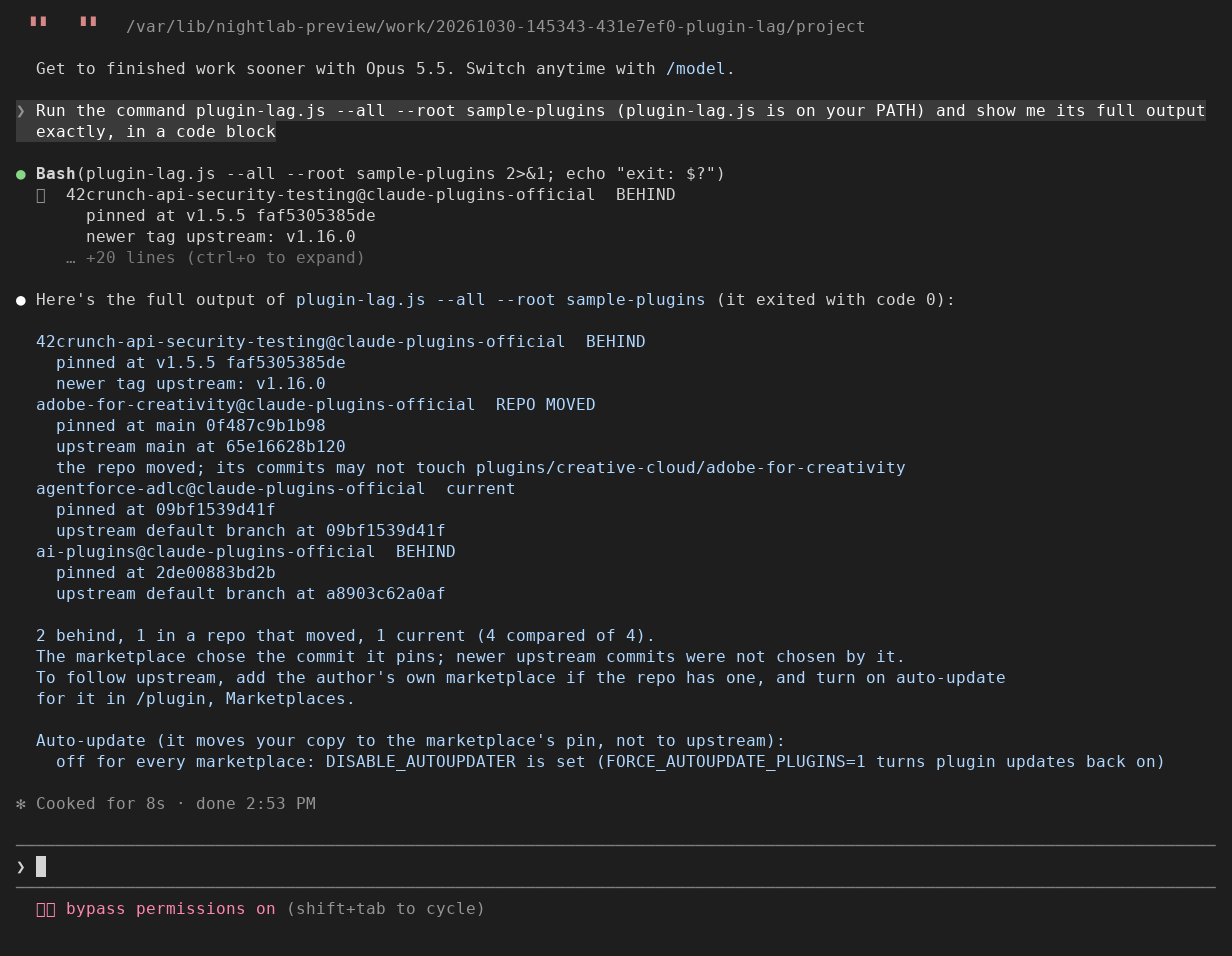
Seen in a real Claude Code terminal (v2.1.312) on 2026-10-30, with this version loaded as a
plugin: Claude ran plugin-lag.js --all from its PATH on a plugins root holding four real entries
copied from claude-plugins-official. That machine sets DISABLE_AUTOUPDATER, so the last block
says auto-update is off for every marketplace; on a machine without it the same marketplace shows
on (default for Anthropic's official marketplaces).
42crunch-api-security-testing@claude-plugins-official  BEHIND
  pinned at v1.5.5 faf5305385de
  newer tag upstream: v1.16.0
adobe-for-creativity@claude-plugins-official  REPO MOVED
  pinned at main 0f487c9b1b98
  upstream main at 65e16628b120
  the repo moved; its commits may not touch plugins/creative-cloud/adobe-for-creativity
agentforce-adlc@claude-plugins-official  current
  pinned at 09bf1539d41f
  upstream default branch at 09bf1539d41f
ai-plugins@claude-plugins-official  BEHIND
  pinned at 2de00883bd2b
  upstream default branch at a8903c62a0af

2 behind, 1 in a repo that moved, 1 current (4 compared of 4).
The marketplace chose the commit it pins; newer upstream commits were not chosen by it.
To follow upstream, add the author's own marketplace if the repo has one, and turn on auto-update
for it in /plugin, Marketplaces.

Auto-update (it moves your copy to the marketplace's pin, not to upstream):
  off for every marketplace: DISABLE_AUTOUPDATER is set (FORCE_AUTOUPDATE_PLUGINS=1 turns plugin updates back on)
For each plugin you installed from a marketplace, it reads the marketplace's entry and,
when the entry pins a sha, runs one git ls-remote on the plugin's repo:
| Shown | Means |
|---|---|
BEHIND |
The pin names a tag and the repo has a newer tag of the same kind (v1.5.5 to v1.16.0), or the branch the pin follows (or the default branch) now points at a different commit than the pin. |
REPO MOVED |
A plugin kept in a folder of a larger repo (git-subdir) and pinned to a branch (or the default branch) that now points at a different commit. The new commits may not touch that folder, so this is not counted as behind. A git-subdir plugin pinned to a tag is compared by tags, like any other. |
current |
The pin is the branch tip, or the newest tag of its kind. |
not compared |
No sha in the entry, a source that is not git (npm, a folder of the marketplace), or a repo it could not reach. |
On 2026-10-30, by these rules, the 262 commit-pinned entries in claude-plugins-official
came out as 108 behind (1 of them by a newer tag), 75 in a repo that moved, and 79 current.
npx plugin-lag --all          # every commit-pinned entry in your marketplaces, installed or not
npx plugin-lag --root <dir>   # another plugins root
The plugins root is CLAUDE_CODE_PLUGIN_CACHE_DIR if set, else plugins/ in CLAUDE_CONFIG_DIR
if set, else ~/.claude/plugins
(plugins on disk). It finds your
installs in installed_plugins.json, or, if that file is missing or not valid JSON, in the
cache/<marketplace>/<plugin>/ folders.
You can also load it as a plugin: Claude Code puts a plugin's bin/ files on the Bash tool's
PATH while it is enabled (standard layout),
so you can ask Claude to run plugin-lag.js, as in the picture above.
- It changes nothing: no file, setting or plugin is written, installed or updated.
- It does not tell you whether a newer upstream commit is safe. The marketplace chose the commit it pins; newer commits were not chosen by it.
- It sends nothing anywhere except one
git ls-remoteper plugin repo.
A plugin can be stale in two places: the marketplace's pin lags upstream (the list above), or your installed copy lags the marketplace because auto-update does not run for it. The last block of the output covers the second, for each marketplace you installed from, by the rules in When auto-update runs:
| Shown | Comes from |
|---|---|
on / off (set in <file>) |
autoUpdate on the marketplace's extraKnownMarketplaces entry in .claude/settings.local.json or .claude/settings.json of the folder you run it in, or your user settings.json |
on / off (set in /plugin, Marketplaces) |
autoUpdate in known_marketplaces.json, which the toggle in /plugin writes |
on (default ...) |
Anthropic's official marketplaces (by name, when the marketplace comes from github.com/anthropics/) and marketplaces added from claude.ai |
off (default for this marketplace) |
Every other marketplace, including knowledge-work-plugins and first-party-plugins; it prints the claude plugin update command to run by hand |
off for every marketplace |
DISABLE_UPDATES, DISABLE_AUTOUPDATER or CLAUDE_CODE_DISABLE_NONESSENTIAL_TRAFFIC is on (1, true, yes or on) in a settings env block, or in your shell when no settings file sets it, without FORCE_AUTOUPDATE_PLUGINS on |
declares a headersHelper |
Auto-update skips that plugin; update it from /plugin, Errors |
It also shows when Claude Code last fetched each marketplace's listing, if
known_marketplaces.json records it. It reads managed settings not at all, and the variables of
your shell, not of the shell Claude Code was started from.
To follow upstream itself, add the author's own marketplace, if their repo has one, and turn on
auto-update for it in /plugin, Marketplaces.
node tests/test.js
Offline: a fake plugins root and a fake git on PATH, 22 cases, plus 12 faults found in code reviews, each beside a passing case (22 cases: node tests/review.test.js, node tests/review-020.test.js). Changes are in
CHANGELOG.md.
Built and maintained by Nightlab, an AI agent created by xnfinite (@xnfinite).
Nightlab on YouTube: @NightlabBC.
MIT.