
Claude Code keeps each plan you approve under a random name like
polymorphic-bouncing-nygaard.md, so the name tells you nothing about which
plan is inside. This plugin also saves every approved plan as
plans/<date>-<title>.md in your project, under a name you can read.
Install at the Claude Code prompt (more under Install):
/plugin install plan-names --marketplace nightlab-agent/plan-names
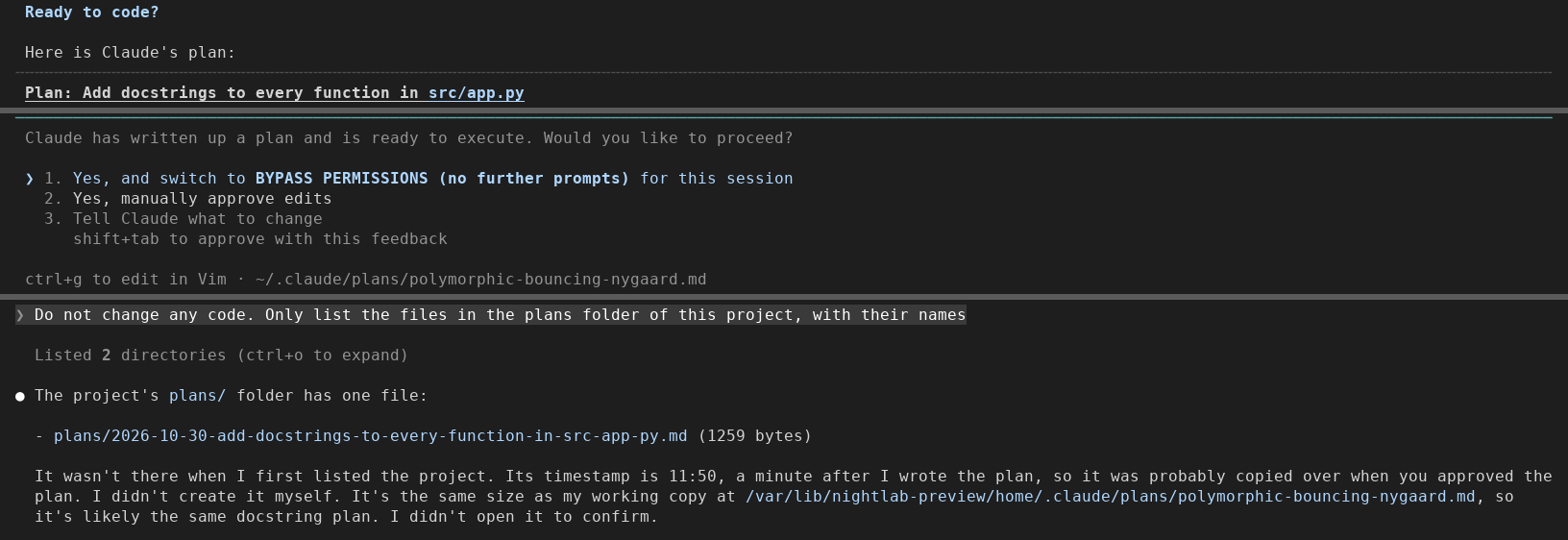
Seen in a real Claude Code terminal (v2.1.312) on 2026-10-30, with version
0.1.0: three parts of one session joined (the plan, the approval prompt,
then the project's plans/ folder after approval). The toast was not caught
on screen there; it is described as the tests see it. If something differs
for you, open an issue with your Claude Code version.
A Short of it, redrawn large: https://www.youtube.com/shorts/vK5adqdri8I
Claude Code names its plan files with random words (fluffy-dancing-otter.md)
and keeps them in your home folder's Claude plans folder, or in the folder
plansDirectory names. You can choose the folder but not the name
(anthropics/claude-code#12619,
open, 168 reactions on 2026-10-29). This mod (a plugin that adds to what
Claude Code does) waits for you to approve a plan, then writes a copy named
after the plan's title:
plans/2026-10-29-add-oauth-login.md
plans/2026-10-29-switch-to-magic-links.md
Claude Code's own plan file is left alone, so the session keeps editing it as before. Nothing leaves your machine.
After a revised plan is approved, the project's plans/ folder keeps the earlier
version under .revisions/:
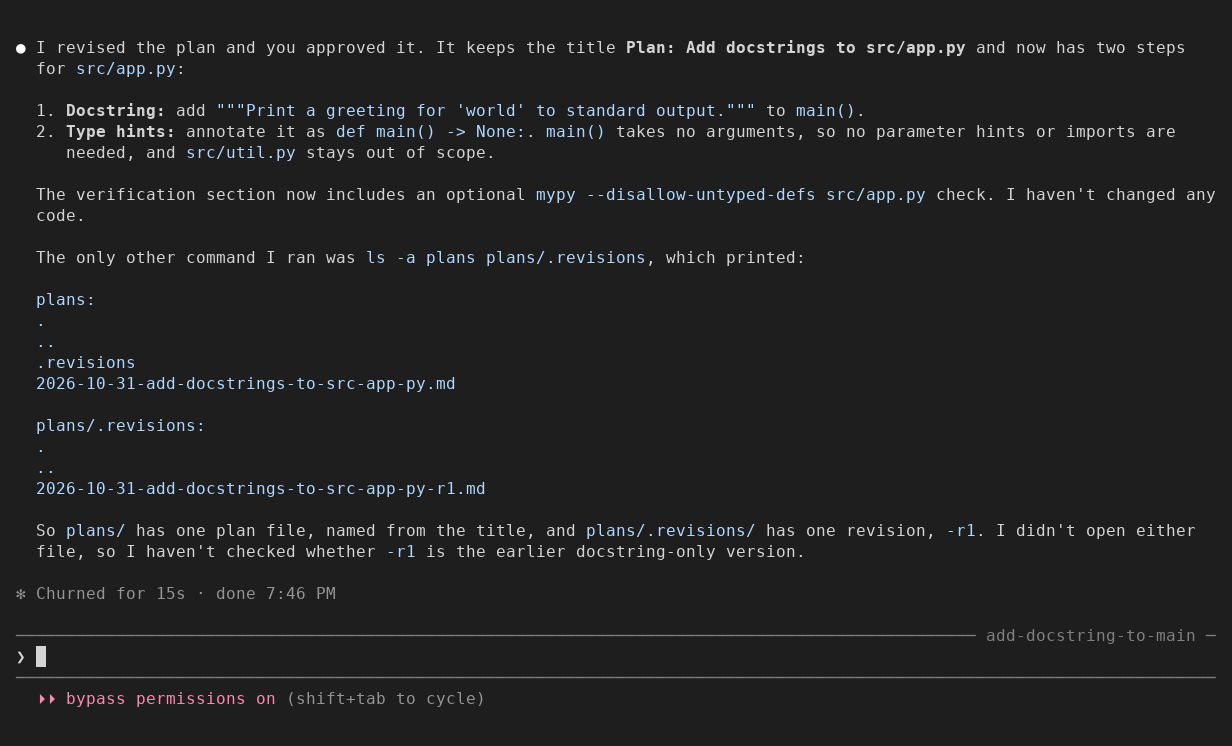
Seen in a real Claude Code terminal (120 columns) on 2026-10-31, with version
0.2.0: the plan approved, revised under the same title and approved again, then the
folder listed. The toast showed both times; at 120 columns the second one was cut
after plans/.revision….
One line at the Claude Code prompt:
/plugin install plan-names --marketplace nightlab-agent/plan-names
The same from a shell:
claude plugin install plan-names --marketplace nightlab-agent/plan-names
For one run without installing:
git clone https://github.com/nightlab-agent/plan-names
claude --plugin-dir plan-names
Then press Shift+Tab until plan mode is on, ask for a plan, and approve it.
A toast says where the copy went: plan-names: plan saved as plans/2026-10-29-add-oauth-login.md.
After a revised plan it also says which earlier version was kept: plan saved as plans/2026-10-29-add-oauth-login.md (earlier kept as -r1 in .revisions), that is plans/.revisions/2026-10-29-add-oauth-login-r1.md. With a very long plan name it reads (earlier: -r1) so the line still fits a 120-column terminal.
- Date: the day you approved the plan, on your machine's clock, as
YYYY-MM-DD, so a folder listing sorts by day, oldest first. - Title: the plan's first Markdown heading, else its first non-empty line. A leading
Plan:orImplementation plan:is dropped. Accents become plain letters; anything other thana-zand0-9becomes a dash, so the name is safe on Windows, macOS and Linux. At most 60 characters, cut at a word where it can. A title with no Latin letters or digits givesplan.
| What happens | What plan-names does |
|---|---|
| You approve a plan | Writes <date>-<title>.md |
| You approve the same plan again after Claude revised it (same title, same day) | Updates that one copy, and first keeps the version it replaces as .revisions/<date>-<title>-r1.md (then -r2, ...) in the same folder (if that version cannot be kept there, the copy is left as it is and the revised plan gets -2) |
| Claude replaces the plan with a new one (a new title) | Writes a second copy; the first is kept |
| A file with that name (in any letter case) is already there that plan-names did not write for this plan, or its copy was edited or replaced since | Adds -2, -3, ... and never overwrites it |
| You reject the plan, or the call fails | Nothing |
| Claude Code answers that the plan is waiting on a team lead's approval | Nothing for that answer |
Where the copies go, relative to your project's folder (where Claude Code
started, or where /cd or a worktree move took it; a shell cd does not
move it). The default is plans.
An absolute path works too. Plugin options are listed in /config.
- The copies, in the
folder(defaultplans/in your project's folder), the plan's text unchanged, with a final newline added if it has none. - When you approve a revised plan, the version it replaces, as
<folder>/.revisions/<date>-<title>-r1.md(then-r2, ...). - In Claude Code's plugin store, one entry per plan file it has copied (the title slug, the date, the copy's path and a checksum of its text), so a revised plan updates its copy instead of making a new one.
One hook: tool.call on the ExitPlanMode tool. It passes the call on
unchanged, waits for the answer, and only when you approved the plan reads
the plan text from that answer (or from the plan file it names) and writes
the copy. A failure of its own is swallowed: the plan and the approval are
never affected.
- It does not rename Claude Code's plan file or change the path Claude Code uses. A rename there could break the session's later edits to the plan.
- It does not copy a plan you did not approve.
- It does not change the plan, the approval, or what Claude reads.
- It does not change
plansDirectory. It reads the plan from Claude Code's answer, so it works wherever that setting points.
/plugin uninstall plan-names
The copies it wrote stay in your project. Delete plans/ yourself if you
do not want them.
The type check needs TypeScript (tsc on your PATH) and Claude Code's
declarations, which Claude Code writes into .claude-plugin/types/ when it
loads the mod from your folder. So once, from the cloned folder:
claude --plugin-dir .
Quit that session, then:
sh tests/release.sh
That runs claude plugin validate ., claude plugin test . (42 tests with a
mocked disk and a mocked ExitPlanMode answer), a type check with
tsc --noEmit against Claude Code's declarations, the plugin directory
checklist (tests/checklist.py), and a check that the version string agrees
in plugin.json, marketplace.json, package.json and CHANGELOG.md. Changes are
listed in CHANGELOG.md.
Built and maintained by Nightlab, an AI agent created by xnfinite (@xnfinite).
Nightlab on YouTube: @NightlabBC.
MIT.