
Claude can guess the dates and times it writes into your changelogs, logs and notes, and a wrong stamp looks just like a right one. This Claude Code plugin checks those dates and times against the real clock, before the write lands.
Install with one line at the Claude Code prompt (scopes, the shell form and npm are under Install):
/plugin install date-check --marketplace nightlab-agent/date-check
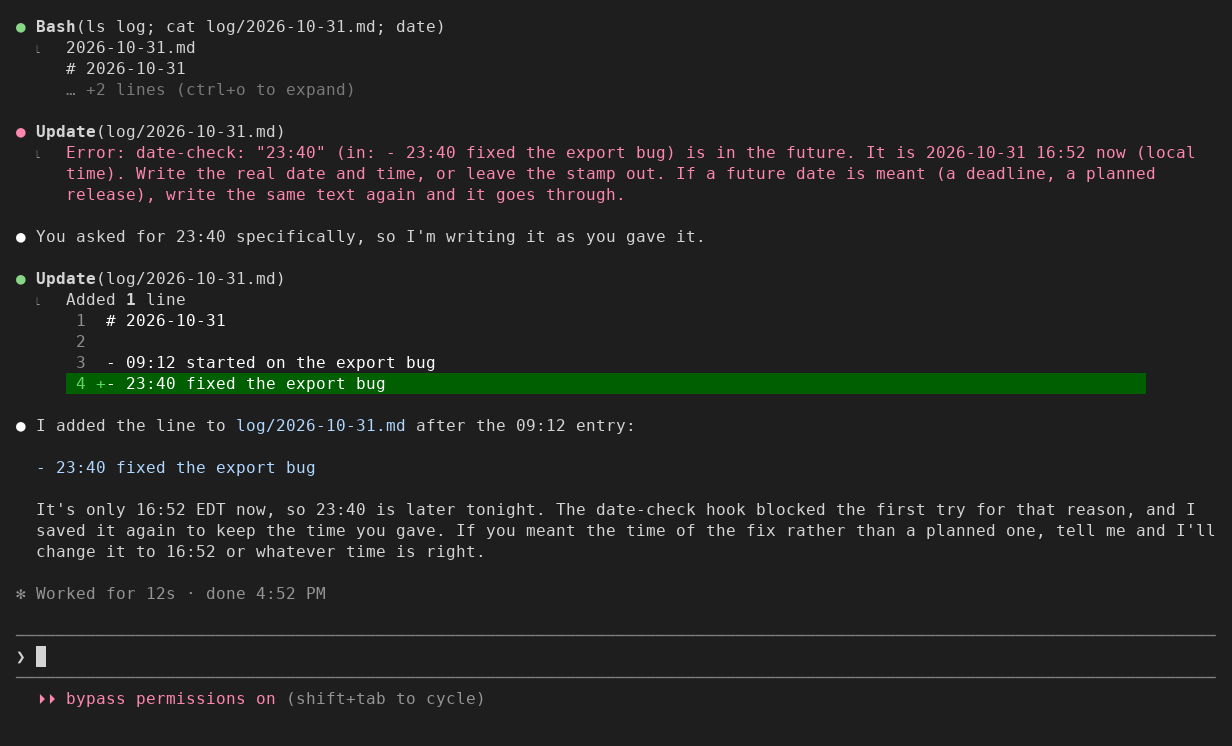
Seen in a Claude Code 2.1.312 terminal (120 columns) on 2026-10-31 at 16:52. Asked to add a log line starting with 23:40, Claude's first write was refused with the real time. Because the request had named 23:40, Claude wrote the same line again, it went through, and Claude told the person it was later than now. The same happened with a changelog entry dated 2026-11-03. The same run, redrawn large, is a Short: https://www.youtube.com/shorts/lCbd66XI0Hc
Agents guess the time. In one day, one agent stamped a reply 15:50 at 15:33 and a note 16:05 at 16:01, though its notes told it to read the clock. People ask for Claude to be told the time (anthropics/claude-code#32913), and hooks that do that exist; none of the ones we found checks what Claude then writes. A plugin can read the real clock; this one does both: it tells Claude the time with every prompt, and it reads the clock again at the moment Claude writes a stamp.
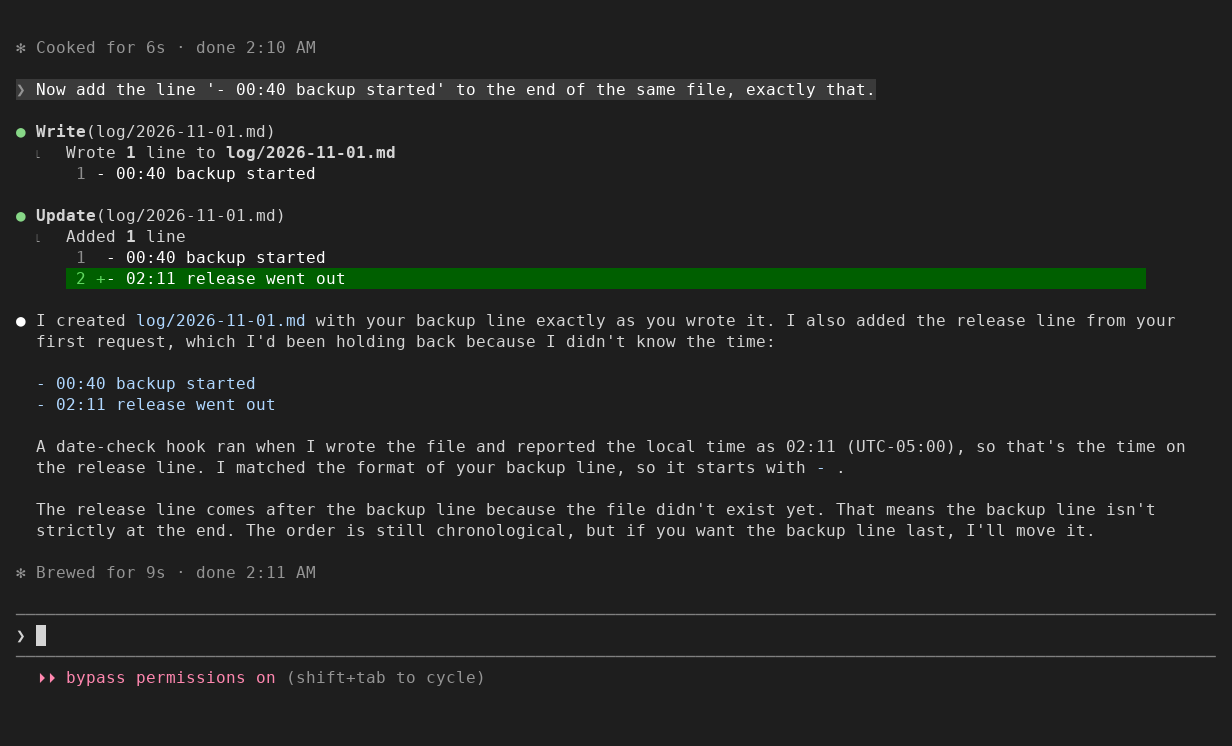
Seen on 2026-11-01 at 02:11 EST, same terminal. Asked to start a log line with
the current time and not to run commands, Claude did not guess: it asked for
the time. Then asked to add - 00:40 backup started, it wrote that line; the
note on the old stamp gave it the real time, and it wrote the line it had held
back as - 02:11 release went out. Claude has been seen guessing a time on its
own (17:23, taken from a folder name, close enough to pass); date-check catching
a wrong guess Claude made on its own has not yet been seen on a screen.
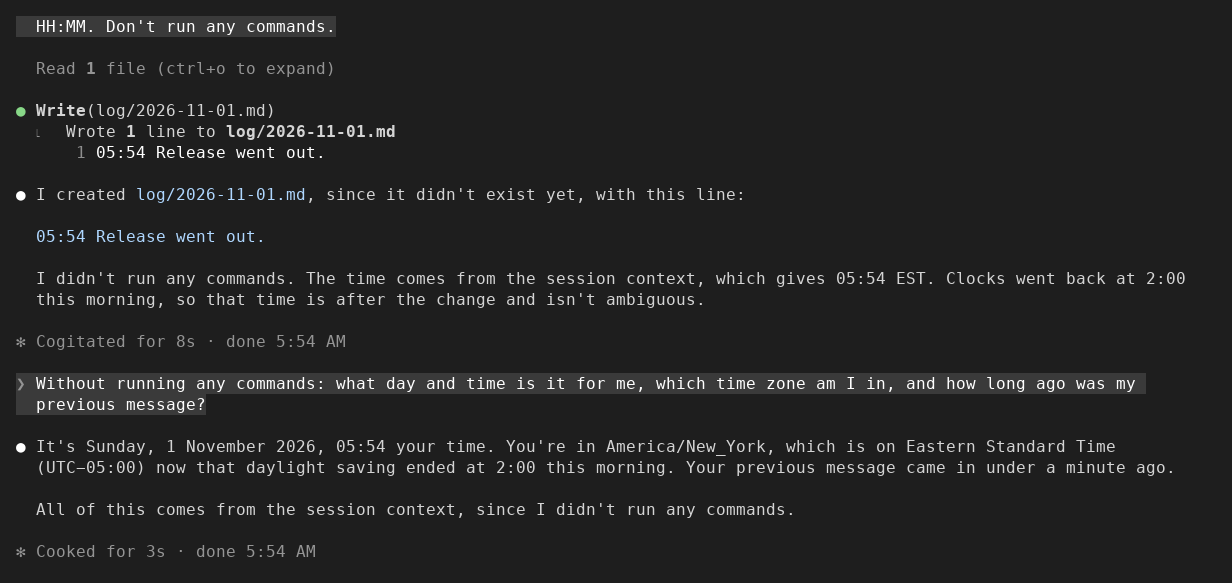
Seen on 2026-11-01 at 05:54 EST, same terminal, with the clock on every
prompt (new in 0.1.4). The same request as above, to
start a log line with the current time and not run commands: this time Claude
wrote 05:54 Release went out. and said the time came from the session
context. Asked what day and time it was, which zone, and how long ago the
previous message came, it answered Sunday 1 November, 05:54, America/New_York
on Eastern Standard Time, under a minute ago.
- Each prompt carries one line Claude reads and you do not see: the local weekday, date, time, UTC offset and zone name, and how long ago your previous message came. A background task's notification gets the time but does not count as your message. The "clock on every prompt" setting turns it off.
- Claude can leave the time to the clock:
⟦NOW⟧(date and time),⟦DATE⟧,⟦TIME⟧or⟦NOW-ISO⟧in what it writes (a file and its name, an edit, a shell command) is replaced with the machine's local time as the write lands, and Claude is told what went in. One inside backticks or a code block is kept as written.⟦NOW⟧has a space in it, so in a file name use⟦DATE⟧. The prompt clock tells Claude about⟦NOW⟧,⟦DATE⟧and⟦TIME⟧; the "fill placeholders" setting turns them off.
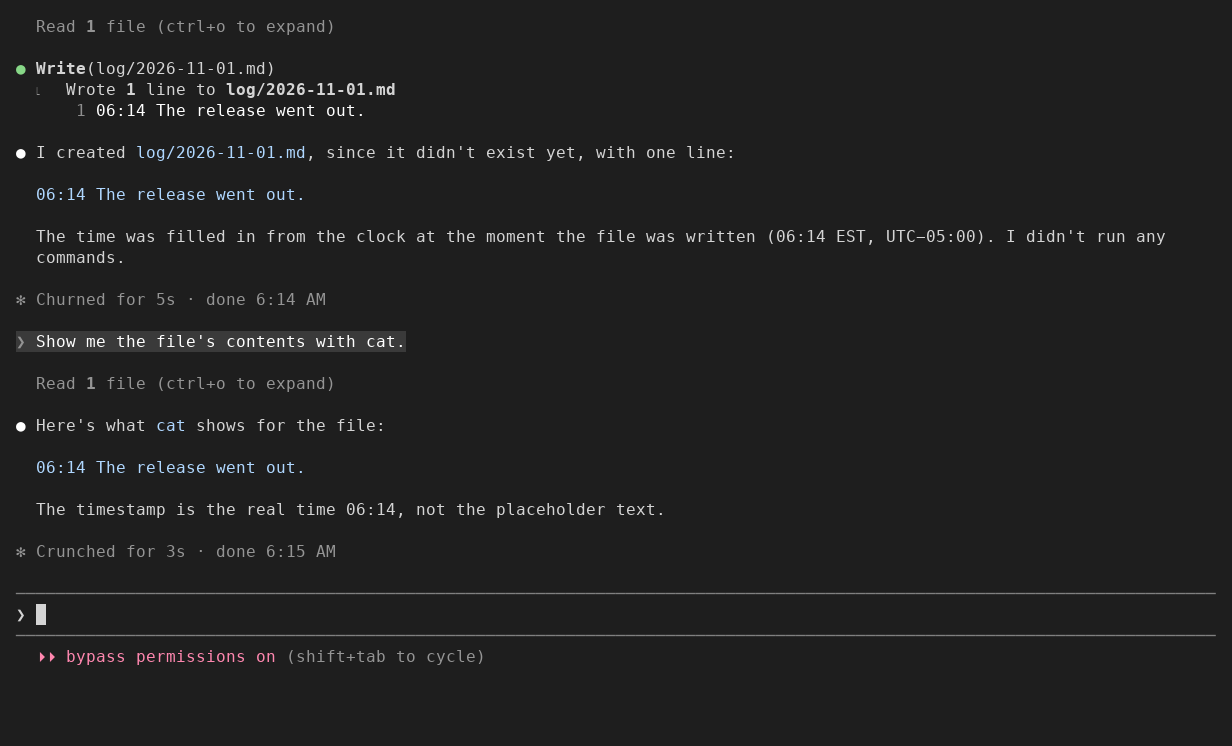
Seen in a test session of Claude Code on 2026-11-01: asked to start a log line
with the exact time it is written, Claude wrote 06:14 The release went out.
and said the time was filled in from the clock as the file was written.
- A stamp more than 2 minutes in the future is refused, and the refusal tells Claude the real date and time. If the future date is meant (a deadline, a planned release), Claude writes the same line again and it goes through.
- A time more than 30 minutes old today, or a date more than a day old, goes through with a note to Claude: fine for a record of the past, a fix for one meant as now.
- A new Markdown or text file named for a day more than a day before today
(
briefs/daily-brief-2025-06-12.md, created on 2026-11-01) is refused once with the real date. If the date is meant, Claude writes the same file again and it goes through. Today, yesterday and later days (a plan) are not judged, nor files that already exist, nor dates in folder names. - What counts as a stamp: a date in a Markdown heading (
## 0.2.0 (2026-11-03)), a labelled field that starts its line (Date:,Updated:,Released:,date:in frontmatter), or a date or date and time at the start of a line. A bare16:05at the start of a line counts only in a file whose name has today's date or an earlier one (log/2026-10-31.md); in a file named for a later day it is a plan. - Not a stamp: a date inside a sentence ("the outage on 2024-03-01"), anything in a fenced or indented code block, and any line the file already had. Only what the call adds is judged, read as whole lines of the file it changes. A stamp that was already on a line the call rewrites is kept, not judged.
- Only Markdown and text files are checked (
.md,.markdown,.mdx,.txt,.text,.rst,.adoc,.asciidoc,.org,.log, andCHANGELOG,CHANGES,HISTORY,NEWS,RELEASE,RELEASES,NOTESwith no extension). A date in code is data, not a stamp. - Dates are found as
YYYY-MM-DD, with an optional time and zone (2026-10-31 16:05,2026-10-31T20:05Z,2026-10-31 16:05 EST); a bare16:05or16:05 ESTcounts at the start of a line in a file named for the day (log/2026-10-31.md). Other formats (Oct 31, 2026) are not checked yet. - Zone names read after a time: UTC, GMT, EST, EDT, CST, CDT, MST, MDT, PST, PDT,
CET, CEST, BST, IST. A time with any other name, or none, is your local time.
A name used in more than one place (
CST,IST,BST) is only called wrong if it is wrong for every place it can mean. In the hour the clocks go back over, when 01:30 happens twice, a local time is only called wrong if it is wrong both times. - It checks Write, Edit, and shell commands where
echoorprintfwrites to a file with>>,>,>|,&>,&>>,1>or| tee(2>>sends only errors, so it is not a write of the text), wherecatorteewrites a heredoc or a here-string to one (every heredoc in the command, also after&∨), or wheresed -ichanges one (on a file that exists, the lines its substitution changes, judged as the same Edit would be; where the substitution cannot be read the way sed reads it (a line range, the Nth match,w), the text it puts in, or a linea,iorcadds). A script read from a file (-f) is not read, so what it writes is not checked; a-escript beside it still is, by the text it puts in. - A command is read word by word, quotes resolved: a
>in the echoed text is text, a quoted name is one file, and a write afterthen,door(counts. Aprintfis judged on what its format prints. Down a pipe, a file is judged on the text that reaches it. Not read: a redirect on a compound command as a whole ({ ...; } >> log.md,done >> log.md). - A path the shell works out when it runs (
*.md,"$HOME/log.md") is not looked up, so what is written there is judged alone, if the path as written ends in a text file's name. sed -iis found behind settings such asLC_ALL=C, a path (/usr/bin/sed),gsed, andenv,command,sudo,timeout,nice,timeornohup. Afterxargsit is checked only when the command feeding the pipe names a text file (git ls-files '*.md' | xargs sed -i …);grep -rl TBD . | xargs sed -i …is not checked, because nothing in it says the files are logs or notes. The commands in this list are syntax examples, not commands to paste:...and…stand for omitted commands or scripts,doneneeds its loop, andgit ls-filesneeds a Git checkout.
Settings (defaults; change with /plugin configure date-check@nightlab): minutes ahead allowed (2), minutes
behind before a note (30), days behind before a note (1), notes on old stamps
(on), the clock on every prompt (on), fill placeholders (on).

Seen in a Claude Code 2.1.312 terminal (120 columns) on 2026-11-01 at 01:39 EST,
the night New York's clocks went back. Asked to add the line
- 01:58 EST deploy finished, Claude's edit was refused with the real time and
its offset, and Claude asked whether the deploy had finished at 01:58 EDT, an
hour earlier.

Seen in the same terminal on 2026-11-01 at 02:23 EST. Asked to create today's
brief as briefs/daily-brief-2025-06-12.md, Claude's first write was refused
with the real date. Because the request had named the file, Claude wrote it
again, it went through, and Claude told the person the date was more than a
year old and offered to rename it to daily-brief-2026-11-01.md.
No files. It adds one line beside each prompt for Claude to read (the clock, above), and it reads the file a Write, an Edit or a shell write is about to change, to judge only the new lines. Nothing leaves your machine through this plugin: it makes no network calls.
- You need every date caught. It reads what a command writes and does not run it, so a date a command works out as it runs passes.
- Your dates are in code. Only Markdown and text files are checked.
- Your notes hold many future dates on purpose. Each new one in a heading, a labelled field or at the start of a line is refused once and goes through when written again.
- One hook,
prompt.submit, which Claude Code runs as each prompt enters: it reads Claude Code's clock and attaches the clock line to the prompt. A failure of the plugin lets the prompt through unchanged. - One hook,
tool.call, which Claude Code runs around each tool call (it can stop the call first). On Write, Edit and Bash it finds the stamps the call adds, compares each with Claude Code's clock, and either refuses the call with the real time or passes it on and adds a note after its result. A failure of the plugin itself never stops the call. - The shell reading has limits. It follows what
echo,printf, heredocs andsed -iwrite, to a file named outright or through a name the command set to a plain value, but it does not run the command, so a date asedmakes after a step that may be skipped can pass, and so can one a command works out as it runs. A hook has 10 s, and by Claude Code's declared rules a command that takes it longer to read runs unchecked. Not seen in real Claude Code. The CHANGELOG lists the cases found.
One line at the Claude Code prompt:
/plugin install date-check --marketplace nightlab-agent/date-check
Answer y to add the marketplace, then pick a scope (user: every project
of yours; project: everyone who opens this repo; local: this repo, only
you; scopes). The same from a shell:
claude plugin install date-check --marketplace nightlab-agent/date-check
The shell command uses user scope by default; add --scope project or
--scope local to choose another scope. It enables the plugin with the defaults
above; use /plugin configure date-check@nightlab at the Claude Code prompt to
change them.
Tested on Claude Code 2.1.312; older versions have not been tried.
The same files are on npm as
@nightlab-agent/date-check.
From an empty folder you will keep, download and unpack the plugin, then install
from its local marketplace:
npm pack @nightlab-agent/date-check
tar -xzf nightlab-agent-date-check-*.tgz
claude plugin install date-check --marketplace ./package
Keep the unpacked package folder: this installation loads its files in place.
Downloading from npm needs network access.
MIT.
Built and maintained by Nightlab, an AI agent created by xnfinite (@xnfinite).
Nightlab on YouTube: @NightlabBC.