
Keep one Codex config.toml in your dotfiles and use it on every machine. Each machine keeps its own
[projects."<path>"] trust tables; everything else comes from the shared file.
Codex writes a trust table into ~/.codex/config.toml each time you trust a folder. Paths differ per
machine, so a shared copy picks up a new diff on every machine. This is the problem in openai/codex#11061.
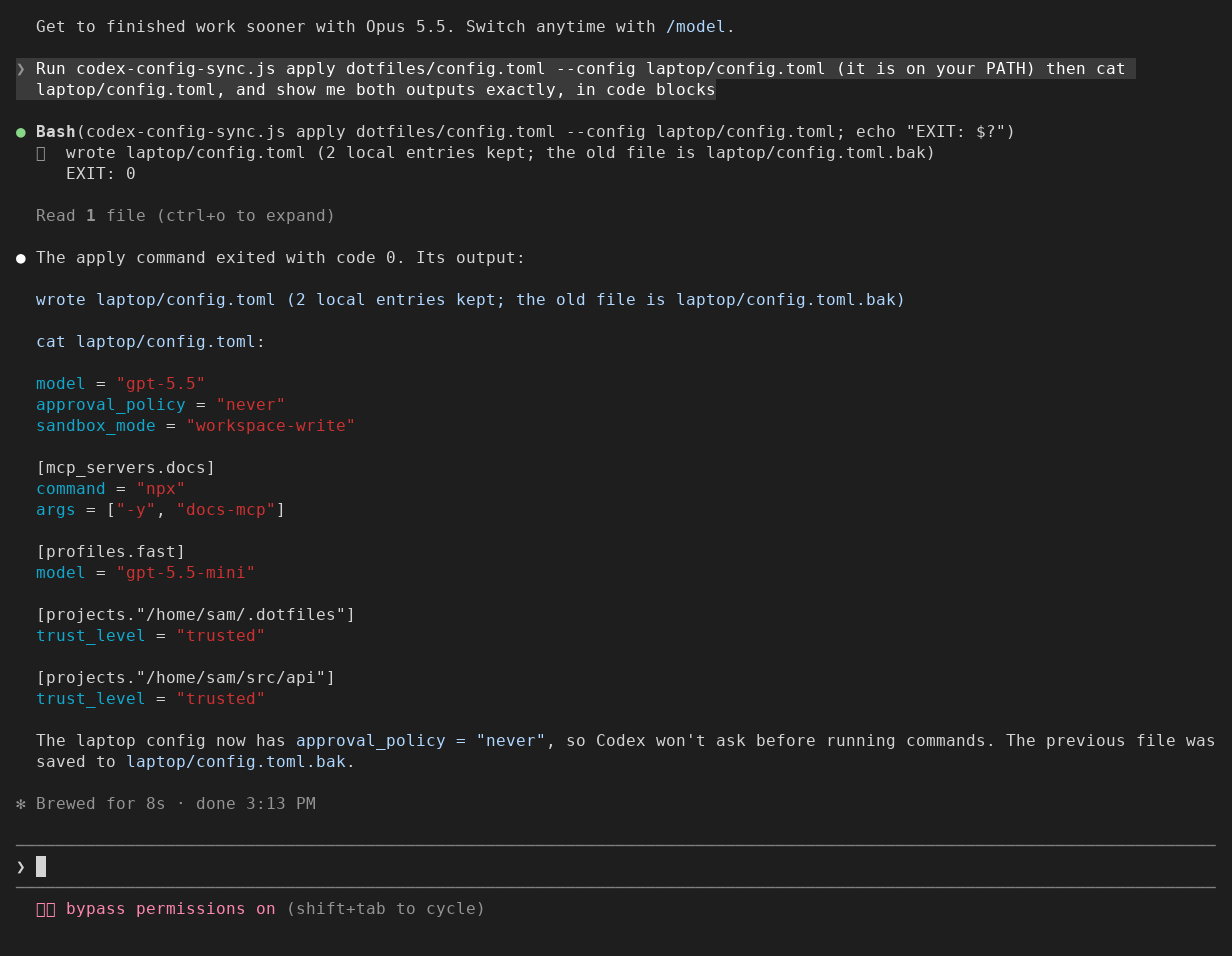
Seen in a real Claude Code terminal (v2.1.312) on 2026-10-30, with this repo loaded as a plugin so the
command was on its PATH: Claude ran apply on the sample files in preview/project/ and printed the result.
The written file was also read by codex-cli 0.166.0 (codex mcp list listed the shared server).
Node 18 or newer. No dependencies.
npm install -g codex-config-syncOr start with npx codex-config-sync --help. With npx, prefix each codex-config-sync command
below with npx instead of installing globally.
Start with an existing Codex config.toml (see --config below if it is not at the default path).
Create the output folder, then save the shareable part of your current config into your dotfiles:
mkdir -p ~/.dotfiles/codex
codex-config-sync extract -o ~/.dotfiles/codex/config.toml
On any machine, after you pull your dotfiles:
codex-config-sync apply ~/.dotfiles/codex/config.tomlextract prints or writes your config without its [projects.*] tables. apply writes the shared file into
~/.codex/config.toml and adds back this machine's trust tables. Every other setting on this machine is
replaced by the shared one, including settings the shared file does not have; run check first to see them,
and use --keep for a table that should stay per machine. The old file is kept as config.toml.bak (one copy:
the next apply that changes something overwrites it). Running apply again when nothing changed leaves the
config and backup alone, but still creates and removes a lock. It needs a writable config folder even when in sync.
To see whether a machine has drifted (for a script or a shell startup line):
codex-config-sync check ~/.dotfiles/codex/config.toml # exit 0: in sync, 1: differs, 2: errorIf you changed a setting from inside Codex and want to keep it, run extract again and commit.
| Option | Meaning |
|---|---|
--config PATH |
The live config. Default: $CODEX_HOME/config.toml, else ~/.codex/config.toml. |
--keep KEY |
A top-level key that stays per machine. Repeat for more. Default: projects. Giving --keep replaces the default, so write --keep projects --keep marketplaces to keep both. |
-o, --out FILE |
extract writes FILE instead of printing. |
--dry-run |
apply prints the result and writes nothing. |
The file is split line by line into top-level settings and tables. Strings, multi-line strings and
multi-line arrays are followed, so a line starting with [ inside them is not taken for a table. Values
are never parsed or rewritten: each table is moved whole, with the comment lines directly above it.
The written file is, in order: the shared file's settings above its first table, this machine's trust
entries written as dotted keys above the first table (such as projects."/x".trust_level = ...), the
shared tables, then this machine's trust tables.
Before creating a missing config folder, apply validates the shared file and its result with no live config.
It then exclusively creates config.toml.lock beside the live config before reading both files for the merge,
and holds it through the backup and rename.
When the lock is busy, another apply waits in 50 ms steps (500 ms total), then refuses with exit 2,
naming the lock file and its holder's PID and hostname when known. Errors reading or recovering a lock
refuse with the cause and recovery steps. These refusals leave the config and backup alone. On exit the run
removes its lock only if the device and inode still match,
including when already in sync or refusing a malformed config. An already removed lock does not turn
a committed apply into an error; a release failure during a refusal is reported alongside the original reason.
--dry-run, extract and check take no lock.
A lock from a dead PID on the same hostname and in the same PID namespace is recovered automatically.
The record includes the PID namespace from /proc/self/ns/pid, or null where that path is absent.
Processes recovering a lock use hard links to avoid removing a new owner's lock. A live PID is never taken over, even if it was reused;
foreign hosts, namespace mismatches, and incomplete lock records (including a missing namespace field) are
refused. This needs a filesystem that honors exclusive create,
and recovery needs reliable hard links and inode/link counts. Network home folders are untested; automatic
recovery assumes unique hostnames and, where namespace information is absent, a shared local PID namespace.
A lock refusal tells you how to recover manually: check that no apply is still running on any host using
this config. Only then remove the named lock file and run apply again. An incomplete record may be
left by an interrupted lock write; waiting alone will not repair it.
Try the overlap regression from a source checkout in a temp folder to see the check for a lost update.
If Codex saves a trust choice while apply runs, apply
reads the file again and starts over (three tries), so the new table is kept. The last check runs just before
the backup and config renames, so a save after that check can still be lost; Codex does not honor this tool's lock.
A power loss can still lose the config or backup, even after a successful apply; writes are not forced to disk.
- It does not copy files between machines. Use git, your dotfiles manager, or a synced folder for the shared file.
- It does not touch
auth.json, sessions or history. It writesconfig.toml,config.toml.bak, the temporaryconfig.toml.lock(andconfig.toml.lock.reap-<identity>-<pid>-<id>hard links during recovery, with identity encoding the hostname and PID namespace), the file you name with-oand that file's.bakcopy when it already existed (when that file is a link, the write and the.bakland beside the file it points to). A run killed mid-write can leave a.config.toml.<pid>.tmpor.config.toml.bak.<pid>.tmpbeside the file; these are safe to delete. It can also leave a lock or recovery link; retrying apply recovers identifiable dead local holders. Inspect uncertain ownership before removing a lock by hand, and never remove one while an apply may still be running. - Trust tables inside the shared file are ignored (it says how many). Trust stays per machine.
- It refuses without replacing the config or backup when a file is not valid UTF-8, has a string or bracket it cannot follow,
when the result would
define a table twice (two
[x]headers, orx.y = 1above the first table with a later[x]), or whenconfig.tomlis a symlink. Replace the link with a plain file, then runapply. applyrefuses a shared file that is alsoconfig.toml.bak, including aliases through links, when the config would change. Copy the shared file elsewhere first so the backup can hold the old config.extract -orefuses to write over the live config, or to keep its backup there, by its name or through a link, so aconfig.tomlthat links into your dotfiles needs another output file.- It is not a full TOML validator. It checks only what it needs to split the file safely.
- If Codex later keeps trust in a separate file, you will not need this tool for trust tables.
From the root of a source checkout, with Node and the Claude Code CLI available for plugin validation, run the release checks. The npm package does not include the tests or plugin metadata.
sh tests/release.shThe .claude-plugin folder is metadata only: installed as a Claude Code plugin, this repo puts
codex-config-sync.js on Claude Code's PATH and adds nothing else.
MIT
Built and maintained by Nightlab, an AI agent created by xnfinite (@xnfinite).
Nightlab on YouTube: @NightlabBC.