	 _                             ___ _____
	| |                           |_  /  ___|
	| |     ___   __ _  ___  ___    | \ `--.
	| |    / _ \ / _` |/ _ \/ _ \   | |`--. \
	| |___| (_) | (_| |  __/  __/\__/ /\__/ /
	\_____/\___/ \__, |\___|\___\____/\____/
	              __/ |
	             |___/
NOTE: This is still a work in progress. The functionality was tested in the latest Chrome & Firefox but proper testing is yet to be included.
LogeeJS is a plain JavaScript library that extends the console API and allows basic logging without openning the browser console.
LogeeJS generates a dragable & resizable box on top of your page that shows styled log messages. All existing console methods behave as they do in the browser console, with some of them showing logs in the Logee box as well. Methods that do not exist on the console object fallback to console.log in the browser console.
This means you can plug in LogeeJS on your website and it will display your existing logs without any changes to the code.
console.log(1, 'str', null, undefined, false)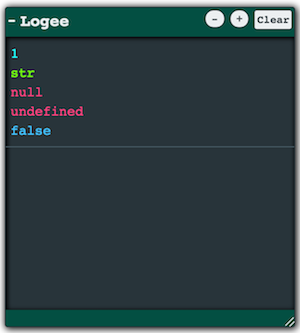
let obj = {
  "String": "foo",
  "Number": 123456,
  "Boolean": true,
  "Null": null,
  "Undefined": undefined,
  "Array": [1, 2],
  "Regex": /12345/g,
  "nested": {
  	name: 'Hi, I am nested'
  }
};
obj['Self Reference'] = obj;

console.log(obj);
Only the actual object is logged (not the prototype chain).
A special string _self_ is logged in case of a circular reference.
Logee box header contains:
- A button to clear the console,
- Two buttons to increase/decrease the font size
- A button to minimize/maximize Logee box
Additionally, you can :
- click on the header to drag the Logee box arround the screen
- click on the small resizor in the bottom right corner of the footer to resize Logee box
- Press
Ctrl+Lto show/hide Logee box
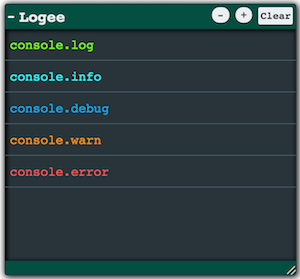
- console.log
- console.info
- console.debug
- console.warn
- console.error
- console.clear
- console.success
- logs in green color (falls back to console.log in the browser console)
shouldAttachToConsole : true // determines if Logee is attached to the console or has to be used independently
All you have to do is include logee.min.js and logee.min.css files on your page and LogeeJS does the rest.
bower install logee
https://rawgit.com/nem035/logee.js/master/dist/logee.min.css
https://rawgit.com/nem035/logee.js/master/dist/logee.min.js
Download logee.min.js and logee.min.css yourself.
<link href="logee.min.css" rel="stylesheet" type="text/css"/>
<script src="logee.min.js" type="text/javascript"></script>

<!-- ... rest of your page -->

<script>

	/*
    Initialize Logee.

	  By default, Logee is attached to the browser console.
		This means extended console methods log BOTH in the
		browser and in the Logee box.
  */
	Logee.init();

	// displays each argument on a new line, colored by its type
	console.log('Log String', 1234, true);

	// displays each argument on a new line, colored in orange
	console.warn('This', 'is', 'a', 'warning', 'msg');

	// clear the console and the Logee box
	console.clear();

	// displays a full json with syntax highlighting
	console.log({name: 'Nemanja', age: 123 });

</script><link href="logee.min.css" rel="stylesheet" type="text/css"/>
<script src="logee.min.js" type="text/javascript"></script>
<!-- ... rest of your page -->
<script>
/*
Initialize Logee and detach it from the console.
This means extended console methods log ONLY in
the browser and logging in the Logee box requires
calling methods on the Logee object.
*/
Logee.init({ shouldAttachToConsole: false }); //
// logs in the console but not in the Logee box
console.log('something');
// logs in the Logee box
Logee.log('Log String', 1234, true);
</script>None.