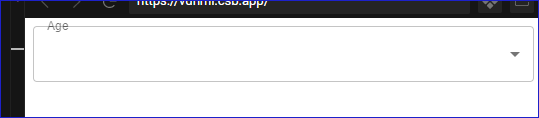
I am trying to use the Select component, however when I set the label to be shrinked by default, it has a strike though. It is not respecting labelWidth not label nor anything
Current Behavior 😯
When select label component is set to shrink by default, the line remains there instead of give space for the label.
Expected Behavior 🤔
If it is shrinked by default, it should not have the strike through
Steps to Reproduce 🕹
https://codesandbox.io/s/heuristic-kepler-vdhml?file=/src/App.js
Steps:
- Just open the codesandbox code and you will see the problem
Context 🔦
The design of the website demands that I have a label shrinked and a placeholder on the empty input
Your Environment 🌎
| Tech |
Version |
| Material-UI |
v4.11.0 |
| React |
16.13.1 |
| Browser |
Chrome |
| TypeScript |
no |

I am trying to use the Select component, however when I set the label to be shrinked by default, it has a strike though. It is not respecting
labelWidthnotlabelnor anythingCurrent Behavior 😯
When select label component is set to shrink by default, the line remains there instead of give space for the label.

Expected Behavior 🤔
If it is shrinked by default, it should not have the strike through
Steps to Reproduce 🕹
https://codesandbox.io/s/heuristic-kepler-vdhml?file=/src/App.js
Steps:
Context 🔦
The design of the website demands that I have a label shrinked and a placeholder on the empty input
Your Environment 🌎