
Background jobs, pub/sub messages and an in-process mediator for .NET 10, stored in the PostgreSQL or SQL Server database you already have.


Documentation · Getting started · Performance · Release notes
- One library, four kinds of work. Jobs, messages, requests and streams share one handler model and one pipeline.
- Jobs commit with your data. Warp writes to your EF Core
DbContext, so a job and the row it belongs to are saved together or not at all. There is no broker to run. - Light on the database. Jobs are claimed in batches and completed in batches (dispatcher mode, the default since 8.0): about 0.22 statements per job.
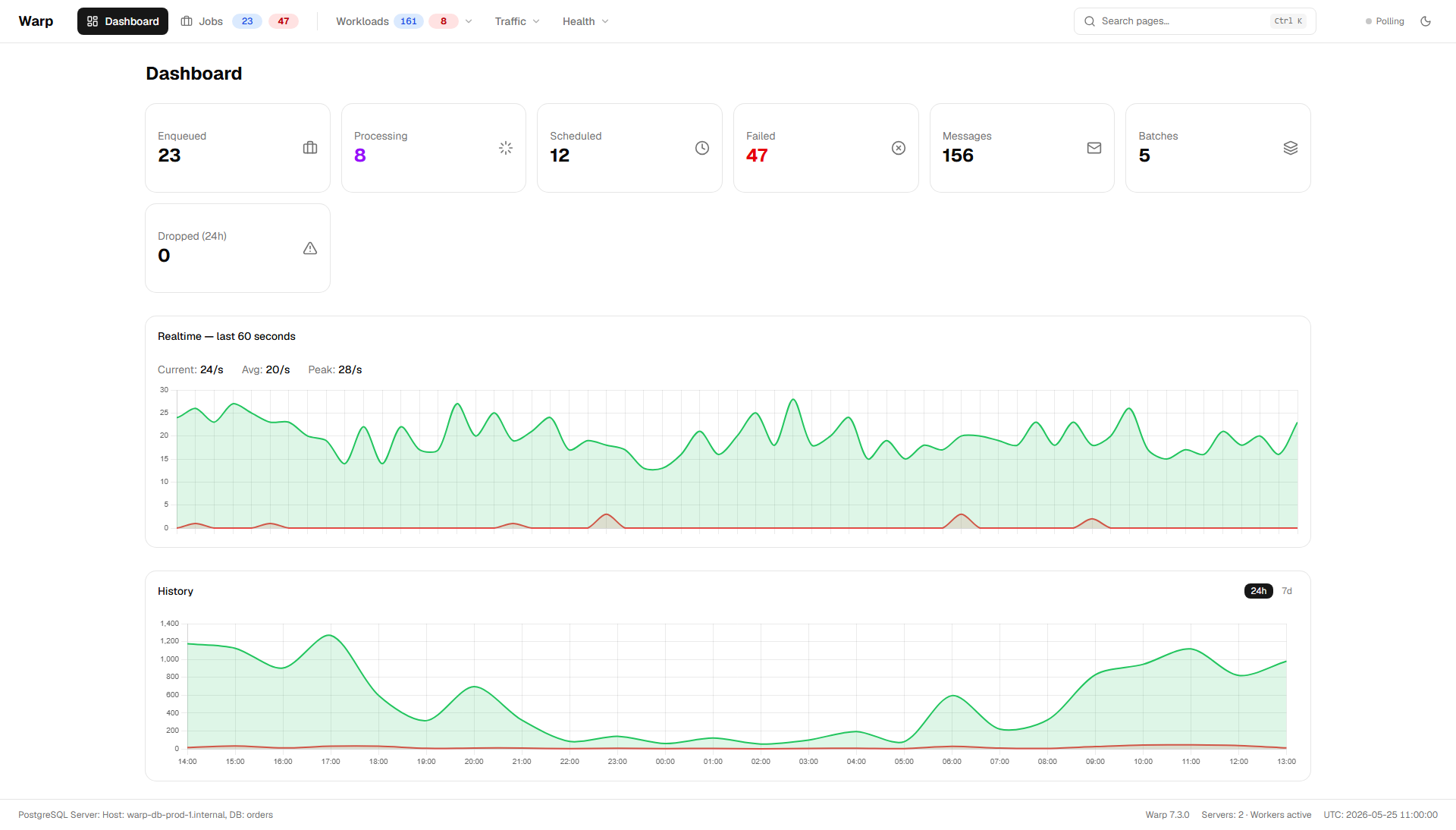
- A dashboard that explains what happened. State history, live handler logs, error groups, queue wait, SLOs and traces across jobs.
- Nothing to register. A source generator finds your handlers at build time and dispatches to them without reflection.
The same 20,000 jobs on the same PostgreSQL server, 1 server × 10 workers, Warp 8.0 against Hangfire 1.8 (median of 3 runs):
| Warp (dispatcher, default) | Warp (single-worker) | Hangfire | |
|---|---|---|---|
| Drain 20,000 empty jobs | 2.1 s | 11.2 s | 34.7 s |
| Drain 20,000 jobs that read and update a row | 5.3 s | 13.8 s | 36.4 s |
| Database statements per empty job | 0.22 | 7.03 | 40.03 |
| Database time per empty job | 0.061 ms | 0.726 ms | 3.444 ms |
| Memory allocated per empty job | 15.2 KB | 130.2 KB | 75.0 KB |
The harness is in src/benchmarks/Warp.Comparison and runs in the Comparison workflow. Setup, every measured row and the caveats are on the comparison page.
dotnet add package Moberg.Warp.Core
dotnet add package Moberg.Warp.Worker
dotnet add package Moberg.Warp.Provider.PostgreSql   # or Moberg.Warp.Provider.SqlServer
dotnet add package Moberg.Warp.Dashboardbuilder.Services.AddDbContext<AppDbContext>(o => o.UseNpgsql(connectionString));
builder.Services.AddWarpServer<AppDbContext>(opt =>
{
opt.UsePostgreSql(); // or opt.UseSqlServer()
opt.AddRetry(r => r.MaxRetries = 3);
});
var app = builder.Build();
app.MapWarpDashboard("/warp");
app.Run();Warp adds its tables to your DbContext model, in the warp schema. Create them with your normal migrations:
dotnet ef migrations add AddWarp
dotnet ef database update
A job commits in the same transaction as your data:
// The job commits in the same transaction as the order.
db.Orders.Add(order);
await publisher.Enqueue(new SendConfirmationEmail { OrderId = order.Id });
await db.SaveChangesAsync();

public class SendConfirmationEmailHandler(IEmailSender email) : IJobHandler<SendConfirmationEmail>
{
    public Task HandleAsync(SendConfirmationEmail job, CancellationToken ct) =>
        email.SendConfirmation(job.OrderId, ct);
}
Use AddWarp in place of AddWarpServer in a process that only publishes. The getting started guide covers the rest.
// Job: one handler, durable, retried
await publisher.Enqueue(new GenerateReport { Month = 3 });
await publisher.Schedule(new GenerateReport { Month = 3 }, DateTime.UtcNow.AddHours(1));

// Message: every handler runs as its own job
await publisher.Publish(new OrderCreated { OrderId = order.Id });

// Request: in-process, typed response, no database
var user = await mediator.Send(new GetUser { UserId = 1 });

// Stream: in-process IAsyncEnumerable
await foreach (var item in mediator.CreateStream(new GetUsers { Role = "Admin" })) { }| Pattern | Contract | Handler | Stored |
|---|---|---|---|
| Jobs | IJob |
IJobHandler<T> |
Yes |
| Messages | IMessage |
IMessageHandler<T>, any number |
Yes |
| Requests | IRequest<TResponse> |
IRequestHandler<T, TResponse> |
No |
| Streams | IStreamRequest<TResponse> |
IStreamRequestHandler<T, TResponse> |
No |
IPipelineBehavior<T, TResponse> wraps all four.
Jobs and workflows Transactional outbox · Recurring jobs · Batches and continuations · Named queues and worker groups · Sagas · Background services · Job metadata · Cancellation · Pause and resume
Flow control Retry · Mutex · Semaphore · Rate limit · Timeout · Circuit breaker · No-restart
Throughput and latency
Dispatcher mode and batched completions ·
Database push (LISTEN/NOTIFY, Service Broker) ·
Crash recovery
HTTP and integrations HTTP endpoints from handlers · Outbound call adapters · Durable webhooks
Observability Dashboard · Tracing across jobs · Error grouping · Queue wait and backlog · SLOs and error budgets · Custom metrics · Operational notifications · Multi-application view
app.MapWarpDashboard("/warp") serves a dashboard with each job's state history, live handler logs, error groups, queue wait, SLOs and traces across jobs. See the dashboard docs.
Use the same version for all of them.
| Package | Purpose |
|---|---|
Moberg.Warp.Core |
Publishing, the mediator, durable webhooks. Always required. |
Moberg.Warp.Worker |
The server: workers and background tasks. |
Moberg.Warp.Provider.PostgreSql |
PostgreSQL provider. |
Moberg.Warp.Provider.SqlServer |
SQL Server provider. |
Moberg.Warp.Dashboard |
The dashboard. |
Moberg.Warp.Http |
Expose request and stream handlers as HTTP endpoints. |
Moberg.Warp.Adapters.Http, Moberg.Warp.Adapters.Refit |
Observe and rate-limit outbound calls. |
Package ids are Moberg.Warp.*; namespaces are Warp.*.
Requires the .NET 10 SDK, and Docker for the database tests.
dotnet build src/Warp.slnx
dotnet test --project src/tests/Warp.Tests/Warp.Tests.csproj                                      # all, about 5 minutes
dotnet test --project src/tests/Warp.Tests/Warp.Tests.csproj -- --filter-trait "Category=NoDb"    # no database
cd src/ui && npm install && npm run dev                                                           # dashboard on :5173
The source is under src/core (libraries and providers), src/ui (dashboard), src/tests, src/benchmarks and src/demo. The docs site is in website/.
MIT. See LICENSE.