Width of secondary fonts (NerdFont Private) via FontChoice appear clipped #979
Description

Using a similar configuration as shown in the wiki Tips, I set the following:
Font=Cascadia Code
FontChoice=Private:3
Font3=SauceCodePro NF
CharNarrowing=50
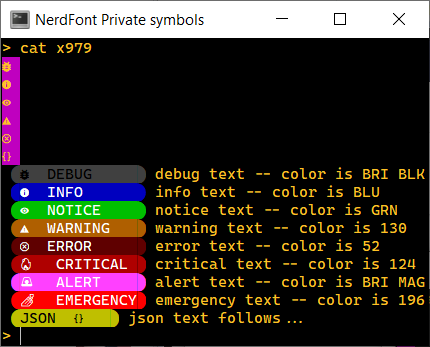
The Powerline Glyphs appear (mostly) correct. However, the NerdFont glyphs appear to be clipped regardless of the CharNarrowing value.

In this screenshot, the ovals (made from Powerline glyphs and bg/fg flipping) appear mostly correct (there's a slight line that appears on the right before the closing round glyph). However, the NerdFont symbols appear clipped. The symbols are:
- Debug:
f53e - Info:
f7fb - Notice:
f707 - Warn:
f525 - Error:
f65c - Json:
f668
This only occurs if the FontChoice is used. The following image is the same screen but FontChoice is not used and relies on the primary font to provide the NerdFont glyphs:

The rendering of the glpyhs look great in this context.
Activity
mintty commentedon Mar 26, 2020
Please provide a file (e.g. a screen log) that produces this with
cat.mintty commentedon Mar 26, 2020
Also, which font do you use? Precise download link please.
mintty commentedon Mar 26, 2020
??? The codes you listed do not produce the glyphs from your screenshot.
Please provide a consistent and reproducible report or I can only close the issue.
awkwong-whi commentedon Mar 27, 2020
This is the raw output (gzipped).
raw.out.gz
The fonts I use:
Cascadia Codeinstalled usingCascadia.ttfCascadia Code PLinstalled usingCascadiaPL.ttfSauceCodePro NF(Regular) installed usingSauce Code Pro Nerd Font Complete Windows Compatible.ttfIt seems to do with with any of the NerdFonts for me.
The NF glyphs:
ef 97 a3-->f5e3nf-mdi-bug (sorry, i mistyped above)ef 9f bb-->f7fbnf-mdi-informationef 9c 87-->f707nf-mdi-eyeef 94 a5-->f525nf-mdi-alertef 99 9c-->f65cnf-mdi-close_octogonef 99 a8-->f668nf-mdi-jsonawkwong-whi commentedon Mar 27, 2020
I discovered that if I use the "Mono" version it seems to be much happier when used as a secondary.
mintty commentedon Mar 27, 2020
With your fonts and your config, I get this:
awkwong-whi commentedon Mar 30, 2020
If the secondary font uses the NerdFonts non-mono (which means the Private Glyphs are not all forced into single width -- and in the case of those selected glyphs, they are wider than one cell), clipping will occur.
If we use
Font=Cascadia Codeas the Primary Font, andFont3=CascaydiaCove NFwithFontChoice=Private:3as the example:Caskaydia Cove Regular Nerd Font Complete Mono Windows Compatible.ttfCascaydia Cove Regular Nerd Font Complete Windows Compatible.ttfIf we use
Font=CascaydiaCove NFand do not useFontChoice:Cascaydia Cove Regular Nerd Font Complete Mono Windows Compatible.ttfCascaydia Cove Regular Nerd Font Complete Windows Compatible.ttfmintty commentedon Mar 30, 2020
With this configuration:
I do not see the first 5 characters (DEBUG...ERROR) at all. While puzzling at the first glance, it sheds more light on the issue: Using the glyph checking escape sequence OSC 7771, it is revealed that the font used for them actually does not contain the glyphs. This means that in some environment, for the display of those characters some other font is used as determined by the Windows font fallback mechanism. In that case, mintty has no control about the font width anymore.
mintty commentedon Mar 30, 2020
There seems to be some confusion about the font and its precise name. I had misspelled above, font name is with "k" and then the glyphs are shown, but not clipped.
I yet have to see a precise configuration, with precise font references, that reproduces an issue.
awkwong-whi commentedon Mar 31, 2020
Lets try the following:
Primary Font is the reference Cascadia Code (as provided by Microsoft) -- to which the Powerline glyphs are not present. Lets use this one:
Cascadia CodeFor Font3, let us use the most recent patched font with large glyphs from nerd-fonts github here:
CaskaydiaCove NFcadis changed tokayd, andCodeis changed toCoveNFThis should then make this configuration reproduce the issue:
mintty commentedon Mar 31, 2020
With this setting, I see:

awkwong-whi commentedon Mar 31, 2020
Do you have "Caskaydia Cove Regular Nerd Font Complete Mono Windows Compatible.ttf" installed,
or "Caskaydia Cove Regular Nerd Font Complete Windows Compatible.ttf" installed?
The one with
Monohas all glyphs forced into a monospaced cell width.The one without the mono has large glyphs.
I've been using Windows 10 "Font settings" to verify which font files are referenced.
mintty commentedon Apr 1, 2020
OK, I seem to have had an issue with font management; installing over a previous font with the same name did not succeed (or I should have rebooted to clear Windows font caches, whatever). It's also not helpful that this nerdy font project publishes font variations with identical names...
Issue reproduced.
Currently, private characters are explicitly excluded from the auto-narrowing heuristics (CharNarrowing=50). To be checked.
awkwong-whi commentedon Apr 1, 2020
I absolutely agree. That part is rather frustrating.
mintty commentedon Apr 1, 2020
You can actually work around this issue with setting
Charwidth=ambig-wide.20 remaining items
BrianInglis commentedon Apr 14, 2020
Might be good to run any OSC esc seq ideas past Thomas Dickey to discuss if similar functionality already exists or where it would best fit architecturally, and thoughts on supporting non-standard fonts' charsets.
Maybe also @ryanoasis about support of and possibly migration to alternative standard codepoints in PUA in their scripts.
mintty commentedon Apr 14, 2020
Non-standard charsets outside the Unicode Private ranges should and shall not be supported.
Considering that Nerdfonts captures existing Unicode ranges actually reduces my motivation to support their peculiarities beyond the Powerline geometrics which raise issues for many people.
Apart from defining specific ranges, I could also imagine a character attribute that would simply make any character wide or narrow. About escape sequences, I've checked EMCA-48 and there are a few sequences already that might be applicable for such a purpose, for example PEC Presentation Expand Or Contract (CSI Ps SP Z).
awkwong-whi commentedon Apr 15, 2020
I'll re-run the scan ignoring the 2%.
mintty commentedon Apr 15, 2020
Two notes about the newer list:
fix previous Powerline tweak (#979)
character attribute to enforce single/double width (#615, #979, #938, #…
experiments for triple-width support (incomplete, not enabled; #553, #…
mintty commentedon May 20, 2020
Released 3.1.5 with explicit character width attribute support.
speedup of width detection for auto-narrowing for certain characters (#…
visual double-width of symbols and emojis with subsequent space (#1104,
mintty commentedon Sep 3, 2021
Released 3.5.1.
fix and enable rendering for geometric Powerline symbols (#979, #943)
mintty commentedon Sep 17, 2024
Released 3.7.5.
Merge commit from f8a6c4d