Repository navigation
Garbled characters when importing multiple folders into the workspace #85870

Description

Issue Type: Bug
Directly importing folders with Chinese names is normal. However, if I first import a folder with an English name (e.g. D: \ npMingw \ mingw), and then import a folder with a Chinese name (e.g. D: \ Data \测试), the import with a Chinese name will fail. The name of the folder in the workspace becomes garbled code, and prompts "Can not resolve workspace folder"
VS Code version: Code 1.40.2 (f359dd6, 2019-11-25T14:54:45.096Z)
OS version: Windows_NT x64 10.0.17134
Extensions (4)
| Extension | Author (truncated) | Version |
|---|---|---|
| vscode-language-pack-zh-hans | MS- | 1.40.2 |
| cpptools | ms- | 0.26.1 |
| vscode-code-runner | wan | 0.9.6 |
| material-theme | zhu | 3.1.2 |
(4 theme extensions excluded)
Activity
sandy081 commentedon Dec 1, 2019
Can you please open the workspace configuration file and see the entry that is corresponding to the folder
测试. You can use the commandOpen Workspace Configuration Fileto open it.rihalvnium76 commentedon Dec 1, 2019
The configuration file can be opened, but it displays garbled characters.
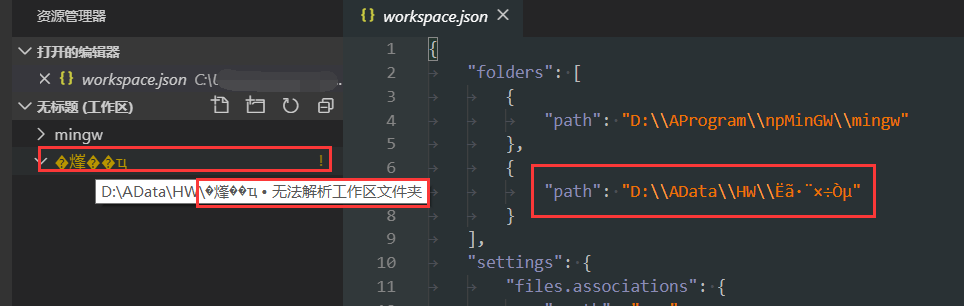
And I found that the encoding of the configuration file is Windows-1252, it seems that this encoding does not support Simplified Chinese.
(This garbled problem has existed from the previous version to the current version, and still has not been fixed)
sandy081 commentedon Dec 1, 2019
If you fix this file by changing the encoding and updating the path then it works?
rihalvnium76 commentedon Dec 1, 2019
Not exactly working. The problem persists.
I tried to modify the configuration file encoding to UTF-8 and save it, but it didn't work.
After that, I tried to remove the folder with Chinese name, opened the workspace configuration file, used "Reopen with Encoding" and selected UTF-8 (not saved), and then re-added the directory with Chinese name, VSCode was able to resolve .
However, when I close the workspace configuration file opened in the editor, and then add another directory with Chinese name, or remove the directory with Chinese name added before, and then add the directory again, VSCode cannot resolve the directory again. The configuration file also became garbled, and its encoding changed back to Windows-1252.
It seems that VSCode fixedly uses Windows-1252 encoding instead of automatic recognition to read and write some configuration files.
sandy081 commentedon Dec 2, 2019
Will wait for Benjamin Pasero (@bpasero) insights.
bpasero commentedon Dec 5, 2019
This can happen if an encoding is configured that is not UTF-8. We have overrides in place that can enforce an encoding but we missed to specify it for untitled workspaces. I added that now here:
vscode/src/vs/workbench/services/textfile/electron-browser/nativeTextFileService.ts
Line 354 in f3f6583