Repository navigation
VS Code fonts don't seem to be using system antialiasing on Windows #82733

Description

Issue Type: Bug
The same font used in VS Code renders fuzzier than in VS. It looks like system anti-aliasing is not being used on Windows.
I have JPG's from screenshots to share which I can add later.
VS Code version: Code 1.39.2 (6ab5985, 2019-10-15T15:35:18.241Z)
OS version: Windows_NT x64 10.0.18362
System Info
| Item | Value |
|---|---|
| CPUs | Intel(R) Core(TM) i7-4790 CPU @ 3.60GHz (8 x 3592) |
| GPU Status | 2d_canvas: enabled flash_3d: enabled flash_stage3d: enabled flash_stage3d_baseline: enabled gpu_compositing: enabled multiple_raster_threads: enabled_on native_gpu_memory_buffers: disabled_software oop_rasterization: disabled_off protected_video_decode: unavailable_off rasterization: enabled skia_deferred_display_list: disabled_off skia_renderer: disabled_off surface_synchronization: enabled_on video_decode: enabled viz_display_compositor: disabled_off webgl: enabled webgl2: enabled |
| Load (avg) | undefined |
| Memory (System) | 14.76GB (4.75GB free) |
| Process Argv | firstsets.cpp |
| Screen Reader | no |
| VM | 0% |
Extensions (3)
| Extension | Author (truncated) | Version |
|---|---|---|
| remote-wsl | ms- | 0.39.9 |
| cpptools | ms- | 0.26.0 |
| perl | ric | 0.9.0 |
Activity
tgani-msft commentedon Oct 17, 2019
roblourens, I'm on the same floor as you if you want to take a look in person.
roblourens commentedon Oct 17, 2019
Screenshots might help for Robo (@deepak1556) to identify it. Also you can compare it to text you see in Chrome.
tgani-msft commentedon Oct 21, 2019
Open the above files in mspaint and enlarge to 300% to see the difference.
tgani-msft commentedon Oct 21, 2019
The first one is for VS. It's interesting to note that if font scaling is used in VS, it resembles VS Code exactly.
roblourens commentedon Oct 22, 2019
To me, it sort of looks like a different font. But even if it's the same, the font rendering will always be slightly different. It should be the same as what you see in Chrome. From the screenshot, I can't tell whether it's wrong.
varunj166 commentedon Nov 8, 2019
Robo (@deepak1556) Instructed from #84154 to add information here. I had opened a separate issue #84214 because I hadn't seen any Windows users reporting what I was seeing, but #84154 tells me I'm not alone.
Version: 1.40.0
OS: Windows 7 64 bit
Resolutions attempted and failed:
There has been a very clear loss of editor text sharpness from 1.39.2 to 1.40.0. Downgrading back to 1.39.2 solves the issue. A gentleman on #84214 tells me this is because VS Code switched from RGB subpixel antialiasing to grayscale subpixel antialiasing, perhaps because of Electron 6.
Whatever the reason, it made looking at the editor window very unpleasant, forcing me to downgrade to 1.39.2 until (if) the issue is fixed.
Screenshots:
1.39.2

1.40
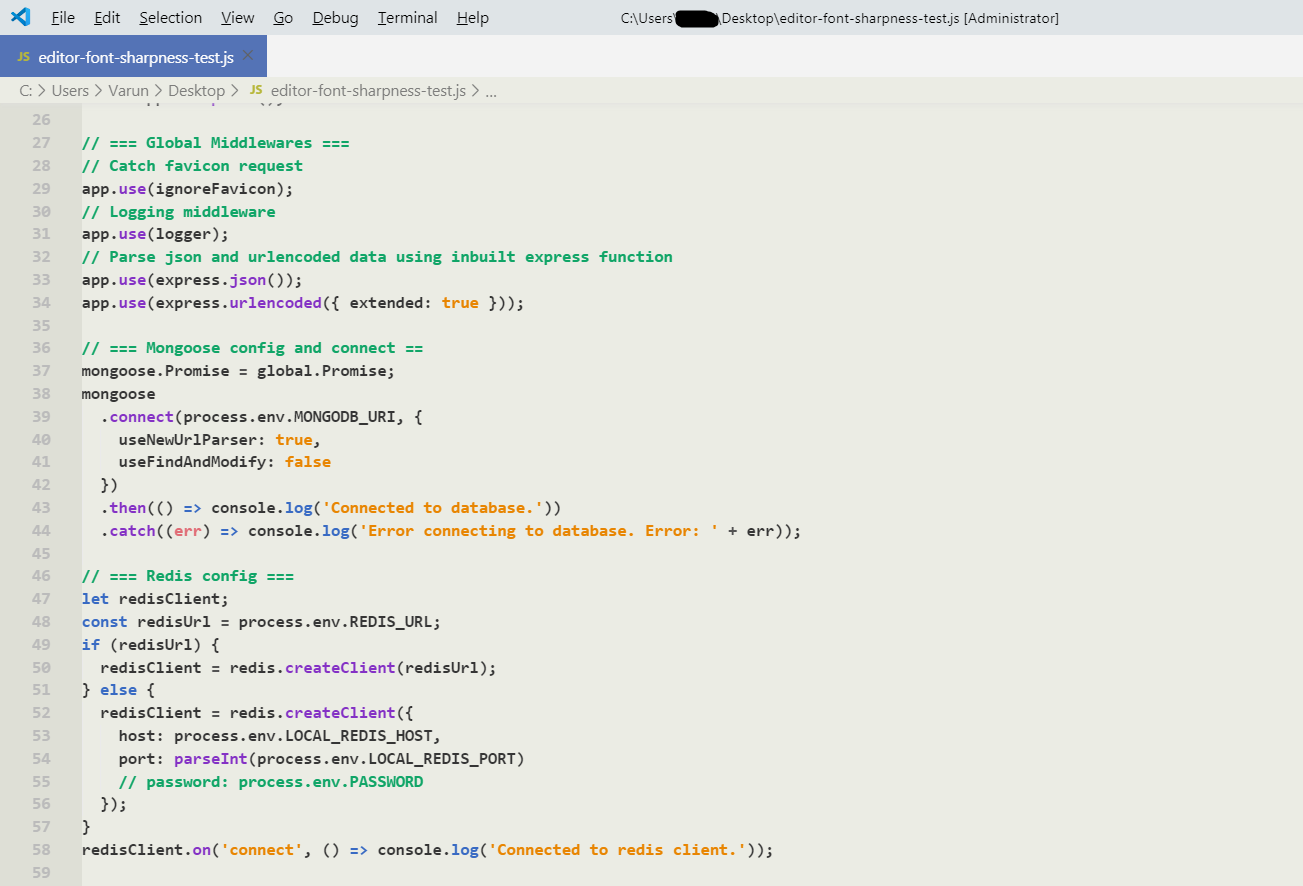
bhughes339 commentedon Nov 8, 2019
I was instructed to leave a comment here. I'm having this issue on Windows 10, starting with v1.40. Font is blurrier and bold scopes (most obviously the red text from the gif) are much less pronounced.
Monokai color scheme:

Original comment: #84154 (comment)
bpasero commentedon Nov 11, 2019
/duplicate #84214
vscodebot commentedon Nov 11, 2019
Thanks for creating this issue! We figured it's covering the same as another one we already have. Thus, we closed this one as a duplicate. You can search for existing issues here. See also our issue reporting guidelines.
Happy Coding!