- VSCode Version: 1.37.1
- OS Version: ubuntu lts 18.04.3
Steps to Reproduce:
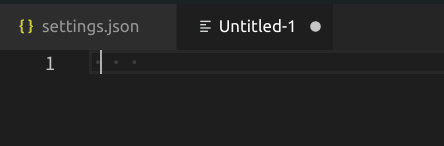
Set "editor.renderWhitespace": "all" for watching easily
- open a new file
- press
space key

- press
space key

- press
space key
- press
space key

we can find the cursor position is incorrect
More info:
- I has three PCs, their are all ubuntu 18.04.3, but only one is normal.
- The bug may be not about vscode version. I tried some old version , the bug is still.
Does this issue occur when all extensions are disabled?: Yes

Steps to Reproduce:
spacekeyspacekeyspacekeyspacekeywe can find the cursor position is incorrect
More info:
Does this issue occur when all extensions are disabled?: Yes