-
Notifications
You must be signed in to change notification settings - Fork 39k
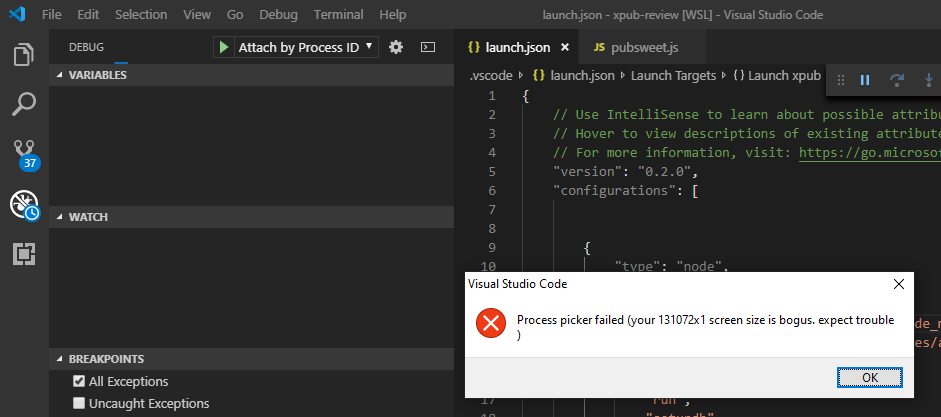
Debug failed to load: Process picker failed (your 131072x1 screen size is bogus, expect trouble) #75932
Copy link
Copy link
Closed
Labels
author-verification-requestedIssues potentially verifiable by issue authorIssues potentially verifiable by issue authorbugIssue identified by VS Code Team member as probable bugIssue identified by VS Code Team member as probable bugdebugDebug viewlet, configurations, breakpoints, adapter issuesDebug viewlet, configurations, breakpoints, adapter issuesverifiedVerification succeededVerification succeeded
Milestone
Description
Debugger failed to load when using with "attach by process ID".
I'm running VS Code connected to WSL 2 with Ubuntu 18.04.2 LTS.
I had the same code running in pure Windows environment, and debugger launched fine. I start getting this screen size is bogus error when I moved my code to WSL 2, unsure if it's WSL related or VS Code.
Version: 1.35.1 (system setup)
Commit: c7d83e5
Date: 2019-06-12T14:30:02.622Z
Electron: 3.1.8
Chrome: 66.0.3359.181
Node.js: 10.2.0
V8: 6.6.346.32
OS: Windows_NT x64 10.0.18917
*** I use the official Microsoft "Remote - WSL" extension from marketplace to connect to WSL
Steps to Reproduce:
- Launch VS Code in Windows
- Open code in WSL 2
- Configure launch.json with the following
{ "type": "node", "request": "attach", "name": "Attach by Process ID", "processId": "${command:PickProcess}" } - Start debugging by click the green play button.
Reactions are currently unavailable
Metadata
Metadata
Assignees
Labels
author-verification-requestedIssues potentially verifiable by issue authorIssues potentially verifiable by issue authorbugIssue identified by VS Code Team member as probable bugIssue identified by VS Code Team member as probable bugdebugDebug viewlet, configurations, breakpoints, adapter issuesDebug viewlet, configurations, breakpoints, adapter issuesverifiedVerification succeededVerification succeeded
