Files served by readonly filesystem initially lack the '(read-only)' suffix on tab labels #69651


Description

- VSCode Version: 1.31.1 and 1.32.0-insider
- OS Version: Windows_NT x64 10.0.16299
Steps to Reproduce:
-
Obtain the MemFS sample (git clone https://github.com/Microsoft/vscode-extension-samples and then go to the fsprovider-sample subdir)
-
Edit package.json to require a newer version of vscode than the sample's default. I changed
"vscode": "^1.23.0"to"vscode": "^1.31.0". This is necessary in order to get use of the isReadonly option onvscode.workspace.registerFileSystemProvider -
npm installin Terminal -
Edit src/extension.ts to add that
isReadonly: trueto the options parameter. -
F5
-
When Extension Development Host window opens, switch to it, press F1 and run 'MemFS: Setup Workspace', then F1 again and 'MemFS: Create Files'.
-
Switch to Explorer view.
-
Single-click on one of the files, e.g. file.js and observe that the tab caption lacks the '(read-only)' suffix.

-
Try typing into the document and verify it is correctly read-only.
-
Doubleclick on the tab to persist it. The caption now gets the expected '(read-only)' suffix.
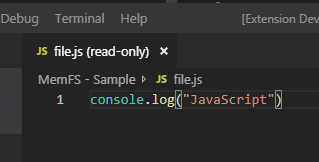
Also notice the weird doubled-up '(read-only) (read-only)' on the titlebar. Is this intentional?