Repository navigation
VSCode Integrated terminal text color goes crazy after npm or gulp commands #40327

Description

- VSCode Version: 1.19.0
- OS Version: Windows 10, latest updates
Steps to Reproduce:
- Open integrated terminal
- Type in "npm outdated" for example, or "gulp" in an SPFx project
Reproduces without extensions: Yes
Running gulp on SPFx project changes the text to be black on black
Running npm outdated highlights the text like it is selected
There is no way to fix it after this happens except either type in blind or open a new terminal

Reacted by Daniel Pintilei, Kevin Hahn, Sergiu Caraian, Tomas Aschan, Yukai Huang and Maksim Sadakov
Activity
hirokuma commentedon Dec 16, 2017
I have similar program.
"terminal.integrated.shell.windows": "C:\\Windows\\sysnative\\bash.exe"Now, my text background color is red.
Only one out of three PCs will occur.
shaipetel commentedon Dec 18, 2017
Seems colors are just going crazy in the console. Using cmd or PoSH directly with the same commands doesn't cause these issues.
This issue makes it impossible to use the integrated terminal completely since it is at times unreadable.
mattgoldspink commentedon Dec 19, 2017
This is how mine looks after the latest upgrade. I'm just running grunt:
I don't know if this is the same issue so let me know if I should open up another ticket.
shaipetel commentedon Dec 19, 2017
Interesting but no. My text is perfect shape. It is just that the background and text colours seem to be random and in a lot of cases end up being black on black.
Tyriar commentedon Jan 2, 2018
Matt Goldspink (@mattgoldspink) that's a different issue, see #34320
robertmain commentedon Jan 13, 2018
I'm having a problem here with colours in my terminal not displaying at all.
Here's the command running in an external instance of git bash:

Here is the exact same command running in the built-in terminal (which is pointed at the version of

bash.exethat ships with git bash btw):baconapplications commentedon Feb 21, 2018
This bug was/is making me crazy. Running npm start or ng server will override my powershell colors with another blue/yellow theme I cannot find. confusingbits suggestion on this post - #40190 fixes the issue for powershell on win 10 version Version 10.0.16299 Build 16299. But also downgrades my powershell to the legacy version...
shaipetel commentedon Feb 22, 2018
I know! after many updates and new versions, this bug isn't getting any better.
By now, I cannot use the integrated terminal at all. After running one command the colors are all messed up and unreadable.
Its a nice feature but completely unusable.
murugaratham commentedon Mar 1, 2018
Affecting me badly, i wanted to use integrated terminal to do
npmrelated commands but the whole color theme went crazy and went back to use cmd.shaipetel commentedon Mar 12, 2018
After many VSCode releases, this issue still happens all the time.
Can anyone comment if this is a priority at all for the team, or if this is a wide spread issue or not?
It seems to be it is affecting everyone I talk to and makes the integrated terminal a great feature that doesn't work and can't be used at all...
5 remaining items
Tyriar commentedon Mar 12, 2018
Shai Petel (@shaipetel) investigating upstream is the main thing that could help.
Mike Griese (@zadjii-msft) this is sometimes an issue but I've told several people to set the colors to normal and it still occurs so I think winpty might be interpreting what gulp/npm/something else does incorrectly (which I'm assuming uses chalk).
robertmain commentedon Mar 12, 2018
Shai Petel (@shaipetel) I consider that to potentially be a different issue than the one described by OP. Or perhaps not, who knows.
Your console mind reading abilities may not be up to much, but equally our mind reading abilities are also lacking. If your manifestation of the bug is slightly different to the OP it can be helpful to give some information rather than just sitting there and expecting someone to somehow use the force to sense what's on your screen. Just a thought.
tomjaimz commentedon Mar 14, 2018
FYI my own experience with this issue (#45015) indicates that this is not due to anything that npm or gulp is doing specifically, other than 'reseting' the terminal colours back to default after decorating text in their output. The issue is with how the terminal window interprets that 'reset' - its default state is not the correct white-on-black one.
If anyone wants to experiment to see if what affected me also affects you, just run
echo -e "\x1b[0m"in your terminal window, which is the colour reset.shaipetel commentedon Mar 14, 2018
Robert Main (@robertmain) Hey Robert, I am the OP, look at the first picture.
That's what happens after running just one command on the terminal:
It allows me to type the first command, then colors go crazy in the output, and it ends the terminal changing to black on black.
If you look closely, you can actually see the white square showing you where the cursor is.
See the last "blank" line in the terminal of the first picture? its not blank. Its just that the terminal changed to black on black. I can still type there, it still runs commands, but from that point I am completely "blind".
Sorry if that wasn't clear before, I hope now it makes it clearer and that you'd agree it is completely useless from that point.
robertmain commentedon Mar 14, 2018
Heh. Didn't see your name as the OP.
Either way, I can see text in the first picture(albeit slightly garbled text). The impression I got from your comment was that the console was completely and utterly blank. Like just a black rectangle with nothing in it. Hence why I thought it might be a different issue to the OP...
shaipetel commentedon Mar 14, 2018
Yeah, to make it clear: I can type the first command just fine.
the output is all crazy-color.
Once the first command finishes, I end up with a black on black terminal...
tomasaschan commentedon Apr 1, 2018
Adding here in case it gives any additional info: I have similar (but slightly different) behavior when I run npm/yarn scripts inside VS Code terminals, but I also have problems with WSL Bash terminals generally:
That's what it looks like if I just open a WSL Bash terminal inside VS Code. Note how the first line is fine up until the
:in the prompt, and then goes bananas with the pink background color.This is what it looks if I open WSL from the start menu:
Other oddities:
I have this in my
.bashrc(which might or might not be relevant), added by WSL (i.e. I haven't touched it):tomjaimz commentedon May 16, 2018
The latest update to Windows 10 (The April 2018 update - 10.0.17134.48) resolved this issue for me.
Tyriar commentedon May 17, 2018
tomjaimz (@tomjaimz) oh really? Wasn't expecting that.
If anyone else doesn't see the issue anymore right after updating I'd like to know 😄
murugaratham commentedon May 17, 2018
I haven't used terminal in a long time, but after getting notification, I tried, it is indeed working. But along the way I did went to registry to delete any customization done on cmd and also installed cobalt2 theme. Not sure if any of those actions help fix the crazy colors
critesjm commentedon Jun 1, 2018
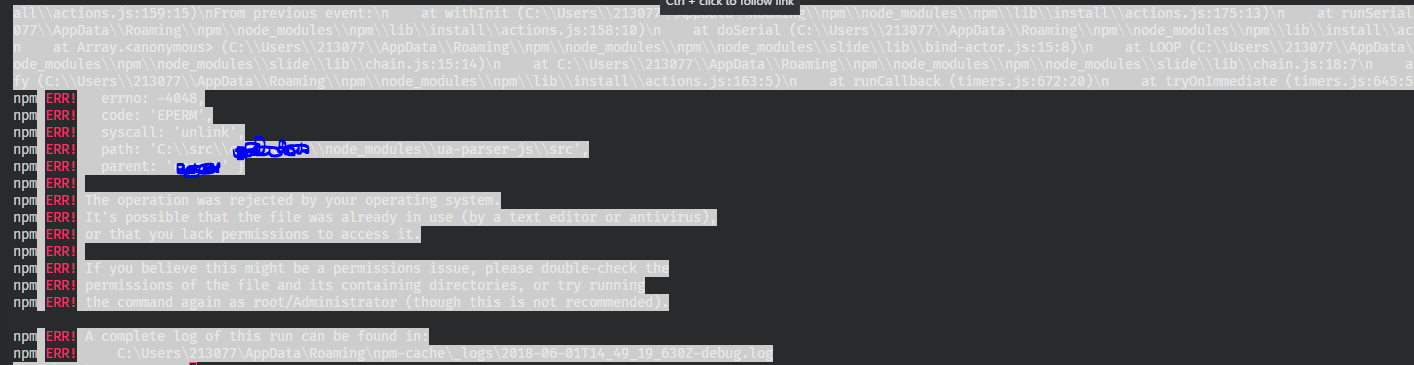
I run into the same issue constantly. On npm commands, gulp commands, powershell errors, webpack errors. Only way to fix it is to restart the terminal. Including a screenshot.
Tyriar commentedon Jun 21, 2018
This is likely related to winpty, tracking in #45693