Repository navigation
[json] Support json-schema draft 2020-12 #165219

Description

Type: Bug
When using json-schema draft 2020-12 in VS Code the code completion no longer works anywhere except for the root level of the json object.
Steps to reproduce:
- Open VS Code and create a new text file
- Enter the following code snippet:
{
    "$schema": "http://json-schema.org/draft/2020-12/schema",
    "properties": {
        "test": {
            "type": "string"
        }
    }
}- Try code completions for the keywords 'properties' and 'type'. The code completion works for the 'properties' keyword, but it does not work for the 'type' keyword.
Expected behaviour:
The code completion should work everywhere in the document.
Screenshots:
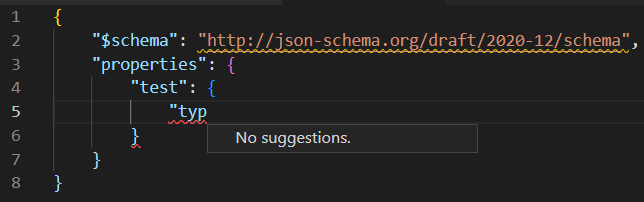
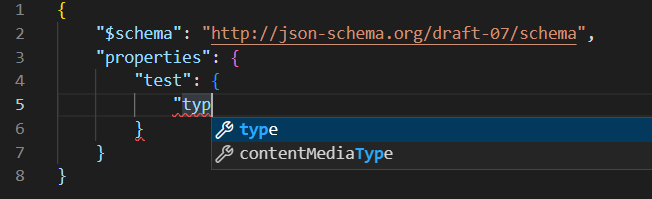
System information:
VS Code version: Code 1.72.2 (d045a5e, 2022-10-12T22:15:18.074Z)
OS version: Windows_NT x64 10.0.19044
Modes:
Sandboxed: No
System Info
| Item | Value |
|---|---|
| CPUs | 11th Gen Intel(R) Core(TM) i7-1165G7 @ 2.80GHz (8 x 2803) |
| GPU Status | 2d_canvas: enabled canvas_oop_rasterization: disabled_off direct_rendering_display_compositor: disabled_off_ok gpu_compositing: enabled multiple_raster_threads: enabled_on opengl: enabled_on rasterization: enabled raw_draw: disabled_off_ok skia_renderer: enabled_on video_decode: enabled video_encode: enabled vulkan: disabled_off webgl: enabled webgl2: enabled webgpu: disabled_off |
| Load (avg) | undefined |
| Memory (System) | 31.73GB (23.11GB free) |
| Process Argv | --crash-reporter-id 3f7fdc24-37cc-44a0-a7f9-36f08a086dab |
| Screen Reader | no |
| VM | 0% |
Extensions (15)
| Extension | Author (truncated) | Version |
|---|---|---|
| simple-react-snippets | bur | 1.2.7 |
| path-intellisense | chr | 2.8.1 |
| vscode-eslint | dba | 2.2.6 |
| prettier-vscode | esb | 9.9.0 |
| solidity | Jua | 0.0.141 |
| python | ms- | 2022.16.1 |
| vscode-pylance | ms- | 2022.11.10 |
| jupyter | ms- | 2022.9.1202862440 |
| jupyter-keymap | ms- | 1.0.0 |
| jupyter-renderers | ms- | 1.0.10 |
| vscode-jupyter-cell-tags | ms- | 0.1.6 |
| vscode-jupyter-slideshow | ms- | 0.1.5 |
| vscode-open | san | 0.1.0 |
| vscode-icons | vsc | 12.0.1 |
| markdown-all-in-one | yzh | 3.4.3 |
A/B Experiments
vsliv368:30146709
vsreu685:30147344
python383cf:30185419
vspor879:30202332
vspor708:30202333
vspor363:30204092
vslsvsres303:30308271
pythonvspyl392:30443607
vserr242cf:30382550
pythontb:30283811
vsjup518:30340749
pythonptprofiler:30281270
vshan820:30294714
vstes263:30335439
vscoreces:30445986
pythondataviewer:30285071
vscod805cf:30301675
binariesv615:30325510
bridge0708:30335490
bridge0723:30353136
cmake_vspar411:30581797
vsaa593cf:30376535
pythonvs932:30410667
cppdebug:30492333
vsclangdc:30486549
c4g48928:30535728
dsvsc012:30540252
azure-dev_surveyone:30548225
pyindex848:30577860
nodejswelcome1:30587005
fc301958:30595537
2e4cg342:30596373
Reacted by Johannes Buchholz, Scott Stevens, Guillaume Meyer (The Opinionated Man), Mikey Lombardi (He/Him), Demitrius Nelon, Jeremy Fiel, NootSponge, Alexander Janzen, Joan Marcè i Igual, prettyv and 98 more
Activity
stephprobst commentedon Nov 2, 2022
Martin Aeschlimann (@aeschli) New issue has been created as requested in #98724.
aeschli commentedon Nov 3, 2022
Looking at the content of the schema, most schema rules are extracted into different files listed in "$vocabulary", which we unfortunately don't understand.
[-]Using json-schema draft 2020-12 breaks code completion[/-][+]Support json-schema draft 2020-12[/+][-]Support json-schema draft 2020-12[/-][+][json] Support json-schema draft 2020-12[/+]gregsdennis commentedon Aug 6, 2023
Happy to answer any questions...
michaeltlombardi commentedon Aug 25, 2023
This would be extremely useful to have for schema authors. It doesn't affect users of schemas as much, but it's very impactful for schema authors.
If you're defining a new schema or meta-schema it's frustrating and, more importantly, error-prone to lose validation and IntelliSense when you move into any object-value keyword from the top-level.
The support that 2020-12 lays down for defining schema dialects is wildly useful for schema authors, but hand-crafting those definitions in VS Code means constantly moving from the editor to a CLI tool to validate the schema. Nearly all of the author-time development experience is lost.
An example of a useful schema dialect is actually for defining a schema that uses VS Code's own annotation keywords:
Having schema dialects for people authoring a schema who want to have the best possible UX for folks filling out a document adhering to that schema would be great.
I work on a lot of side projects that involve writing schemas for configuration files and documenting configurations. While I could pin those schemas to using draft 7, it's more maintainable for me to use 2020-12, especially when you consider annotations like versioning information or the link to online docs:
{
  "title": "Cache Busters",
  "description": "Defines a list of sources and targets to re-process assets for supporting Tailwind's JIT compiler.",
  "markdownDescription": "...", // longer block with pretty-rendering info
  "minimumVersion": "0.112.0",
  "docsUrl": "https://gohugo.io/getting-started/configuration/#configure-cache-busters",
  "type": "array",
  "uniqueItems": true,
  "items": {
    // definition for a cache buster
  }
}
I don't think I'd be very helpful for implementing 2020-12 support, but I'd be happy to test things out and to help with the documentation.
VS Code's support for using JSON schemas is wildly good. Being able to get IntelliSense, high-quality validation error messages, and contextual documentation makes filling out schematized documents in VS Code so much easier than keeping the reference to the schema open and re-running a validator every few minutes.
I'd love to see VS Code's support for authoring schemas match that experience, and 2020-12 support, which makes authoring new vocabulary so much easier, is a huge part of that.
gregsdennis commentedon Aug 27, 2023
Mikey Lombardi (He/Him) (@michaeltlombardi) thanks for adding in your use case. It's very enlightening.
Regarding custom dilect support, it's important to remember that any implementation (whether its a validator or an editor or something else) can only support vocabularies that it's been programmed to understand. There's nothing yet defined that provides a machine-readable format that allows implementations to automatically understand new vocabularies.
That said, we (the JSON Schema team) are working on defining that. Until then
$vocabularyis still very much a work in progress.michaeltlombardi commentedon Aug 28, 2023
Greg Dennis (@gregsdennis) yup! For right now, I've only been defining/using annotation keywords, even though I keep finding useful ideas for other keywords.
GabenGar commentedon Mar 25, 2024
Martin Aeschlimann (@aeschli)
Is it still the case today? The site has the section on bundling schemas, which relies on different
"$id"resolution mechanics onwards fromdraft/2019-09. If multi-file nature of meta-schemas is the problem, so maybe it's worth to bundle it and incrementally make a basic implementation against it, ignoring all the super-duper dynamic free-for-all logic for now.StefanR23 commentedon Jan 6, 2025
as commented in microsoft/monaco-editor#3160 I got it work partially - but e.g. new keyword like
$dynamicRefand$dynamicAnchorare not working. And IMHO this needs to fixed within the monaco editor.IvanPizhenko commentedon Mar 15, 2025
Are there any plans to fix this in the nearest future?
DarkLite1 commentedon May 8, 2025
It would be great if support could be added for
When hovering over the schema URL we see the warning:
Specifications can be found here.
Thank you for having a look to implement this in VS Code or maybe allow an extension to handle this? See also #98724
schema.json
{ "$schema": "https://json-schema.org/draft/2020-12/schema", "$id": "urn:hm:schemas:move-file-sftp", "type": "object", "title": "Move file over SFTP", "description": "Download files from an SFTP server or upload files to an SFTP server.", "required": ["Tasks", "Settings"], "properties": { "MaxConcurrentTasks": { "type": "integer", "title": "The MaxConcurrentTasks Schema", "default": 1, "examples": [1, 2, 3], "minimum": 1 }, "Tasks": { "type": "array", "title": "The Tasks Schema", "default": 0, "examples": [25] } } }Improve editor experience for server.json using schema (#441)
Improve editor experience for server.json using schema (#441)
mikecentola commentedon Sep 17, 2025
Hello Martin Aeschlimann (@aeschli) I was wondering if I would be able to work on this or if there are already people working on it?
aeschli commentedon Sep 19, 2025
Hey Mike Centola (@mikecentola), help is very welcome! The code is in https://github.com/microsoft/vscode-json-languageservice/blob/main/src/services/jsonSchemaService.ts
DerekChasse commentedon Oct 26, 2025
Really hopeful that there's an answer to this. This is critical to validating OpenApi Documents.
baywet commentedon Jun 18, 2026
Sharing this here in case some of you are interested microsoft/vscode-json-languageservice#308
aeschli commentedon Oct 20, 2026
🤖 Thanks for the report and detailed context. JSON Schema draft 2020-12 support, including
$dynamicRef/$dynamicAnchorand completion through dynamic references, was implemented in microsoft/vscode-json-languageservice@257468d and integrated into VS Code by 041d1b6, so this can be closed as completed.Frulfump commentedon Oct 21, 2026
It was closed as not planned?!
bryceschober commentedon Oct 21, 2026
You can see in Martin Aeschlimann (@aeschli)'s comment that it was implemented and integrated. My guess is that he made a minor mistake in the closed reason.