Does this issue occur when all extensions are disabled?: Yes
- VS Code Version: V1.70.0
- OS Version: Ubuntu 20.04
Steps to Reproduce:
- Update to latest V1.70.0 version of VSCode
- Use starship prompt for the bash shell.
I have my starship prompt configured to update if the previous command execution failed for unknown reasons.
After the latest update, every command execution seems to fail only in VSCode's terminal.
Below is the expected behaviour, in a bash terminal:
skondapa@hyd-skondapa-l [~]
❯❯❯ echo "Hello world"
Hello world

skondapa@hyd-skondapa-l [~]
❯❯❯
The screenshot of the same with colors:

Now in the VSCode's terminal (running bash):
(It shows the error condition even in a brand new instance of the terminal)
skondapa@hyd-skondapa-l [~]
Error in prev cmd ✗ echo "Hello World"
Hello World

skondapa@hyd-skondapa-l [~]
Error in prev cmd ✗
A screenshot of the same with colors:
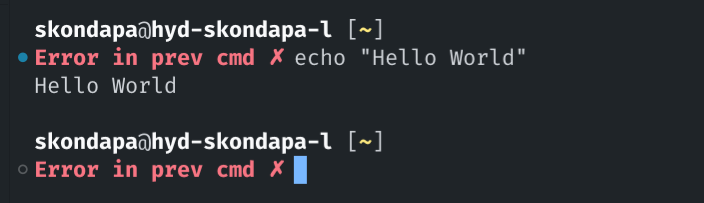
This behaviour of always erroring out even for a successful command execution started today after VSCode auto updated to V1.70.0
Below is the information I got from Help -> About menu:
Version: 1.70.0
Commit: da76f93
Date: 2022-08-04T04:38:48.541Z
Electron: 18.3.5
Chromium: 100.0.4896.160
Node.js: 16.13.2
V8: 10.0.139.17-electron.0
OS: Linux x64 5.15.0-43-generic snap


Does this issue occur when all extensions are disabled?: Yes
Steps to Reproduce:
I have my starship prompt configured to update if the previous command execution failed for unknown reasons.
After the latest update, every command execution seems to fail only in VSCode's terminal.
Below is the expected behaviour, in a bash terminal:
The screenshot of the same with colors:

Now in the VSCode's terminal (running bash):
(It shows the error condition even in a brand new instance of the terminal)
A screenshot of the same with colors:

This behaviour of always erroring out even for a successful command execution started today after VSCode auto updated to V1.70.0
Below is the information I got from
Help -> Aboutmenu:Version: 1.70.0
Commit: da76f93
Date: 2022-08-04T04:38:48.541Z
Electron: 18.3.5
Chromium: 100.0.4896.160
Node.js: 16.13.2
V8: 10.0.139.17-electron.0
OS: Linux x64 5.15.0-43-generic snap