Repository navigation
Add "find all occurences" in the current file feature #14836

Description

Using Search sidebar to find all items in current file requires too much clicks.
VS has a find all option
- VSCode Version: 1.6.1
- OS Version: Windows Server 2008
Steps to Reproduce:
- Ctrl + F
- Type search test
Expected
option to see all occurrences
Actual
No such option
Visual Studio

VS Code

Reacted by erlais, Cuong Tran, Murat Sutunc, Sam Lee, peters9, jrysig, Josh Johnson, Guoquan Zhao, Till Hoffmann, He Ma and 221 more
Reacted by heartacker
Reacted by Mohammad Arafat Hossain
Activity
rebornix commentedon Nov 2, 2016
Maxim Belugin (@AxCoder) can you provide a screenshot showing your request as I don't have Windows available right now. It sounds like
highlight all selectionsto me but I'm not quite sure.AxCoder commentedon Nov 3, 2016
The difference is that highlight only shows occurrences that are on the current screen while in VS I see all occurences condenced on the bottom pane (similar to the Search sidebar in VS Code). Using of the search sidebar is a workaround, but requires too many clicks

(BTW I tried to copy the full path into the "files to include" it did not find anything)
rebornix commentedon Nov 3, 2016
So let me try to summarize it, you want to see all the search results while using the search palate.
Bill-Stewart commentedon Nov 3, 2016
Have you tried
workbench.view.search(default keybinding ctrl+shift+f)?AxCoder commentedon Nov 3, 2016
Peng Lyu (@rebornix)
Yes, thank you
Bill Stewart (@Bill-Stewart)
I have not find out how to quickly search only the current file
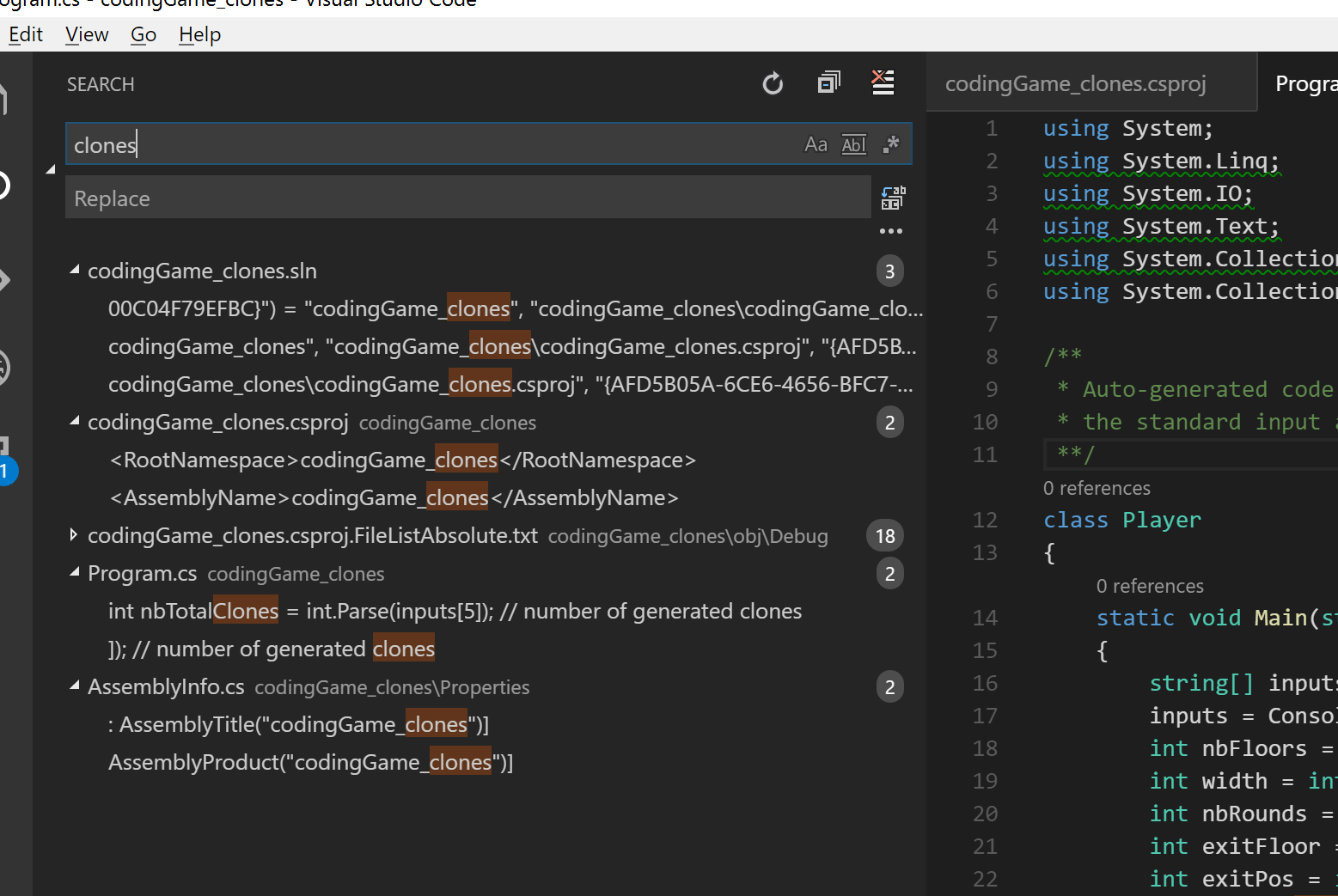
Bill-Stewart commentedon Nov 7, 2016
I don't understand? Pressing the shortcut key means you don't have to use the mouse.
AxCoder commentedon Nov 7, 2016
Bill Stewart (@Bill-Stewart) the problem with Ctrl+Shift+F hotkey is that is searches in ALL files in the folder, while I want to search only in CURRENT file (active tab). In the screenshot above I'd like to see only entries found in Program.cs not other files.
alexdima commentedon Nov 7, 2016
I think this could be implemented by having an action in the editor that invokes the global find in files but scoped only on the current file.
Thus, the search viewlet could show only hits in the current file. fyi Sandeep Somavarapu (@sandy081)
132 remaining items
jamesl-dm commentedon Apr 17, 2025
+1 on this. Can't believe this still requires a plugin. Even adobe acrobat can do this since the 90's. How can vscode be worse than adobe?
albjeremias commentedon Apr 30, 2025
what is the plugin you can use?
thanks.
bnason-nf commentedon May 1, 2025
Hi Albatroz Jeremias (@albjeremias),
I'm not sure if it's the one that James Limbouris (@jamesl-dm) was referring to, but I created this extension years ago. I hope it helps.
https://marketplace.visualstudio.com/items?itemName=bnason-nf.findallinfile
-Benbuck
joaomoreno commentedon Nov 4, 2025
This is supported today by pressing Alt Enter in the Find Widget. Do we really need a button for this?
vldmrrr commentedon Nov 4, 2025
That shortcut by default opens search results in a new editor - it has no relation to the feature requested in this thread.
bhanratt commentedon Nov 4, 2025
Not for me. It behaves as described. That said this is very unintuitive and should be a button in the find widget if you forget the shortcut.
vldmrrr commentedon Nov 4, 2025
Interesting, here is screenshot of my settings:

What command is bound to Alt+Enter in your instance?
noam-zur commentedon Nov 4, 2025
When I press Alt+Enter on the Find box the editor puts a cursor on each result in current file. this is not the request - I want to have a list of all results in current file that you can press and jump to each one
joaomoreno commentedon Nov 5, 2025
What do you mean exactly? Where do you expect to have that list of all results? Note that VS Code by default will highlight all results just by typing the search term.
KernelLeak commentedon Nov 5, 2025
"Find in Files" in the sidebar, limited to the one file currently being edited, not just "all open editors"...
noam-zur commentedon Nov 7, 2025
please see my suggestion above with screenshot regarding how to solve it: #14836 (comment)
mat-m commentedon Nov 22, 2025
A shortcut to "exclude */**; include current editor", in the sidebar.
Rbascoe commentedon Nov 25, 2025
Simply, we want an equivalent of the "Find All in Current Document," feature in Notepad++ to be added to VSCode. This shows the search results in a split window
Notepad++
Here is an example of me using this feature to find all instances of "resource" in a file. This is useful when searching large files to find what you are looking for. We want to have the same capabilities in VS code.
Hopefully the visuals help folks understand what is being requested.
bnason-nf commentedon Nov 25, 2025
Since this is unfortunately still relevant six years later, and not everyone may find it in the long list of comments:
#14836 (comment)
Hopefully this will be added to VSCode at some point.
FreHu commentedon Jan 29, 2026
One more extension you can try (mine):
https://github.com/FreHu/vscode-fmof
https://marketplace.visualstudio.com/items?itemName=frehu.fmof
It packs together multiple useful commands:
https://github.com/FreHu/vscode-fresh-file-explorer
This one can search in recently modified files (current contents), inside diffs (added/deleted lines), or inside search results (searches in the files found by the previous search result)