Repository navigation
Explore adding a second side bar #132893

Description

This issue contains the discussion around adding a second side bar. The secondary side bar would be the next step in improving layout flexibility.
A primary motivator of the second side bar is to address the scenarios expected in #26777.
The current step is understanding the various UX options that could be used to solve the problem. Below are some notes from the current exploration.
- Side bar is a loose term here. We could introduce a second panel instead which already knows how to move to multiple orientations.
- Second may also be limiting. As many have pointed out, should we just allow N number of panels or side bars? Limiting the number does simplify things like keybinds and general layout management and adding too many comes at the cost of complexity that many users will find less useful.
- Currently the panel and side bar solve nearly the same purpose but the panel is drawn differently. Could we adapt the panel to turn into a side bar when it is on the left or right and then make more of them?
- If we go with a second side bar, is it necessary to have an activity bar?
Also adding some mockups from @misolori

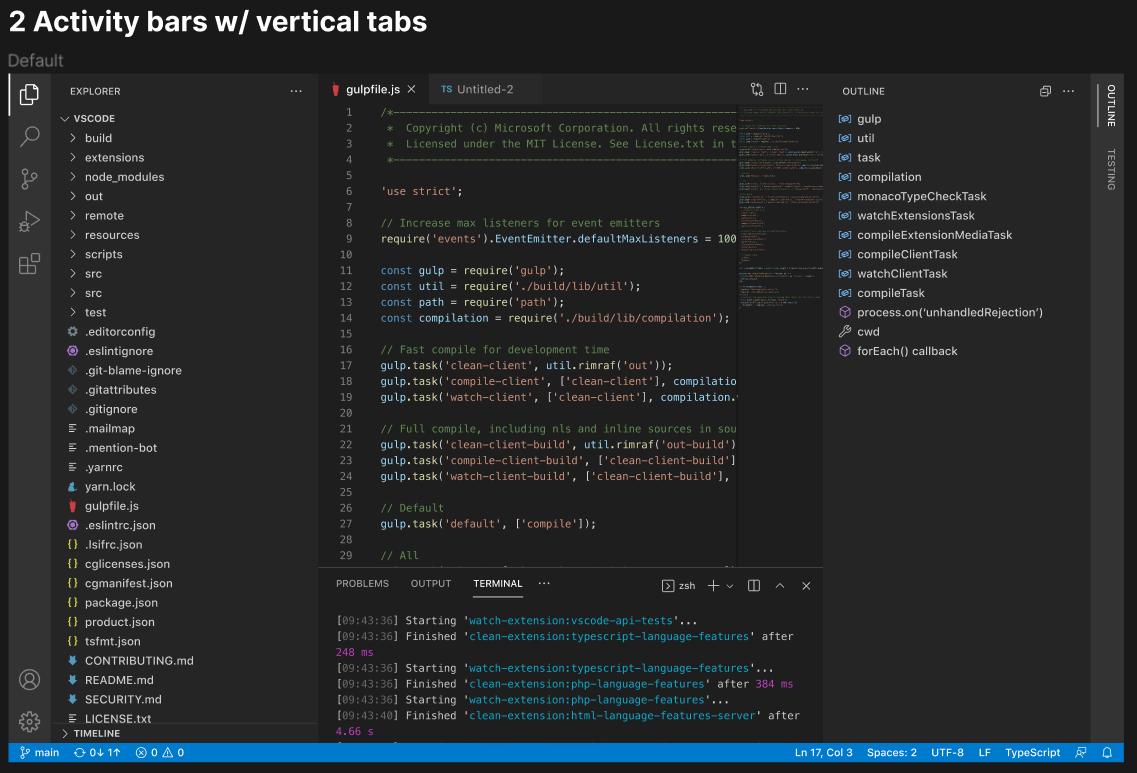


Reacted by byehack, Dominic Vonk, Igor Mahov, mhanuszh, baiyongrui, Jeroen Rothbauer, Frank Mosca, VoidEmpty, YuTengjing, Wenzhao Hu and 61 more
Reacted by Andrii Dieiev, Igor Mahov, Henning Dieterichs, Réginald Parotte, mhanuszh, jahan01, Wu WeiChao, li1234yun, Mike Hogye, Jeff L. and 10 more
Reacted by Andrii Dieiev, Adrian Widerski, Wu WeiChao, Yukai Huang, li1234yun, Mike Hogye, Patrick Bänziger, Alex Tsvetkov, Vuong, JD Solanki and 12 more
Reacted by Andrii Dieiev, li1234yun, Mike Hogye, Sebastian Müller, JD Solanki, Mohamed Aref, Anton Lagerholm, Kiarash Kiani, cavallonechen, Christos Lytras and 3 more
Reacted by Yi-Mu "Enoch" Chen, Christos Lytras, KytoSai, hello-smile6 and li1234yun
Activity
DominicVonk commentedon Sep 14, 2021
Maybe make it possible to do vertical tabs or icons on both sidebars.
paror commentedon Sep 14, 2021
Another possibility : horizontal icons on the top of the second sidebar (not to waste space in a long vertical bar with some icons on top ...)
miguelsolorio commentedon Sep 14, 2021
Here's another iteration that SteVen Batten (@sbatten) and I worked on. This idea closely follows the sidebar appearance/styling but works just like the panel (with multiple panel titles and views):
So this means that the panel will still be able to be placed on the left/bottom/right and the secondary sidebar can take multiple views containers:
We also discussed toggling the secondary sidebar via keyboard shortcuts and via the "sash" drag & adding a single click to toggle this:
DominicVonk commentedon Sep 15, 2021
Maybe make a setting, that everyone can pick their favorite. I would really like the activity bar because then I feel more organized.
sbatten commentedon Sep 15, 2021
Adding some screenshots comparing a full length second side bar and editor length side bar
Full-Length

Editor-Length

wzhudev commentedon Sep 17, 2021
Great to have this feature!
heartacker commentedon Sep 17, 2021
SteVen Batten (@sbatten) Thanks
and IMO, I want the new side bar like this,
exactly, I believe that floating panel is a good solution for user, like ^VS2019, the visual studio float panel is very useful and powerful, we could use for reference.
there is the float panel(FP) of vs2019, and some of those features are yummy
#26777 (comment)
DominicVonk commentedon Sep 22, 2021
I would prefer Full-Length SteVen Batten (@sbatten)
mhanuszh commentedon Sep 22, 2021
How about a setting for it?
DominicVonk commentedon Sep 24, 2021
I have it enabled with the setting "workbench.experimental.sidePanel.enabled". And it already looks promising. But I would also like side tabs please.
41 remaining items
fix issue with svg icons
heartacker commentedon Jan 17, 2022
seem that the icon is some bigger that other three in visual
nidefawl commentedon Jan 17, 2022
The second sidebar is a great addition.
One bug I came across today:
I have the references view in the extra sidebar, I enabled it in the workspace config.
When I open a new workspace that has the sidebar disabled it fails to open the references view when use 'Find all references'.
sbatten commentedon Jan 18, 2022
Michael H (@nidefawl) in the latest insiders builds, the side bar can no longer be "disabled" so this should no longer be an issue. please follow up if you are still seeing it in those builds
as for the icon heartacker, we are still playing around with this icon, feedback is noted. cc @misolori
heartacker commentedon Jan 19, 2022
{
"command": "workbench.action.toggleMaximizedPanel"
}
SteVen Batten (@sbatten) the command seems to maximize the side panel, not the panel
sbatten commentedon Jan 19, 2022
heartacker are you using a non-center panel alignment?
heartacker commentedon Jan 20, 2022
SteVen Batten (@sbatten) there is the gif pic
sbatten commentedon Jan 20, 2022
heartacker I attempted to support maximization of the panel in the non-centered panel alignment scenario but our grid widget has some issues with it at the moment. as such, I've had to disable panel maximization in this case while we look into proper support for this.
heartacker commentedon Jan 21, 2022
SteVen Batten (@sbatten) thanks for ur clarify, so I want to set the penel aligning by center. but
panel alignoralign penel3. finish I find it is menu view
maybe we could improve the ux.

for example:
add setting to panel right click menu
sbatten commentedon Jan 21, 2022
heartacker thanks for testing this out, it highlights a discoverability issue with the command titles. in today's insiders, there are a few ways to tweak the panel alignment.
Command Palette
Note In the next build, all panel alignment commands will be of the form
Set Panel Alignment to ...Appearance Menu
Control Layout to Customize Layout...
sbatten commentedon Jan 21, 2022
Closing this issue as the exploration phase is over. Please file new issues for feedback, bugs, and requests.
Remove VSCode `workbench.panel.defaultLocation`