Get editor line height (px) and character space-width (px) by VSCode API #125341


Description

Hi, I wrote VSCode extension, took me 6 months to build. It's a visual helper, it highlights nested code blocks. You can change block colors, depth, turn on/off focus, curly/square/round brackets, tags, python indentation and more.....
Supports: Python, PHP, JavaScript, JSX, TypeScript, TSX, C, C#, C++, Java, HTML, CSS and more...
It has already more than 1000 installs.
https://i.ibb.co/ZTkQKgR/blockman-view-extension333d.png

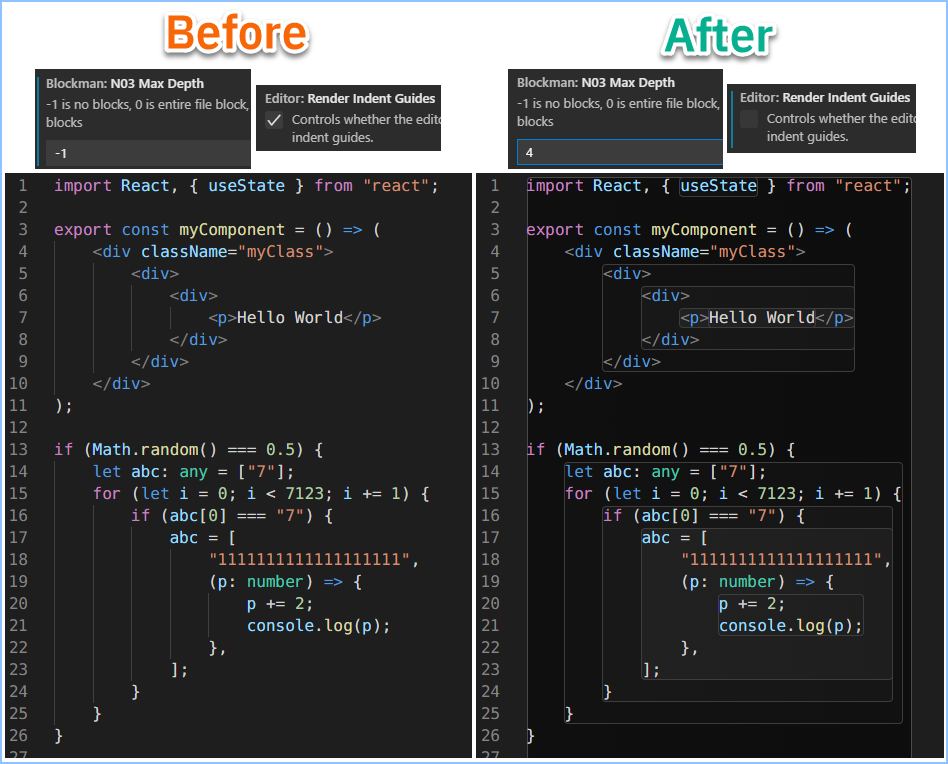
The main problem is calculating or finding editor line height (px) and character space-width (px) of monospace font, I cannot find such function in the VSCode API. I need these two values to render blocks properly.
So currently the only solution is to manually adjust line height and character space-width.
For simplicity, font must be monospace, so block width will be just multiplication of char count and char space-width (px).

So, in order to avoid manual adjustment of these two values, please provide a function to get these two values programmatically with VSCode API.
Thanks...