Allow for camel case matches in editor history #108446

Description

- VSCode Version: 1.49, 1.50, 1.51 insiders
- OS Version: Windows 10
Starting in 1.49 recently opened behavior in the quick open panel changed for me. For example, here is a screenshot of me trying to open the C_Unit.cs file:
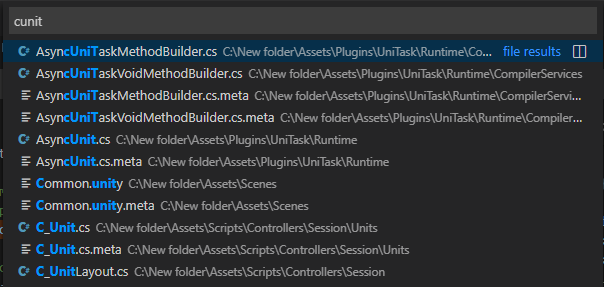
I never type the underscore. The file is not on top - fair enough (I don't remember if the order was the same before, but that's not the point). So I pick the file I need and go about my day. Some time later I want to open that same file again. I type the first letter, and there it is, recently opened:
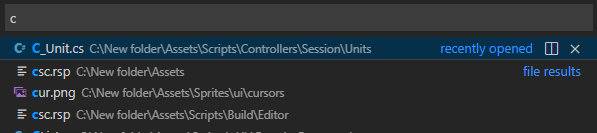
The problem is that I don't normally type one letter, I'm used to typing cunit to open this particular file. And as soon as the letter u is typed, the C_Unit.cs file disappears from top never to be seen again. The panel looks the same as in the first screenshot, and I have to pick the file manually again. Prior to 1.49 update it was always shown as recently opened along with several other files starting with C_.
Does this issue occur when all extensions are disabled?: Yes