Repository navigation
[Performance] High amount GC gen2 delays with ONNX models converted to ML.Net #15488

Description

Describe the issue
High amount GC gen2 delays with ONNX->ML.Net text classification models that use unknown input dimension (string array is passed in, here the tokenization happens outside the model) vs the models that use known input dimension string[1] (here the tokenization happens inside the model)
We are using this feature "Adds support so that you can have 1 unknown dimension for the ONNX runtime models (not including the batch input since we set that to " dotnet/machinelearning#6265
System Information (please complete the following information):
- OS & Version: Windows server
- ML.NET Version: 2.1
- .NET Version: .Net Framework 4.6
Describe the bug
Two issues with the models we have updated to leverage the above feature:
-Slow latency because of 90% time spent in OrtValue CreateStringTensor()
-High amount of GC gen2, 30% of time CPU spending in GC for NamedOnnxValueGetterVec()
To Reproduce
We can share models and code internally.
Onnx model converted to ML.Net. Using ML.Net at runtime.
Models are updated to be able to leverage the unknown dimension feature to allow passing pre-tokenized input to model.
Previously model input was a string[1] and tokenization took place inside the model.
Expected behavior
A clear and concise description of what you expected to happen.
Screenshots, Code, Sample Projects
Image showing details from azure profile viewer of CPU usage hot spot:
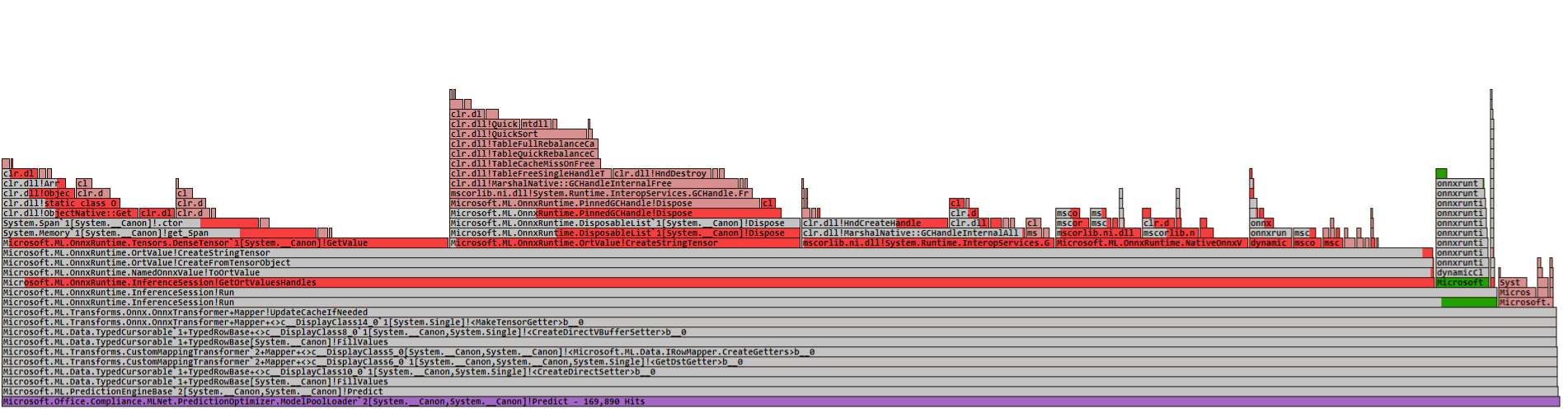
image with gcdump and stack of the object tree contributing the GCs (there are the object that survived), so not sure if these contribute to GC or different ones that got cleaned up.

Additional context
Details from our internal investagations:
I am finding that GC is a problem with new models,
CPU usage increased from 5% to 43% for GC.
Time taken for GC increased from 5 ms to 250ms.
All the other code is being blocked by frequent GC, this is causing P99 to increase ( code is locked when GC is running)
System is continuously busy with Garbage collection, caused by allocations from CreateStringTensor function. It is locking the service for long durations. the tests results are bad for P99 values, because the service gets locked from time to time because of GC execution and causes 500ms delays on predict calls.
We traced it to below stack
we profiled the service and got the delta between the old model and new model runs.
The delta pointed to GC. and the source of GC is the onnx internally calling
namedOnnxValue -->toOrtValue --> createFromTensorObj() --> createStringTensor()
there seems to be some sort of allocation bug inside ort that is causing the GC to go crazy high (running 30% of the time, vs 1% previously) and this causes drop in throughput and high latencies. (Only 1% of the time) (but I see that GC is not clearing up fine.)
To reproduce
We can share models and code internally.
Onnx model converted to ML.Net. Using ML.Net at runtime.
Models are updated to be able to leverage the unknown dimension feature to allow passing pre-tokenized input to model.
Previously model input was a string[1] and tokenization took place inside the model.
Urgency
Our rollout of 38 models is blocked, this was supposed to be a change that would reduce latency and save millions in COGS, but we are finding opposite behavior because of the GC issues.
Platform
Windows
OS Version
Windows server 2021
ONNX Runtime Installation
Released Package
ONNX Runtime Version or Commit ID
1.13.1
ONNX Runtime API
C#
Architecture
X64
Execution Provider
Default CPU
Execution Provider Library Version
ML.Net 2.0.1
Model File
Can share internally.
Is this a quantized model?
No
Activity
sanketshahMS commentedon Apr 12, 2023
I have tried to used the ONNX model directly with below code to try and not allocate memory on each call, but I see similar GC footprint here, and the runtime is 50% slower than ML.Net, if you can recommend changes to this, we can load test and profile it for latency and GC.
alamoot commentedon Apr 12, 2023
minor note to the ticket, the .Net version our team uses is .NetFramework 4.7.2
wschin commentedon Apr 13, 2023
Dmitri Smirnov (@yuslepukhin), do you have any idea? ORT C# is 2x slower than ML.NET's ORT interface.
yuslepukhin commentedon Apr 13, 2023
Stings are slower, because they require conversion/copy from native UTF-8 to UTF-16 strings. Both ways. Even without conversion it would be a copy and object creation (C# string vs std::string).
One of the objects that require GC is PinnedGCHandle. The managed memory passed on to native code requires pinning so GC does not move it. In this case, byte[] with utf-8 bytes. The object would unpin it. I was planning to get rid of it, and replace with Memory.Pin(), but the idea would be the same anyway.
The newest versions of .NET provide native marshalling while converting strings to/from UTF-8. But it would have to do the same thing.
Tensor memory with primitive data types is not copied but mapped directly both ways.
Also, with maps and sequences, there is not a way to avoid the copy currently.
If you would prefer to perform UTF-8 conversion, we can provide interfaces for that.
Also, it is already on the list, we can also provide direct access to tensor strings on the way out, that would also be UTF-8 (non zero terminated).
sanketshahMS commentedon Apr 13, 2023
we can use utf8.
do we still need some changes on your side to leverage what you described.
yuslepukhin commentedon Apr 13, 2023
Well, the GC would be on you side, that's all unless you are going to feed the same data.
I have some ideas in mind, but as Pranav Sharma (@pranavsharma) already mentioned, we do not have any upcoming release soon.
I can certainly iteratively produce some patches so you see if that helps and may be you could consume Nightly feed.
sanketshahMS commentedon Apr 13, 2023
We can test with nightly build.
As of now, is there no alternative code changes we can try to fix this.
Any changes in the model design or calling code can help fix it?
sanketshahMS commentedon Apr 13, 2023
Will running this in python have same issue? Meaning is the GC issue specific to c# only? And we can try running in c++ or python?
yuslepukhin commentedon Apr 14, 2023
Python is a GC based languge, but I never used it in production.
yuslepukhin commentedon Apr 14, 2023
I will try to produce a PR that may reduce some of it.
michaelgsharp commentedon Apr 14, 2023
Dmitri Smirnov (@yuslepukhin) this pr should fix the issue. Tanner Gooding (@tannergooding).
There may be more we can do to further optimize it, but this is a 2 to 5 times perf improvement (based on framework being used), runs much more stable, and removes the GC pressure. We should also be able to apply this same logic to many other places in the C# code.
This would be a bigger change, but if more of the underlying code were exposed, say for example allowing the user to create a C# tensor that was already backed by native memory, there would be more optimizations that could be done (specifically between ML.NET and ORT, but also for any user using the C# API).
yuslepukhin commentedon Jun 22, 2026
Use OrtValue API for better GC behavior.