Library
React Components / v9 (@fluentui/react-components)
System Info
https://aka.ms/fluentui-storybook
Are you reporting Accessibility issue?
No response
Reproduction
https://aka.ms/fluentui-storybook
Bug Description
[Shared color] BG 1 from hcCanvasText -> hcCanvas


[Shared color] FG 1 from hcCanvas -> hcCanvasText


(For Yellow FG 1 only, change should not impact other shared colors)
Yellow FG 1 from Yellow Shade 10 -> Yellow Shade 30

Badge Tint spec updated to reflect update

This update will help resolve this Teams bug:
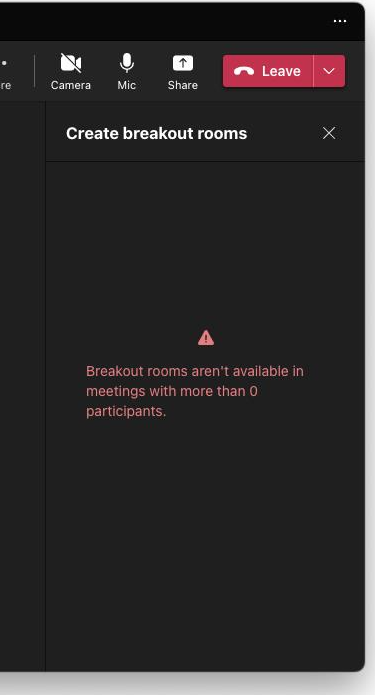
error string not visible in high contrast. This is because this element is using the same alias color token that is assigned to the tint badge. (Red Foreground 1)
Red Foreground 1 currently has Canvas (black) assigned in high contrast directly onto the content background, so in high contrast theme today the text is black on black.
Tint badge has been fine because it's paired w/ the background (Red Background 1) so as long as we change both FG1 and BG1 at once the badge should be unharmed.

cc @miroslavstastny
Logs
No response
Requested priority
Normal
Products/sites affected
No response
Are you willing to submit a PR to fix?
no
Validations

Library
React Components / v9 (@fluentui/react-components)
System Info
Are you reporting Accessibility issue?
No response
Reproduction
https://aka.ms/fluentui-storybook
Bug Description
[Shared color] BG 1 from hcCanvasText -> hcCanvas


[Shared color] FG 1 from hcCanvas -> hcCanvasText


(For Yellow FG 1 only, change should not impact other shared colors)

Yellow FG 1 from Yellow Shade 10 -> Yellow Shade 30
Badge Tint spec updated to reflect update

This update will help resolve this Teams bug:

error string not visible in high contrast. This is because this element is using the same alias color token that is assigned to the tint badge. (Red Foreground 1)
Red Foreground 1 currently has Canvas (black) assigned in high contrast directly onto the content background, so in high contrast theme today the text is black on black.
Tint badge has been fine because it's paired w/ the background (Red Background 1) so as long as we change both FG1 and BG1 at once the badge should be unharmed.

cc @miroslavstastny
Logs
No response
Requested priority
Normal
Products/sites affected
No response
Are you willing to submit a PR to fix?
no
Validations