Repository navigation
Tar on Windows is very slow when extracting many small files from tar files #27

Description

Environment
| Item | Value |
|---|---|
| OS, Version / Build | Windows 10 version 10.0.19041.388 |
| Processor Architecture | AMD64 |
| Processor Type & Model | Core i5 (Skylake) |
| Memory | 8GB |
| Storage Type, free / capacity (e.g. C: SSD 128GB / 512GB) | SSD 256GB |
| Relevant apps installed | ___ |
Description
Creating multiple small files is very slow: Windows Defender's real-time protection appears to makes things even slower but even when it's disabled Windows appears to lag behind Linux and macOS when handling multiple small files.
To show how slow Windows is at creating lots of small files, I downloaded the Firefox sources. Since it's a tar.bz2 file, I first uncompressed the .bz2 file to get the .tar file and all tests were done using this file as a source. It's a 852mb file that flattens to a directory containing 119 954 files.
I know it's an extreme case, but it's not rare having to deal with thousand of small files when working with npm, git, development, etc..
I added macOS results (running on a slow MacBook with a core m3) as a comparison.
| Operation | Windows 10 (protection on) | Windows 10 (protection on, folder excluded) | Windows 10 (protection disabled) | Ubuntu (WSL2) | macOS |
|---|---|---|---|---|---|
| flatten tar file | 28m38s | 3m14s | 1m29s | 15s | 50s |
| delete directory | 58s | 57s | 45s | 5s | 14s |
The commands I used were:
- Mac & Linux:
time tar -xf firefox-40.0.source.tarandtime rm -Rf mozilla-release - Windows (PowerShell):
Measure-Command { tar xf .\firefox-40.0.source.tar }andMeasure-Command { rm -r -fo .\mozilla-release\ }
I am sure that improving these file operations will benefit to a lot of different Windows use cases:
- installing Windows apps
- installing dev packages, like npm, ruby gems,...
- git operations on large repositories
- building apps/websites (webpack, C/C++ compilers,...)
- apps like VSCode that need to deal with lots of files in the background
- installing Windows updates
- even browsers like Chrome/Edge have caches with lots of files in it
- ...
Windows & Linux (WSL2) tests were run on a Surface Book 1/core i5/8gb/256gb SSD.
Mac tests were run on a 2017 MacBook 12" with a core m3/256gb SSD/8gb and Catalina 10.15.3
Applications used:
| App | Windows 10 | Ubuntu (WSL2) | macOS |
|---|---|---|---|
| tar | bsdtar 3.3.2 - libarchive 3.3.2 zlib/1.2.5.F-ipp (tar.exe that's included in Windows 10) | tar (GNU tar) 1.30 | bsdtar 3.3.2 - libarchive 3.3.2 zlib/1.2.11 liblzma/5.0.5 bz2lib/1.0.6 |
| delete tool | rm -r -fo (powershell alias) | rm (GNU coreutils) 8.30 | rm from Catalina 10.15.3 |
Activity
dada051 commentedon Aug 5, 2020
You can use Measure-Command in Powershell as a Linux's time equivalent
bitcrazed commentedon Aug 5, 2020
Thanks for filing this Nicolas Ramz (@warpdesign). It's a well known issue and one we're already hard at work measuring and figuring out how best to deliver meaningful improvements.
As soon as we have analysis, measurements, plans etc., we'll update this and related threads.
Bear with us - exciting stuff on the way 😀
lukeblevins commentedon Aug 6, 2020
I certainly notice when extracting a 1 GB+ ZIP file for Flutter SDK that speeds are throttled by Windows Security. Turning off Realtime Protection for the duration of the operation does make a difference.
bitcrazed commentedon Aug 6, 2020
Hey @duke7553 Thanks for sharing. Yes, this is a known issue and something we're actively working to address.
Could you please update your comment and add a few details as to which tool you're using to extract the zip, link to specific zip file,
measure-command { ... }output, etc. The more info & specifics you share, the more repro's we can analyze, and the greater likelihood that we can make meaningful improvements.Thanks.
warpdesign commentedon Aug 7, 2020
Rich Turner (@bitcrazed) The link to the tar.bz2 was already there (you first need to uncompress the bz2 file to get the tar file I used in the tests).
I added the version of the apps I used to flatten the tar file and to delete the folder.
The exact command line used for all systems was already there, only thing is that I measured using my phone's stopwatch function on Windows since I was using cmd and didn't know about
measure-commandof powershell.lukeblevins commentedon Aug 7, 2020
The Realtime Protection Tax Sits at 48%
When unzipping the 610 MB stable Flutter SDK 1.17.5 compressed archive, I get the following results in this order:
Windows Security Realtime Protection Disabled:
Completed in 3 minutes 25 seconds (205000ms)
Windows Security Realtime Protection Enabled:
Completed in 6 minutes 32 seconds (392000ms)
Other observations worth mentioning:
orcmid commentedon Aug 7, 2020
Installers pausing at 100% is even more disturbing :).
Non-expert observations: Depending on the size of the directory for the archive, I imagine it may take a while to isolate and load it (equivalent) before anything else starts happening. There's also a fair amount of integrity checking on a Zip apart from security scanning the individual parts. An interesting side-experiment is to do a virus scan of the unexpanded archive and see how long it takes on your system. (I confirm that just opening [not extracting] the 1.20.1-stable.zip in FIle Explorer is definitely not instantaneous although not particularly lengthy as long as I am expecting to see an empty directory for a time.)
dada051 commentedon Aug 7, 2020
I tried tar and 7-zip. 7z is much more efficient:

nmoinvaz commentedon Aug 7, 2020
I think that Windows Realtime Protection prevents file handles from closing until after it can scan the contents. That is why the delay for installers at 100% - waiting to close the files.
bitcrazed commentedon Aug 10, 2020
Thanks Nicolas Ramz (@warpdesign) & others.
FWIW re. TAR/ZIP archives
Tar and/or compressed/archive files are not signed and can contain arbitrary files. As such, in order to protect users from malicious files, anti-malware tools like Defender have to scan the contents of each file extracted from an archive before it is copied to disk.
This is doubly-so for files copied from potentially untrusted websites, and/or branded with the mark of the web.
This is just one of the reasons we encourage vendors of, apps, tools, SDKs and libraries to package their files in signed installers, rather than tar/zip files: When extracting the contents of a signed installer, Defender et al. can relax a little since the provenance of the installer and its contents are more easily determined.
I am preparing guidance on just this as I type and hope to have it published soon on this site's wiki/docs.
asklar commentedon Aug 11, 2020
Nicolas Ramz (@warpdesign) @duke7553 I'd be interested to learn whether you see Defender slowing things down even if you add an exclusion for the folder the file is on?
In Windows Security, click on Manage Settings under Virus & Threat protection settings

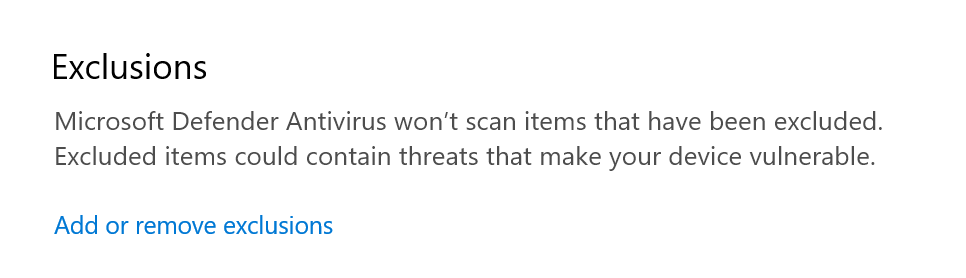
Then scroll down to the Exclusions section and click on Add or remove exclusions to add the folder to the excluded list
warpdesign commentedon Aug 11, 2020
Alexander Sklar (@asklar) I updated my issue with timings when the source folder is excluded. It's faster but Windows Defender still appears to be slowing things down. I also re-run all Windows benchmarks with Powershell's
Measure-Command.bitcrazed commentedon Aug 11, 2020
Thanks Nicolas Ramz (@warpdesign) - I have downloaded the Firefox 40 source code from the link you provided, extracted the
tarfile and then extracted the contents of the tar archive usingMeasure-Command { tar xf .\firefox-40.0.source.tar }During extraction, Defender was indeed very busy, scanning the extracted files:

But as I outlined above, this is Defender doing its job, protecting you from extracting potentially malicious content onto your filesystem from an archive who's integrity and provenance cannot be determined.
This said, we do understand that this can result in significant performance impact and are working with Defender and other teams on several approaches and improvements that should improve IO perf in particular.
Bear with us while we dig into this.
warpdesign commentedon Aug 11, 2020
I understand the job of Windows Defender but maybe there is a better way to block mailware/virus than checking every single file that's written to disk, the second it is written to disk?
This likely will happen in lots of different cases I listed above.
bitcrazed commentedon Aug 11, 2020
Nicolas Ramz (@warpdesign) It's all a series of trade-offs.
From Defender's perspective, it has no idea whether tar is about to extract 2 files or 2,000,000. Nor whether the archive it's extracting content from is "trustworthy", nor whether the archive has been tampered-with during/after transit. Nor, if something goes wrong, who the user should chase down to ask them why they've shipped an infected archive.
If Defender doesn't scan files as they're created/updated, then you could have malware on your machine. If it delays scanning until the file is accessed, the perf penalty is deferred until runtime which could slow down app startup or service runtime perf.
warpdesign commentedon Aug 11, 2020
I understand there has to be trade-offs but it appears to me something can be done so that it doesn't slow down some operations like extracting archives as much as it does (32 times slower in this specific case: 89s vs 2898s) and still ensures security for the user.
bitcrazed commentedon Aug 11, 2020
Nicolas Ramz (@warpdesign)
Which is why we're actively investigating various scenarios and issues closely related to the issue you describe above. We'll share details as and when we have concrete improvements landing, though note that some of these improvements will take a while to land. Rest assured, however, that work is ongoing as I type.
[-]Windows file/IO perf is slow when handling many small files[/-][+]Tar on Windows is very slow when extracting many small files from tar files[/+]bitcrazed commentedon Aug 20, 2020
I have just edited the title of this issue to accurately reflect the reported issue ... and the fix we deployed during last weekend!
What we did
Last week, I shared this issue with Defender, IO, and NTFS partner teams and we worked together to repro, measure, trace, and analyze the issue with tar taking far longer than expected to extract a large source archive on Windows.
What we found
It turns out that Defender was synchronously scanning each file as it was extracted, significantly impacting tar's ability to extract files quickly. This was somewhat surprising since Defender already has special-case heuristics for archiving tools like 7Zip, WinZip, etc. wherein it defers scanning of the extracted files until after the extraction completes.
What we fixed
The team implemented and tested a fix in their signatures & scanning engine, adding tar to the same heuristic, and extraction of the test case - Firefox's source archive - dropped from ~31 mins to ~3 mins!
This improvement was deployed live by the Defender team last weekend, so if your machine is up to date with its Defender signatures, etc. you should also see that it now only takes < 3 mins (depending on your hardware) to extract the archive above.
Here's how long my Surface Pro 4 (Core-i7 256GB SSD) takes to extract Firefox's source tarball on Windows:

This will also likely significantly improve the performance of extracting WSL Linux distros' files when installing Linux distros from the Microsoft Store.
We're not done yet!
While this is a considerable improvement, we're not done yet! We're also hard at work behind the scenes analyzing and working on a number of filesystem/IO related performance improvements that we expect will result in yet more performance improvements to this and many similar scenarios.
Stay tuned for more on this as we make progress.
Thank you!
Nicolas Ramz (@warpdesign) & all - Thank you for filing this issue, sharing repro steps, your measurements, etc. We're excited to work with you all to find and fix this issue so quickly. Do please keep the feedback and issues coming. We can't always guarantee to be able to deliver fixes quite this quickly, but know that we appreciate your feedback and are working hard to remedy the problems you report!
Sincerely, Rich (on behalf of the Defender, IO, and Filesystem teams) 😀