Repository navigation
WSL [--set-version] fails with message 'Element not found' when converting to WSL 2. #5631
Description

Environment
Windows build number: [run `[Environment]::OSVersion` for powershell, or `ver` for cmd]
Your Distribution version: [On Debian or Ubuntu run `lsb_release -r` in WSL]
Whether the issue is on WSL 2 and/or WSL 1: [run `cat /proc/version` in WSL]
Windows build number:
Win32NT 10.0.19041.0 Microsoft Windows NT 10.0.19041.0
Current WSL1 Distro:
Release: 20.04
WSL Distro version:
Linux version 4.4.0-19041-Microsoft ([email protected]) (gcc version 5.4.0 (GCC) ) #1-Microsoft Fri Dec 06 14:06:00 PST 2019
Steps to reproduce
After performing the WSL 2 upgrade using the guide:
https://docs.microsoft.com/en-us/windows/wsl/install-win10
I checked my current distributions.
❯ wsl -l -v
  NAME      STATE           VERSION
* Ubuntu    Running         1
Then i ran the update command to set the current Ubuntu distro to WSL 2.
> wsl --set-version ubuntu 2
Conversion in progress, this may take a few minutes...
For information on key differences with WSL 2 please visit https://aka.ms/wsl2
Element not found.
Then it fails with the message.
Expected behavior
The upgrade should succeed and the Distibution should be converted to WSL 2.
Actual behavior
The upgrade fails and the Distibution stays WSL
Log files
I've provided the etl trace files.
set-version etl logs.zip
Activity
Lazare-C commentedon Jul 22, 2020
Same problem and I cant launch any wsl

ulziibat-n commentedon Jul 22, 2020
Same here ... 😭😭😭 What i should do?
licanhua commentedon Jul 23, 2020
I didn't see any error on your picture:
wsl --set-default-version 2looks goodlicanhua commentedon Jul 23, 2020
Ben Hillis (@benhillis) CreateNetworkEnd fails with 0x80070490
benhillis commentedon Jul 23, 2020
Interesting. Could somebody who is hitting this issue please take networking logs?
Thanks!
martijnvanschie commentedon Jul 23, 2020
I think yours works 👍
Do a
wsl -l -vto see the versionsulziibat-n commentedon Jul 23, 2020
Yes. Now works fine.
After updated Windows 10 and WSL. My distro still works on WSL1.
I'm uninstalled my distro, then installed back. After this quick step my distro works on WSL2.
Thanks all ...
martijnvanschie commentedon Jul 23, 2020
Hi Ben Hillis (@benhillis). I took a network log as described.
https://aka.ms/AA9286r
Hope this helps solve the issue.
Regards.
imsumitrai commentedon Jul 25, 2020
Mine was working fine after restart it stop working.

I reinstalled package from https://aka.ms/wsl2-install
What to do?
martijnvanschie commentedon Jul 26, 2020
Hi Sumit Rai (@imsumitrai). You have the same error message as I get.
I posted a network trace on the Feedback Hub so hopefully they can find something soon.
martijnvanschie commentedon Aug 4, 2020
Hi Ben Hillis (@benhillis) . Did you get a chance to check the network log?
I'm really eager to get this problem solved.
Regards,
Martijn
imsumitrai commentedon Aug 14, 2020
Hi Ben Hillis (@benhillis).
Please address this issue.
We all are stuck on this. Nothing works.
I am eagerly waiting for this.
Unfortunately my DockerDesktop stops working after this issues. It requires WSL2 working.
Unfortunately my docker desktop even won't able to run on Hyper-V enabled.
gitsoup commentedon Aug 23, 2020
Same here, that error still exists.
imsumitrai commentedon Aug 27, 2020
If anyone found the solution please help me.
This error is killing me.
gitsoup commentedon Aug 27, 2020
OneBlue commentedon Aug 27, 2020
We acknowledge the issue and we are actively working on it. I'll update this thread when we'll have more information.
martijnvanschie commentedon Aug 27, 2020
Good to hear its been picked up. Hope a solution is found soon 😀
ootjersb commentedon Aug 28, 2020
I was able to overcome this error by uninstalling any network component (such as VPN client). I could also see within Hyper-V Manager whenever I created a new virtual machine that opening network settings was taking a long time, and after that time nothing appeared. Maybe your situation is similar.
martijnvanschie commentedon Aug 28, 2020
The Hyper-V issues was also the case before i moved to WSL2 which does not require Hyper-V anymore. But i had the same "unresponsiveness" with the network settings. This is also trying to get the Virtual Network Adapters.
imsumitrai commentedon Aug 28, 2020
Finally it works..
I performed network reset. after that my internet stopped working.
So I was able to figure out the culprit driver which is blocking my network.
After that I uninstalled that culprit driver and after a restart. Wewww everything start working.
For reference my adaptor configuration looks like this now.

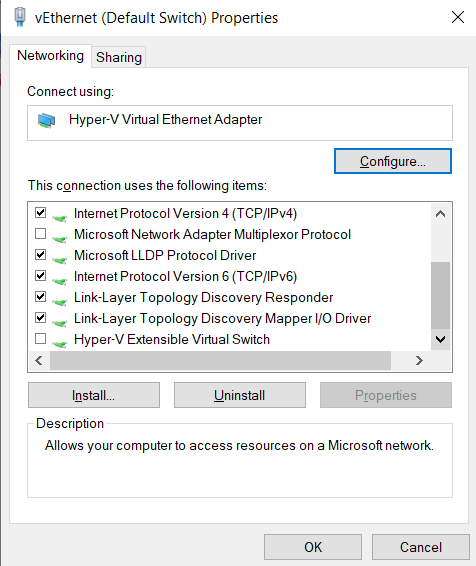
If you have any issue either disable/ or uninstall other driver which you think is culprit and restart.
martijnvanschie commentedon Jul 30, 2021
Closed this issue because it does not occur on my end anymore but not sure how it got fixed to be honest. Feedback from WSL2 team was not what fixed it in this case so I can post solution. Sorry.