Repository navigation
Unable to accessing Windows applications from WSL #4793
Description

Please fill out the below information:
-
Your Windows build number: Microsoft Windows [Version 10.0.19041.1]
-
What you're doing and what's happening:
-
follow this document start a node app on Windows (Powershell 7.0.0-rc.1);

-
request the app from WSL;
  NAME      STATE           VERSION
* Ubuntu    Running         2

- What's wrong / what should be happening instead:
Unable access Windows applications from WSL.
Activity
craigloewen-msft commentedon Jan 2, 2020
Seems likely that this is related to this issue: #4139
therealkenc commentedon Jan 2, 2020
Related #4619 (it can be both, too).
On the Windows side, listen on
172.17.48.1(or a subnet) instead of127.0.0.1. Or ever-popular0.0.0.0.numeric-lee commentedon Jan 20, 2020
I was able to use graphic applications in WSL using XMING and Export DISPLAY=:0.0
However, once I upgraded to WSL2 and switching to Export DISPLAY = 172.28.801:0 (my host#) it failed to connect
Things tried:
downloading VcXsrv
switching to another graphics application
running vcxsrv -ac from bash (command not recognized)
running vcxsrv -ac from powershell (command not recognized)
turning firewall off
My Windows 10 build: 19041.1
Here is a typical error message
QStandardPaths: XDG_RUNTIME_DIR not set, defaulting to '/tmp/runtime-lw' qt.qpa.screen: QXcbConnection:
Authorization required, but no authorization protocol specified
Could not connect to any X display.
In #4106 you advise to run "vcxsrv -ac" from the bash command line and at least one user accepted that as a solution. I downloaded vcxsrv.exe from sourceforge as an .exe outside of bash, and I see no way to execute it from bash
Many thanks
fredericseiler commentedon Jan 22, 2020
Hi,
A quick & dirty workaround
Install VcXsrv, then run XLaunch:

Specify your display port:

Select "Start no client":
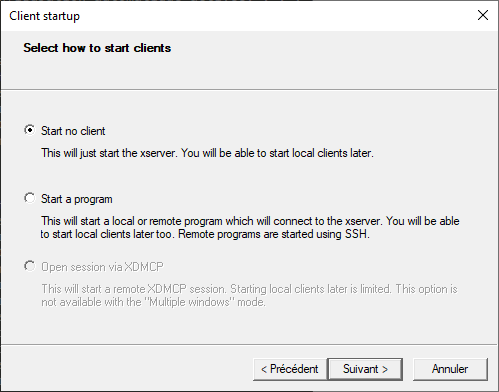
Don't forget to check "Disable access control" (the "-ac" switch, listen on all interfaces):

Finish the configuration and verify that VcXsrv is actually listening on all interfaces (

hostname:0.0):Find your host LAN IP address (your real Ethernet/Wifi IP, ex. 192.168.1.3)
On your wsl distro shell, modify the $DISPLAY env:
Then, you can start any GUI app:
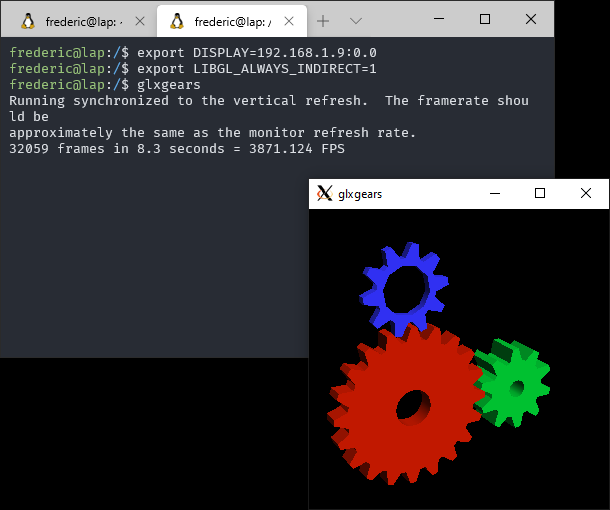
At the time of writing, for any wsl > host connection, you have to listen on the host side for all interfaces (eg. 0.0.0.0) and specify the host LAN IP address on the wsl distro side:
If you really want to use the
/etc/resolv.confhost IP address (the one from the Hyper-V virtual ethernet adapter), you have to play with the public profile of Windows Defender Firewall. At your own risk. Dealing with private profile rules makes me much more comfortable.numeric-lee commentedon Jan 29, 2020
Frederic Seiler (@fredericseiler) therealkenc
Thanks for the clear response and the additional details
I followed your instructions, still experiencing the same issues
I am running with the windows firewall turned off
the IP address has been dummified
(base) yy@ZZ:
$ export DISPLAY=999.88.77.1:0.0$ export LIBGL_ALWAYS_INDIRECT=1(base) yy@ZZ:
example 1
(base) yy@ZZ:
$ spyder &$ QStandardPaths: XDG_RUNTIME_DIR not set, defaulting to '/tmp/runtime-yy'[1] 18558
(base) yy@ZZ:
qt.qpa.screen: QXcbConnection: Could not connect to display 999.88.77.1:0.0
Could not connect to any X display.
example 2
(base) yy@ZZ:
$ glxgears &$ Error: couldn't open display 999.88.77.1:0.0[1] 19820
(base) yy@ZZ:
Any additional suggestions? any workarounds where I fallback on the methods which worked successfully in WSL1?
fredericseiler commentedon Jan 29, 2020
It's one of a kind IP address you got there.
numeric-lee commentedon Jan 29, 2020
The iP address has been dummified :)
fredericseiler commentedon Jan 29, 2020
Didn't see that part, my bad. You don't need to obfuscate the IP, as only devices in your own private network can reach it. Or maybe are your trying to use your WAN IP ?
What is the result of a
ping host_lan_ip_addressfrom your WSL distro ?numeric-lee commentedon Jan 29, 2020
Frederic Seiler (@fredericseiler) therealkenc
I just solved it with that last hint. Your instructions were accurate, superior to the official documentation, and much appreciated. However, there were two different IPv4 Addresses, one for the Ethernet adapter and one for the WiFI. Once I substituted the second IPV4 address, it worked. Thanks so much.
fredericseiler commentedon Jan 29, 2020
I'm glad if that helped you ;)
Alternatively, you can mess around with the Windows Firewall and disable the WSL interface protection (while letting the Firewall turned on for the other interfaces) every time you start your computer (for example, via a powershell script in a scheduled task). This way, you can use the host Hyper-V IP (the one from
/etc/resolv.conf). And as a bonus, you can add linux-side services automatic startup in your script.Other options:
winest commentedon Feb 19, 2020
I come up with an script after checking discussions, which makes things easier without adding Firewall rules and not exposing public IP.
[Updated Feb.21]
For enterprise firewall, try also adding this
powershell -Command "Set-NetFirewallProfile -DisabledInterfaceAliases \"vEthernet (WSL)\""To make it works:
That's all to make WSL2 works automatically. The idea is to get the private LAN IP of WSL interface on Windows, and use Environment variable to pass to WSL. WSL then update this LAN IP to DISPLAY for X-Server connection.
gx761 commentedon Feb 27, 2020
This issue should not be closed, the solution provided by Frederic Seiler (@fredericseiler) only works when the service on host machine is listening on 0.0.0.0. But in my case, there is a proxy service listening on localhost, and the service is initiated by another software which is not configurable. To access any internal resources from my company, I have to visit through this proxy. Before, in wsl1, the proxy is usable by setting --proxy=http://127.0.0.1:12639. However, since wsl2 does not have built-in support for this and the solution mentioned above cannot deal with this either, I really hope the microsoft team can put some serious effort on this and give us a clean solution. Just try to be consistent with the wsl1.
KindDragon commentedon Mar 19, 2020
This worked for me:
#4106 (comment)
1 remaining item
gwd999 commentedon Mar 29, 2020
same problem - none of the above work on WSL2 neither with Xming nor with VcxSrvr. Tried all of them EXPORT DISPLAY=localhost:0.0 (or 127.0.0.1) or DISPLAY=Some.WSL.IP.Address:0 -> NOPE nothing can be done to make WSL2 (in my case Ubuntu 18.04) run some xeyes or xclock X-Windows, not to mention any Firefox or similar app. The only solution for me was to set up a fully fledged X-Windows env on Ubuntu and log into it via Remote Desktop; NOT really what was intended with WSL2 in the first place, was it?
fquinner commentedon Apr 1, 2020
For what it's worth, I put some documentation together on how to get the firewall playing nicely with X11 here:
https://github.com/cascadium/wsl-windows-toolbar-launcher#firewall-rules
My main problem was I didn't realize that that security prompt actually adds a Block rule when you uncheck that box as opposed to simply deciding not to add an Allow rule. So I needed to both disable that rule, and add my own to allow the path through.
The IP i use in my
.bashrcis from:famelis commentedon Apr 5, 2020
(2nd update)
I created some scripts, which can be run either when boot or from WSL or from Powershell.
They launch, in a transparent manner. a windowed KDE, using VcXsrv and the accompanying Xlaunch. It works very well and has no problems with reboots or shutting it down and back again
A 2nd working version has been uploaded at:
https://github.com/famelis/wsl2-x11
luochen1990 commentedon Apr 25, 2020
Frederic Seiler (@fredericseiler) I'm trying your powershell solution, and it works well (tips: we need
set-ExecutionPolicy RemoteSignedand set up this task as admin authority). But there is a little issue: the windows defender still display the unsafe wranning, I believe this is a false positive, but it disturbing... hoping that the clever guys of MS fix it...medmin commentedon Dec 29, 2020
This works for me.
But I had to execute
wsl --shutdownin PowerShell to restart wsl2OlivierMiriel commentedon Apr 30, 2021
Hi,
I might be not so skilled as you guys because I think I tried what I have red here but without any success:
I am on Ubuntu 20.04.2 LTS on WSL2.
my Ethernet vEthernet (WSL) IPv4 is 192.168.xx.y.
VcXsrv is launched
then I tried:
$ export DISPLAY=192.168.xx.y:0.0
$ export LIBGL_ALWAYS_INDIRECT=1
but whatever I try to launch it doesn't open anything...
something is wrong, but where should I look first ?
thanks
lackovic commentedon May 7, 2021
Use the following command instead:
export DISPLAY=${DISPLAY:-$(grep -Po '(?<=nameserver ).*' /etc/resolv.conf):0}OlivierMiriel commentedon May 8, 2021
thanks lackovic,
I've tried your suggestion, with -oP or -Po, but unfortunately it's still not working...
one question: should I keep the following line in the bashrc ?
export LIBGL_ALWAYS_INDIRECT=1at the moment my bashrc looks like as below, and includes several lines I have tested with no success:
I am still hoping it will be possible to fix this issue..
lackovic commentedon May 10, 2021
Yes.
Try following these instructions.
therealkenc commentedon May 10, 2021
No. This guidance (tragically) made it into several widely distributed guides for X11 on WSL, and is incorrect.
Remove unnecessary line
lackovic commentedon May 25, 2021
After I removed it I got the following errors every time I ran a Windows application through XLauch (VcXsrv):
Setting
Wgl="False"in my XLaunch configuration has fixed the issue.lengocthuong15 commentedon Aug 28, 2021
In my case, I am using MobaXterm and it built-in X11 server, so I need to enable all process like this in firewall in order to access WSL GUI
(Besides all the setting likes export DISPLAY variable, enable firewall rule for port 6000)
Goto :
Control Panel\All Control Panel Items\Windows Defender Firewall\Allowed appsghylander commentedon Feb 24, 2022
Hi all, I've been following the suggestions and many fixes in this thread, to no avail
I've been having trouble setting up gui support for wsl2, and honestly the docs are laughable
After following the many comments here, I managed to get gimp to start (the app I've been using to debug this)
However, I'm now getting an error with a x server resource being unavailable, after which the program crashes. The GIMP start up window and toolbars will show up for a second before it crashes. Here the error:
What could be the cause of this? I already added a firewall rule to accept TCP traffic in port 6000, and made sure VcXsrv is allowed to communicate through the firewall.
I tried the batch file and /.bashrc "trick" but I get the exact same result