Repository navigation
**[WARNING]** WSL unusable in build 18272 (No such interface supported) #3645

Description

There is an issue in this build that makes WSL inoperable. When trying to launch your distribution you will see a “No such interface supported” error. The issue has been fixed and will be in next week's Insider Fast build. If you've installed this build you can roll back to the previous Windows build using “Go back to the previous version of Windows 10” in Settings->Update & Security->Recovery.
Reacted by Refael Ackermann, Alex Malinovich, Kevin Robatel, Eric McCormick, Matthew Fay, Balint Kardos, Shanti, Mikael Karon, Elizabeth Anne Cray, Tatu Tamminen and 1 more
Reacted by Dave Jensen, Loongphy, L1ttleFlyyy, DDoSolitary, Kevin Robatel, Matthew Fay and David Duong
Activity
therealkenc commentedon Oct 31, 2018
Thanks so much for the heads up Ben. My radiator fan is whirring as we speak while 18272 installs in the background. Work-around: hold together a week of uptime somehow.
benhillis commentedon Oct 31, 2018
therealkenc - No problem. I feel bad about this but luckily the rollback mechanism works well and is actually surprisingly fast.
Biswa96 commentedon Oct 31, 2018
Lxss User session <--> Lxss Instance connection gone... poof....
Workaround: Is there any black magic to use old LxssManager.DLL file in newer builds?
benhillis commentedon Oct 31, 2018
Biswapriyo Nath (@Biswa96) - Unfortunately not, I suggest rolling back.
Biswa96 commentedon Nov 1, 2018
The whole WSL subsystem isn't affected. Install, uninstall, get-, set-properties, get-id, get-, set-default work as usual. Also there is a new feature in ConHost.exe. I am using build 18272 in VirtualBox.
Out of curiosity, why do you introduced the 15 seconds delay in Lx instance termination? The release notes didn't say something about that.
benhillis commentedon Nov 1, 2018
Biswapriyo Nath (@Biswa96) - "My car isn't broken, I can open the door, turn on the lights, adjust the seats, I just can't start it!"
[-]**[WARNING]** WSL unusable in build 18272[/-][+]**[WARNING]** WSL unusable in build 18272 (No such interface supported)[/+]Loongphy commentedon Nov 2, 2018
my god!!I have been struggling with this problem for 3 hours !!
dinfyru commentedon Nov 3, 2018
So what we can do for work now?
Biswa96 commentedon Nov 3, 2018
dinfyru
refack commentedon Nov 4, 2018
Ahhh 😨 I have this bad situation with a faulty piece of hardware, in order to easily rollback I need this key in my registry (Including in the PE environment):
Details
Can anyone give me a simple recipe for that?
(I'm nimble with DISM, I know how to mount
R:\Recovery\WindowsRE\Winre.wim, and I have a licence to ntlite and I've used Win10PE before. I just can't seem to grok how to slipstream a simple reg change into the update pipeline. ETOOMANYGUIDES)benhillis commentedon Nov 4, 2018
If you can not tolerate the occasional bug, the insider fast ring is likely not a good fit for you.
1 remaining item
refack commentedon Nov 5, 2018
Took the rollback over the night, now I'm back on 18267 and WSL is working great.
Again, thank you all for making WSL such a valuable part of my toolkit 🎩
fenchu commentedon Nov 6, 2018
There was a new version of hyper-v aswell. having spend 2hours upgrading all my vms, I rather use cygwin.
benhillis commentedon Nov 7, 2018
Fixed in 18277.
ramyd-a5 commentedon Nov 7, 2018
this is fixed in the latest update: 18277
Biswa96 commentedon Nov 7, 2018
Ya, it works in new build 18277. Happy WSL-ing!
Ben Hillis (@benhillis) It looks like there was a Swiss Army knife beside driver seat in our old car ;)
refack commentedon Nov 8, 2018
Confirm fixed:
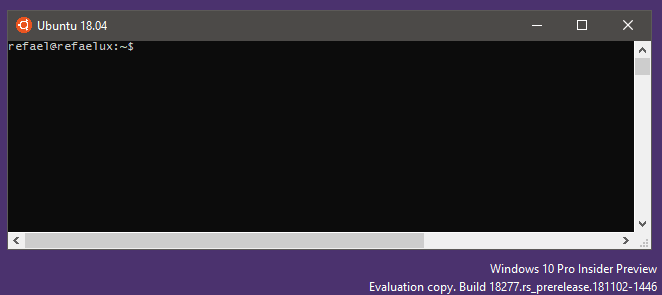
Thank you all again!
mqudsi commentedon Nov 14, 2018
The only problem I have with the rollback mechanism is that afterwards Windows Update always tries to reinstall the same build I rolled back.
therealkenc commentedon Nov 14, 2018
'Relax' said the night man,
We are programmed to receive.
You can roll back any time you like,
But you can never leave. 🎵
benhillis commentedon Nov 14, 2018
therealkenc - I hate the f'ng eagles, man!
djensen47 commentedon Nov 15, 2018
What I do is "Pause Updates" and then you don't need to worry about it. 😃
Biswa96 commentedon Nov 17, 2018
Apology for hijacking this issue 🙇♂️ Sometimes while I'm (ab)using with LxBus internals in build 18277 I got 50% CPU usage with
/initprocess. Should I post that in a separate issue?benhillis commentedon Nov 17, 2018
Biswapriyo Nath (@Biswa96) - sure, create a new issue with some proof of concept code and I can take a look.