Repository navigation
Renaming file triggers error in tsconfig.json #46432

Description

TS Template added by Matt Bierner (@mjbvz)
TypeScript Version: 4.5.0-dev.20211019
Search Terms
- jsconfig / tsconfig
- config
- configFileDiag
See #46432 (comment) for the simplest repo
Issue Type: Bug
The project is in JS but has configured TS support with tsconfig.json. After renaming source file in explorer pane, following error appears twice in problems pane pointing to tsconfig.json:
File '/home/jarek/work/wymarsz/wk-web/node_modules/source-map/source-map' not found.
  The file is in the program because:
    Root file specified for compilation
The issue appears also with all extensions disabled.
The error goes away after window reload.
Reproductible: always.
VS Code version: Code 1.60.0 (e7d7e9a9348e6a8cc8c03f877d39cb72e5dfb1ff, 2021-09-01T10:43:02.136Z)
OS version: Linux x64 5.4.0-81-generic
Restricted Mode: No
System Info
| Item | Value |
|---|---|
| CPUs | AMD Ryzen 5 3400G with Radeon Vega Graphics (8 x 2002) |
| GPU Status | 2d_canvas: enabled gpu_compositing: enabled multiple_raster_threads: enabled_on oop_rasterization: disabled_off opengl: enabled_on rasterization: disabled_software skia_renderer: enabled_on video_decode: disabled_software vulkan: disabled_off webgl: enabled webgl2: enabled |
| Load (avg) | 1, 1, 1 |
| Memory (System) | 29.34GB (23.56GB free) |
| Process Argv | --unity-launch --crash-reporter-id 75655822-4d79-453c-9a0d-23266699ca32 |
| Screen Reader | no |
| VM | 0% |
| DESKTOP_SESSION | ubuntu |
| XDG_CURRENT_DESKTOP | Unity |
| XDG_SESSION_DESKTOP | ubuntu |
| XDG_SESSION_TYPE | x11 |
Extensions (6)
| Extension | Author (truncated) | Version |
|---|---|---|
| vscode-eslint | dba | 2.1.23 |
| gitlens | eam | 11.6.0 |
| EditorConfig | Edi | 0.16.4 |
| prettier-vscode | esb | 8.1.0 |
| dotenv | mik | 1.0.1 |
| sass-indented | syl | 1.8.18 |
(1 theme extensions excluded)
A/B Experiments
vsliv368:30146709
vsreu685:30147344
python383cf:30185419
pythonvspyt602:30300191
vspor879:30202332
vspor708:30202333
vspor363:30204092
vswsl492:30256859
pythonvspyt639:30300192
pythontb:30283811
pythonptprofiler:30281270
vshan820:30294714
vstes263:30335439
pythondataviewer:30285071
pythonvsuse255:30340121
vscod805:30301674
pythonvspyt200:30340761
vscextlangct:30333562
binariesv615:30325510
vsccppwt:30329788
pythonvssor306:30344512
bridge0708:30335490
pygetstartedt2:30360495
bridge0723:30353136
pythonf5test824:30361777
vsdyn478:30356813
pythonvspyt187cf:30362783
pydsgst2:30361792
vscus224:30358039
vssid140:30362080

Reacted by Anders Madsen, Benjamin Vincent, Leandro Aguiar, j4k0xb, rjrobben and DBeidachazi
Activity
zgoda commentedon Sep 7, 2021
Moving file in explorer triggers the same issue.
tsconfig.jsoncontent:{ "compileOnSave": false, "compilerOptions": { "jsx": "preserve", "jsxFactory": "preact.h", "jsxFragmentFactory": "preact.Fragment", "allowJs": true, "checkJs": true, "noEmit": true, "moduleResolution": "node", "target": "ESNext", "module": "esnext", "resolveJsonModule": true, "allowSyntheticDefaultImports": true, "downlevelIteration": true }, "include": ["node_modules/wmr/types.d.ts", "**/*"], "typeAcquisition": { "enable": true } }mjbvz commentedon Sep 7, 2021
Please share a minimal example project that demonstrates the issue
zgoda commentedon Sep 8, 2021
Not exactly minimal: https://github.com/zgoda/wk-web
Really minimal is skeleton project created with
npm init wmr@latest myproject.mjbvz commentedon Sep 8, 2021
Please share steps to reproduce that using the project
zgoda commentedon Sep 8, 2021
tsconfig.jsonappears.tsconfig.jsongoes away.Subsequent rename operations do not trigger this behaviour.
zgoda commentedon Sep 20, 2021
The same happens on OS X:
Also, editing
tsconfig.jsonalso triggers this behaviour.zgoda commentedon Sep 20, 2021
I see people asking for that on Reddit and SO and the only answer is "reload window to fix temporarily".
The package (and file) definitely exists:
zgoda commentedon Oct 11, 2021
File
jsconfig.jsonin another project triggers the same kind of errorTarrowren commentedon Oct 12, 2021
install adler-32
create jsconfig.json
{
  "compilerOptions": {},
  "include": ["src"],
  "exclude": ["node_modules"]
}
If no error is reported, edit jsconfig.json multiple times

mjbvz commentedon Oct 19, 2021
Thanks! Confirmed this in the latest typescript build
Using the steps in #46432 (comment), I also confirmed the
typesdirectory does exist on diskTarrowren commentedon Oct 20, 2021
My solution #42840 (comment)
and I think these two are the same problem
13 remaining items
Luxcium commentedon Dec 1, 2022
As I mentioned in #43838 :
For the moment I have changed my keybindings (using VS Code) and I think I will be using them often so I will probably change them again...
It remaps some default keybindings, You probably need something similar depending on your workflow...
DanielRosenwasser commentedon Dec 16, 2022
It sounds a whole lot like TypeScript 4.8's file-watching fixes and TypeScript 4.9's usage of file system events should alleviate this issue. The 4.8 fix targeted Unix-like systems (including Linux and macOS) if that's relevant to anyone reading this.
So I'm curious to hear if anyone is experiencing this with the latest version of TS.
jleclanche commentedon Dec 17, 2022
Daniel Rosenwasser (@DanielRosenwasser) yes, I've been able to reproduce this in WSL and TS 4.9. I don't remember if I experienced it on Linux itself.
Ashin-55 commentedon Jan 24, 2023
i got the same error while renaming any file ,
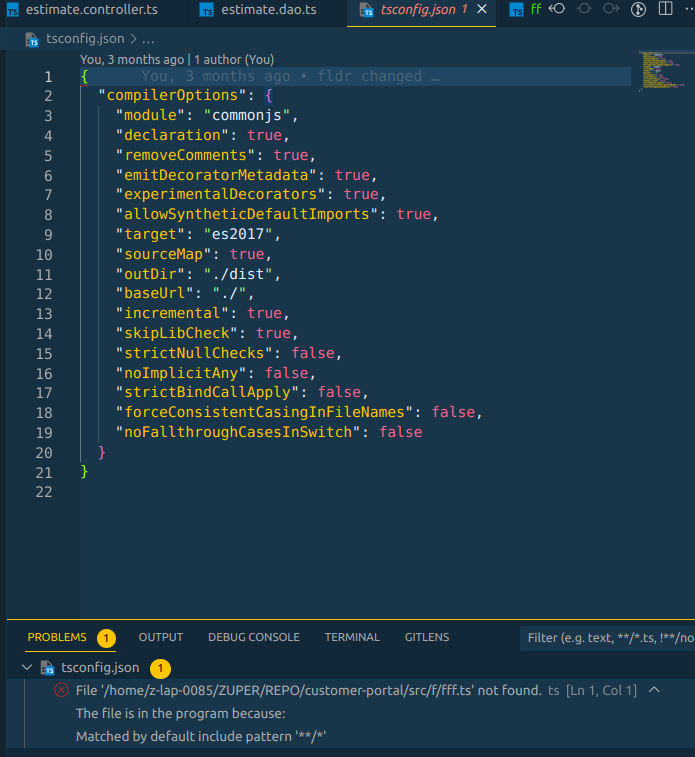
then I reopened the code again, and that time the error is not showing...
typescript 4.3.5
sandersn commentedon Feb 6, 2023
The repro I get now is exactly #43838, so I think the original bug has been fixed -- the bizarro "thing in node_modules is not found" been replaced by the similar, slightly better, but obviously-wrong "The old name of the thing you renamed is not found."
jonschlinkert commentedon Jul 2, 2024
I still have this error, literally every time I rename any file.
gameprogrammingsteven commentedon Jul 4, 2024
I just got this error as well. It seems to repro when I rename things above my src dir for React. It does not fix when I re-rename it file -> file_old -> file again (.tsx extension)
ChristopherHaws commentedon Jul 23, 2024
This issue should not be closed. I have been dealing with this issue for over a year now, it's an awful developer experience. Is it really that hard to watch the file system? I feel like every other language is able to do this... For the longest time I thought it was just a local environment, but even on fresh installs of Windows or Linux I instantly run into this issue. I have tried different configurations of
typescript.tsserver.watchOptions,files.watcherInclude, andfiles.watcherExcludein VSCode to no avail.NOTE: I am using
pnpmand notnpmsheetalkamat commentedon Jul 23, 2024
If this is still an issue, you should file a new issue with clear steps to repro, tsserver log so that can be investigated.
gameprogrammingsteven commentedon Aug 18, 2024
If you need clearer instructions than "rename file", maybe you're not meant for this job.
RyanCavanaugh commentedon Aug 19, 2024
Stephen J (@gameprogrammingsteven) please refer to the code of conduct and consider yourself warned re "insults"