Original issue is #135, which has been split into multiple issues.
We need UI specs and implementation for:
- When the bot is offline, due to
- Never able to connect successfully (or a definite result for not able to connect)
- In the first 5 seconds, don't say it's not able to connect
- UI for bad configuration (wrong secret or access token)
- If it last for > 5 seconds , we should show an error
- We need to find a good number, is 5 seconds 'longer than usual'?
- UI for network error
(This thread is very long -- please see the summary so you don't have to read every comment. :) )
Summary
- Modify "Send failed, retry" text to "Send failed. Retry"
- Message will show above the sendbox (static location), and disappear when status is fixed. Message will not bump up or scroll when new messages are added
- We will use the warning or error icon for both statuses:
- ! Web Chat is taking longer than usual to connect. Retrying in 30 (will countdown) seconds. (Retry now)(button) - Warning icon
- ! Web Chat is unable to connect. Error icon
- Warning for taking longer than usual will appear after ~15 seconds, but this number is pending adjustment after design sees the implementation
- Full error "unable to connect" will show up when we receive a failing HTTP header OR after inability to connect after 20 seconds. -- this is also pending adjustment for after design team sees implementation
What we need
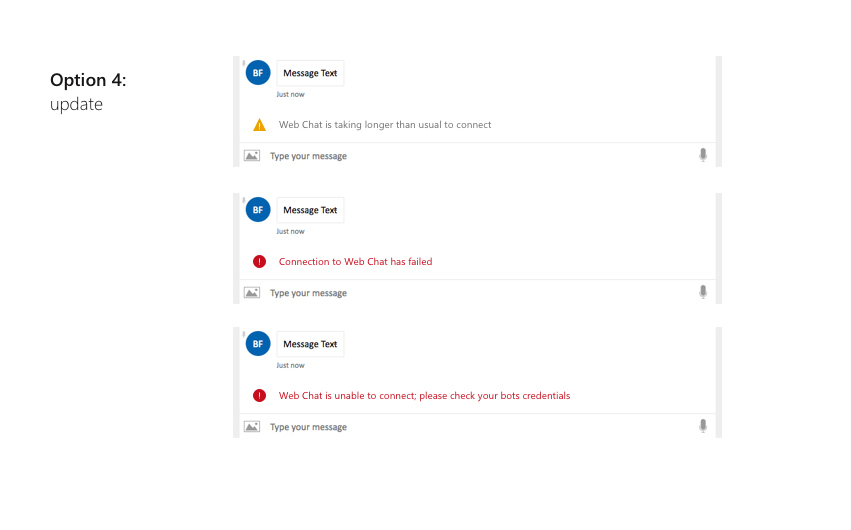
Text:
Web Chat is taking longer than usual to connect. Retrying in 30 seconds. (Retry now)(button)
Web Chat is unable to connect.
> ‘Web Chat is unable to connect; please check your bot's credentials’


Original issue is #135, which has been split into multiple issues.
We need UI specs and implementation for:
(This thread is very long -- please see the summary so you don't have to read every comment. :) )
Summary
What we need
Text: