Actual Result:
Luminosity Contrast Ratio of 'Text' which appears after ''Adaptive cards that is broken because of invalid language' button is 4.0:1.
Note - Same issue repro at -
- 'Text' which appear after ''Adaptive cards that is broken because of invalid Version' button is 4.0:1.
- Text 'No renderer for this attachment' appear after activating "Show an attachment of unknown type" button.
Expected Result:
Luminosity Contrast Ratio for 'Heading Text - No renderer for this attachment' should be greater than or equal to 4.5:1.
Repro Steps:
- Open URL https://microsoft.github.io/BotFramework-WebChat/full-bundle/ in Edge browser.
- Notice 'Upload File' and 'Send' button icons present in bottom of screen.
- Type 'Help' in the input control at the bottom of the screen and hit enter (or click on send button).
- Content will upload, Navigate to any "Adaptive cards that is broken because of invalid language" button by using Tab key and press Enter on it.
- New data will upload.
- Open 'Colour Contrast Analyser' and select Foreground & Background color of mentioned elements one by one.
- Observe that Luminosity Contrast Ratio of text is less then 4.5:1.
User Impact:
Users with low vision or Color blindness will find it difficult to access content with low luminosity contrast ratio.
MAS Reference:
MAS 1.4.3 – Contrast (Minimum) (17)
Test Environment:
OS: Windows 10
OS Build: 17134.345
OS Version: 1803
Browser: Edge
Tool: Color Contrast Analyser
Attachment:
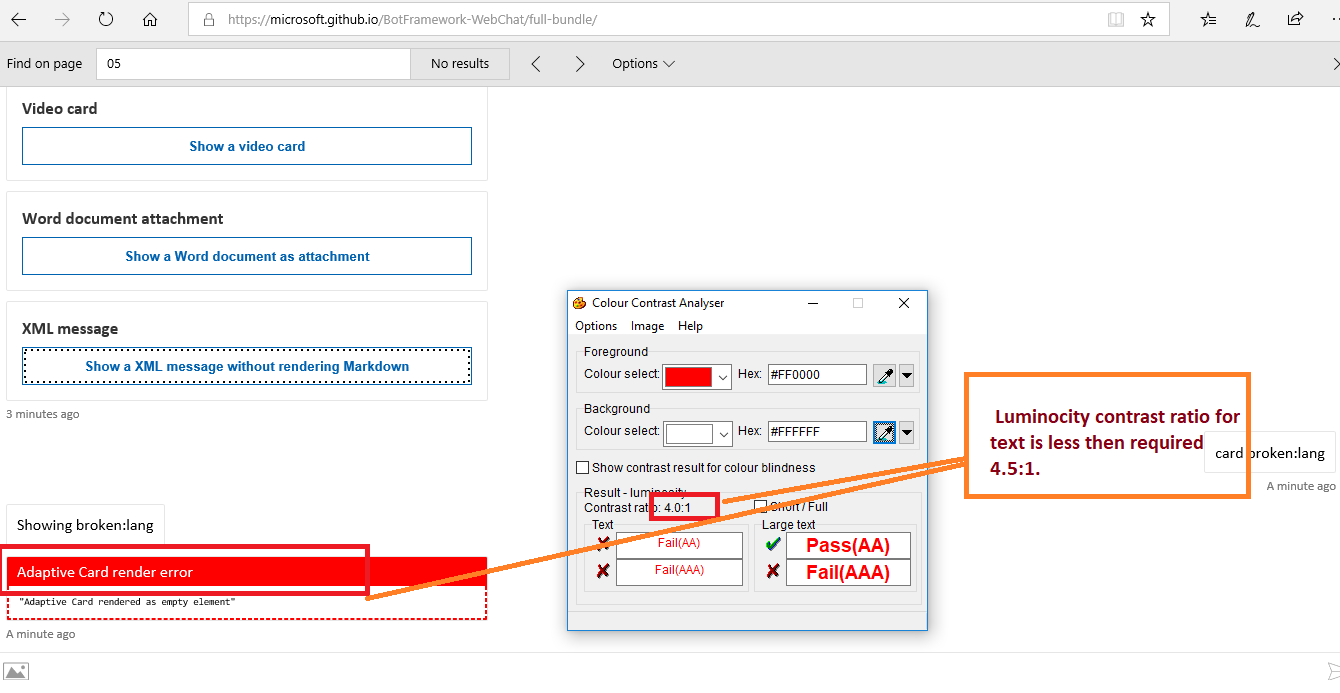


Actual Result:
Luminosity Contrast Ratio of 'Text' which appears after ''Adaptive cards that is broken because of invalid language' button is 4.0:1.
Note - Same issue repro at -
Expected Result:
Luminosity Contrast Ratio for 'Heading Text - No renderer for this attachment' should be greater than or equal to 4.5:1.
Repro Steps:
User Impact:
Users with low vision or Color blindness will find it difficult to access content with low luminosity contrast ratio.
MAS Reference:
MAS 1.4.3 – Contrast (Minimum) (17)
Test Environment:
OS: Windows 10
OS Build: 17134.345
OS Version: 1803
Browser: Edge
Tool: Color Contrast Analyser
Attachment:
