Skip to content
This repository was archived by the owner on Oct 17, 2025. It is now read-only.

feat(css): Add example of @keyframes#2094

Merged
estelle merged 5 commits intomdn:mainfrom
NiedziolkaMichal:keyframes
Jul 28, 2023
Merged

feat(css): Add example of @keyframes#2094
estelle merged 5 commits intomdn:mainfrom
NiedziolkaMichal:keyframes

Conversation

@NiedziolkaMichal
Copy link
Copy Markdown
Member

@NiedziolkaMichal NiedziolkaMichal commented Apr 20, 2022

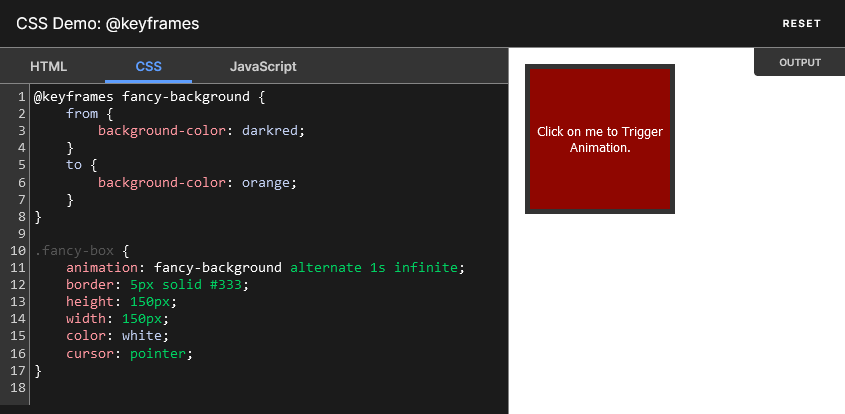
It adds interactive example to @keyframes.

image

@schalkneethling schalkneethling added Content:CSS issues related to CSS examples. community contributions by our wonderful community labels Apr 20, 2022
@NiedziolkaMichal NiedziolkaMichal changed the title @keyframes keyframes at-rule Apr 22, 2022
@NiedziolkaMichal
Copy link
Copy Markdown
Member Author

@wbamberg defaultTab is added and this at-rule is fully working on modern browsers. Could you take some time to review it please?

@wbamberg
Copy link
Copy Markdown
Contributor

wbamberg commented Jun 7, 2022

This works fine. The only reservation I have is that I'm a bit uncomfortable when we have animations that play by default, as animations can be very distracting. Most (but not all!) of our examples for CSS animation properties are triggered by a button, so the user can choose when (and whether) to see the animation.

I wondered if we could do something like:

@keyframes bounce {
    from {
        margin-top: 0;
        background-color: #1766aa;
    }
    to {
        margin-top: 40%;
        background-color: #078372;
    }
}

.animating {
    border-radius: 50%;
    border: 5px solid #333;
    height: 150px;
    width: 150px;
    background-color: #1766aa;
}

div:hover > .animating {
    animation: bounce alternate 1s infinite;
}

?

A couple of issues with this:

  • if we did this we should probably change the class name to animatable or something like that
  • it makes the example longer, so we would need the taller editor
  • would users figure out that they have to hover to see the effect, or should we add a label, which would make things even more complicated? I think they should figure it out probably.

What do you think? Honestly I'm not sure if it is worth adding this or if your PR is fine as it is.

@NiedziolkaMichal
Copy link
Copy Markdown
Member Author

@wbamberg I don't think using hover is a good idea, because it wouldn't work on smart phones and even PC users might not notice that placing a mouse over example is required for it to work.

I reworked example so user needs to click on the box to start or stop animation.

image

JavaScript code sets animationPlayState values, so CSS is not cluttered and we can keep current window height. Unfortunately it also requires Shadow DOM PR.

@wbamberg
Copy link
Copy Markdown
Contributor

wbamberg commented Jul 1, 2022

@wbamberg I don't think using hover is a good idea, because it wouldn't work on smart phones and even PC users might not notice that placing a mouse over example is required for it to work.

I reworked example so user needs to click on the box to start or stop animation.

image

JavaScript code sets animationPlayState values, so CSS is not cluttered and we can keep current window height. Unfortunately it also requires Shadow DOM PR.

This approach looks good to me. I wonder if we should label PRs that are blocked by the shadow DOM PR.

@github-actions github-actions Bot added the idle Issues and pull requests with no activity for three months. label Dec 22, 2022
@NiedziolkaMichal NiedziolkaMichal mentioned this pull request Feb 10, 2023
94 tasks
@NiedziolkaMichal NiedziolkaMichal removed community contributions by our wonderful community depends on shadow DOM fix idle Issues and pull requests with no activity for three months. labels Feb 26, 2023
@NiedziolkaMichal NiedziolkaMichal changed the title keyframes at-rule feat(css): Add example of @keyframes Feb 26, 2023
@github-actions github-actions Bot added the idle Issues and pull requests with no activity for three months. label Mar 29, 2023
@estelle
Copy link
Copy Markdown
Member

estelle commented Jul 25, 2023

instead of using JS to pause and play, we can use hover and focus-within - activating the animation when the user is either hovering the example (for pointer users) or has entered the widget (for keyboard users)

@github-actions github-actions Bot removed the idle Issues and pull requests with no activity for three months. label Jul 25, 2023
@NiedziolkaMichal
Copy link
Copy Markdown
Member Author

instead of using JS to pause and play, we can use hover and focus-within - activating the animation when the user is either hovering the example (for pointer users) or has entered the widget (for keyboard users)

It would make the code of the example significantly longer. I also think that clicking is more convenient for users, especially those who use smartphones.

Copy link
Copy Markdown
Member

@estelle estelle left a comment

Choose a reason for hiding this comment

The reason will be displayed to describe this comment to others. Learn more.

Thanks! 🎉

@estelle estelle merged commit 8d776bb into mdn:main Jul 28, 2023
Sign up for free to subscribe to this conversation on GitHub. Already have an account? Sign in.

Labels

Content:CSS issues related to CSS examples.

Projects

None yet

Development

Successfully merging this pull request may close these issues.

4 participants