Repository navigation
Log scale tick labels are overlapping #6549

Description

-
Linux hypatia-pc 4.5.0-1-amd64 Fix autofmt_xdate() when using in conjunction with twinx() #1 SMP Debian 4.5.1-1 (2016-04-14) x86_64 GNU/Linux
lsb_release -a No LSB modules are available. Distributor ID: Debian Description: Debian GNU/Linux 8.4 (jessie) Release: 8.4 Codename: jessie -
matplotlib 1.5.2~rc2-1
-
Python 2.7.11+
-
installed using:
sudo apt-get install -t sid python matplotlibg
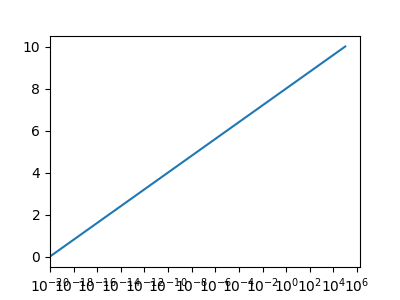
Here is an example where the problem appears:
from matplotlib.pyplot import *
figure( figsize=[4,3] )
subplot( 111, xscale='log' )
plot( [1e-20,1e5], [1e-16,10] )
show()
For lack of time the following image wasn't reproduced with the above example, but came from another problem:

The right side shows the problem and the left side is my workaround which calculates some distance for a given amount of labels I want (here I wanted 5 labels or less). So it set every exponent, but every sixth integer exponent, i.e. -16,-10,-4.
It would be cool if it was fully automatic like with linear scales.
Activity
mxmlnkn commentedon Jun 7, 2016
This bug also happens with the linear scale:
Note that without
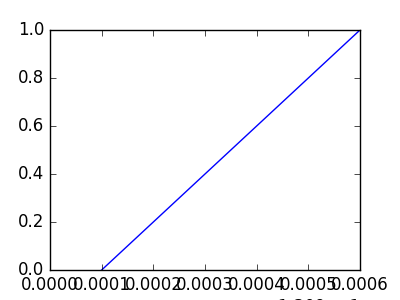
tight_layoutthe+1.309e1won't be inside the canvas:I would say this is still another bug.
I would just be nice if the formatter could do something like:
tacaswell commentedon Jun 8, 2016
Can you try the 2.0.0b1 which implements something like that?
anntzer commentedon Jun 8, 2016
2.0 solves the problem for linear scale, but not for log-scale (the original issue): the
LogLocatorclass does not use the ticks-limiting logic present inMaxNLocator. (Apparently neither doSymmetricalLogLocatororLogitLocator.)mxmlnkn commentedon Jun 8, 2016
@tacaswell : The only difference in 2.0b is that the default label font size is smaller (or maybe it just uses a different backend), resulting in the above linear scale example to actually work. But adding some 0s, I can still reproduce the problem even with linear scales, unlike @anntzer said.
logarithmic scale (minimal example from 1st post):

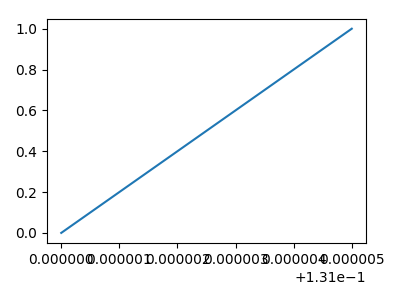
linear scale (minimal example from 2nd post):
linear scale even more extreme (This may be an extreme example, but it could still be solved by reducing the number of tick labels by one):
Above done with:
anntzer commentedon Jun 8, 2016
Indeed, 2.0 just uses a heuristic where the aspect ratio of an xlabel is no more than 1x3 (by the way, I just realized that this would be way too pessimistic (too optimistic for ylabels) if the labels are rotated...).
As discussed in #5494, it is not so easy to handle this automatically because the tick labels are rendered after the tick positions are selected.
tacaswell commentedon Sep 12, 2016
Linked with #7001
ENH: LogLocator can auto-select number of ticks based on axis