Repository navigation
hatch_demo.py does not correctly save all the hatches in pdf #12367
Description

Bug report
Bug summary
Code for reproduction
The same code available in
with just two addition: matplotlib.use('Agg') and plt.savefig in different formats.
# Paste your code here
"""
Hatching (pattern filled polygons) is supported currently in the PS,
PDF, SVG and Agg backends only.
"""
import matplotlib
matplotlib.use('Agg') #the same happen also without this line backend TkAgg
import matplotlib.pyplot as plt
from matplotlib.patches import Ellipse, Polygon

fig = plt.figure()
ax1 = fig.add_subplot(131)
ax1.bar(range(1, 5), range(1, 5), color='red', edgecolor='black', hatch="/")
ax1.bar(range(1, 5), [6] * 4, bottom=range(1, 5), color='blue', edgecolor='black', hatch='//')
ax1.set_xticks([1.5, 2.5, 3.5, 4.5])

ax2 = fig.add_subplot(132)
bars = ax2.bar(range(1, 5), range(1, 5), color='yellow', ecolor='black') + \
    ax2.bar(range(1, 5), [6] * 4, bottom=range(1, 5), color='green', ecolor='black')
ax2.set_xticks([1.5, 2.5, 3.5, 4.5])

patterns = ('-', '+', 'x', '\\', '*', 'o', 'O', '.')
for bar, pattern in zip(bars, patterns):
    bar.set_hatch(pattern)

ax3 = fig.add_subplot(133)
ax3.fill([1, 3, 3, 1], [1, 1, 2, 2], fill=False, hatch='\\')
ax3.add_patch(Ellipse((4, 1.5), 4, 0.5, fill=False, hatch='*'))
ax3.add_patch(Polygon([[0, 0], [4, 1.1], [6, 2.5], [2, 1.4]], closed=True, fill=False, hatch='/'))
ax3.set_xlim((0, 6))
ax3.set_ylim((0, 2.5))

#plt.show()

plt.savefig('hatch_demo.pdf')
plt.savefig('hatch_demo.png')
plt.savefig('hatch_demo.eps')
print(matplotlib.__version__)
print(matplotlib.get_backend())
Actual outcome
The pdf saved image does not show all the hatch.
Instead, the png and the eps ones show all the hatch correctly.
Expected outcome
The same shown in
Matplotlib version
- Operating system: Ubuntu 18.04 x86_64
- Matplotlib version: v3.0.0 (but the same happen also whit v2.1.1)
- Matplotlib backend (
print(matplotlib.get_backend())):Agg(but the same happen also whitTkAgg) - Python version: Python 3.6.6
- Jupyter version (if applicable):
- Other libraries:
Matplotlib installed with pip
Reacted by Amir Mohammadi, hxer7963, Matthias Redies, Andrés Sánchez and Philipp Niedermayer
Activity
[-]hatch_demo.py does not save pdf[/-][+]hatch_demo.py does not correctly save all the hatches in pdf[/+]QuLogic commentedon Oct 2, 2018
This is strange because
ax.barproducesRectangles in aBarContainer, andRectanglehatching for PDF is definitely tested here:matplotlib/lib/matplotlib/tests/test_simplification.py
Lines 221 to 226 in 7bcf618
The only difference is the example sets hatching after the object is created. But modifying the test to do the same still passes.
Perhaps something to do with the
BarContaineris messing things up.ftesser commentedon Oct 2, 2018
Hi, I have just realized that the embedded pdf visualizer in my web browser show me the pdf correctly.
So I have to reformulate my issue:
I have done another test, I noticed that the generated pdf file is a "PDF-1.4" file.
I tried to to convert the same file as "PDF-1.5" version and now I can see all the hatching also with evince.
Does it exist any way to force
plt.savefigto save the figure using PDF CompatibilityLevel 1.5?For convenience I attach the "PDF-1.5" version here: hatch_demo-PDF-1.5.pdf
ImportanceOfBeingErnest commentedon Oct 2, 2018
pdfSam: Blured hatching
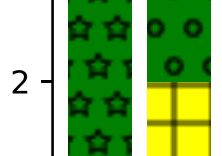
Adobe Acrobat: No hatching at all

SumatraPDF: No hatching + some white lines
Strikingly, the shared hatch_demo-PDF-1.5.pdf looks perfect in all tested pdf viewers and browsers (Firefox, Opera, Vivaldi, Foxit Reader, Acrobat, pdfSam, SumatraPDF).
However, I cannot reproduce the conversion. Trying to convert via ghostscript9.16 as
>gswin64 -sDEVICE=pdfwrite -dCompatibilityLevel=1.5 -dPDFSETTINGS=/screen -dNOPAUSE -dQUIET -dBATCH -sOutputFile=hatch-demo15.pdf hatch_demo.pdfgives a pdf which looks bad in all tested viewers.Also using some online tool (https://docupub.de/pdfconvert) produces undesired output.
@ftesser Can you share how exactly you did the conversion?
anntzer commentedon Oct 2, 2018
Curiously, I get similar result with mplcairo: chromium shows the hatches, mupdf and zathura don't, and okular only shows the round ones (second from the left).
ftesser commentedon Oct 2, 2018
@ImportanceOfBeingErnest I did the conversion like this:
I imported the file with inkscape (https://inkscape.org) and saved back (inkscape allows to "restrict to PDF version" 1.5).
ImportanceOfBeingErnest commentedon Oct 5, 2018
I see, that means that it's not enough to just change the version, but to convert it to svg first and then save to pdf again. (Did you try with "restrict to version 1.4"? It might just work as well.)
ftesser commentedon Oct 5, 2018
@ImportanceOfBeingErnest: I confirm, the same inkscape procedure but with "restrict to PDF version" 1.4 works as well.
ImportanceOfBeingErnest commentedon Oct 5, 2018
Good to know that it doesn't depend on the pdf version. It means that this is purely a problem of the pdf backend.
For a workaround one can indeed use inkscape as
which requires inkscape to live in the Path.
use inkscape workaround
export plots as pdf
xhain commentedon Nov 18, 2019
Bump.
I'm having a similar issue here: hatching is not exported to PDF.
ShawnZhong commentedon Sep 19, 2022
Adding
alpha=1tobar()seems to solve this problem.The screenshots below are taken from Chrome. I can always see the hatches in Adobe Reader and the default Preview app in macOS with or without
alpha=1.ShawnZhong commentedon Sep 19, 2022
Here is what I see when I open the following files in Chrome (105.0.5195.125 on arm64 macOS):
ShawnZhong commentedon Sep 19, 2022
I dig into this a bit more and found that the alpha value is indeed the problem.
The following code snippet generates two images
default.pdfandalpha1.0.pdf. Only the latter one properly shows the hatches in Chrome.By diffing the generated PDF files. There is only a single line of difference:
One can also see this using a PDF parser:
The reference from http://res.icesoft.org/docs/icepdf/v4_4_0/core/org/icepdf/core/pobjects/graphics/ExtGState.html shows:
In terms of the code from matplotlib, it has something to do with the following lines:
matplotlib/lib/matplotlib/backends/backend_pdf.py
Lines 1991 to 1996 in 1d5221b
github-actions commentedon Sep 20, 2023
This issue has been marked "inactive" because it has been 365 days since the last comment. If this issue is still present in recent Matplotlib releases, or the feature request is still wanted, please leave a comment and this label will be removed. If there are no updates in another 30 days, this issue will be automatically closed, but you are free to re-open or create a new issue if needed. We value issue reports, and this procedure is meant to help us resurface and prioritize issues that have not been addressed yet, not make them disappear. Thanks for your help!
oscargus commentedon Sep 20, 2023
Thanks for these insights @ShawnZhong !
It seems like
CAandcais set here:matplotlib/lib/matplotlib/backends/backend_pdf.py
Lines 1455 to 1466 in bd8198c
Which in turn is called from:
https://github.com/matplotlib/matplotlib/blob/bd8198c8b8b1a41c39e7f85ef164f7801682ecd0/lib/matplotlib/backends/backend_pdf.py#L2510C1-L2513C1
This is only called in:
matplotlib/lib/matplotlib/backends/backend_pdf.py
Lines 2589 to 2625 in bd8198c
(as part of
self.commands)There is a bit related to hatches where maybe alpha should be dealt with in some way...
Now, checking #17049, I may be somewhat correct, but the easiest thing is probably to build on that.
A-Vani commentedon Mar 1, 2024
I still have this issue. An alternative is to generate svg files and then convert to pdf.
tacaswell commentedon Apr 16, 2024
I can confirm some of the reports in this thread on ~current main: