Repository navigation
Provide pre-compiled libvips+deps for OS X #312
Description

#42 provided the infrastructure and initial support for 64-bit Windows and Linux binaries.
- OS X
We could use Travis' OS X environment + homebrew e.g. https://github.com/lovell/package-libvips-darwin-x64/blob/master/.travis.yml
If we use this approach a shell script is required to update the paths in the .dylib files - this will look something like:
for each .dylib file (e.g. libvips.42.dylib):
- otool libvips.42.dylib
- install_name_tool -id @rpath/libvips.42.dylib libvips.42.dylib
- for any entry that does not start with /usr/lib (e.g. libGraphicsMagick.3.dylib):
  - install_name_tool -change /usr/local/opt/graphicsmagick/lib/libGraphicsMagick.3.dylib @rpath/libGraphicsMagick.3.dylib libvips.42.dylib
- ARM
Best bet is to use a first generation Raspberry Pi Model B to compile ARMv6 binaries, possibly via Hypriot. Support for ARMv6+ added in v0.12.2.
Reacted by James Homer and Eric McCarthy
Activity
lovell commentedon Jan 1, 2016
ARMv6 build machine in action. This might take some time.

lovell commentedon Jan 6, 2016
Commit a0e034a adds support for building and using pre-compiled libvips binaries on ARMv6+.
This will be included in sharp v0.12.2.
[-]Investigate pre-compiled libvips+deps for OS X and ARM-based systems[/-][+]Investigate pre-compiled libvips+deps for OS X[/+]davej commentedon Mar 10, 2016
How about falling back to sips on OS X. Could that be a viable alternative to compiling libvips?
lovell commentedon Mar 10, 2016
@davej Installation of
libvipsis already relatively easy on OS X via:This task relates to making it even easier.
homerjam commentedon Apr 27, 2016
@lovell I think what @davej means is - could you fallback to using sips instead of vips from sharp in order to support using sharp in electron apps on osx.
@davej can you clarify? And that link to sips leads nowhere? Can I find more info on that somewhere else? Thanks!
Just to mention - I'm mega interested in making an electron app that can use sharp cross platform under the hood.
davej commentedon Apr 27, 2016
@homerjam Here's the cached man page. I ended up creating my own lib to do cross-platform resizing of images on Electron, not the most performant approach but it works: https://github.com/davej/electron-image-resize
lovell commentedon Jun 17, 2016
There's now an experimental packaging script for OS X and commit dac8654 on the
osx-binariesbranch takes advantage of the pre-built binaries it creates.I'd very much appreciate it if everyone interested in this feature can test it by running the following on a Mac where vips is not already installed (or has been removed via
brew unlink vipsorbrew uninstall vips) and report back here.npm install lovell/sharp#osx-binaries[-]Investigate pre-compiled libvips+deps for OS X[/-][+]Provide pre-compiled libvips+deps for OS X[/+]sharpfuryz commentedon Jul 18, 2016
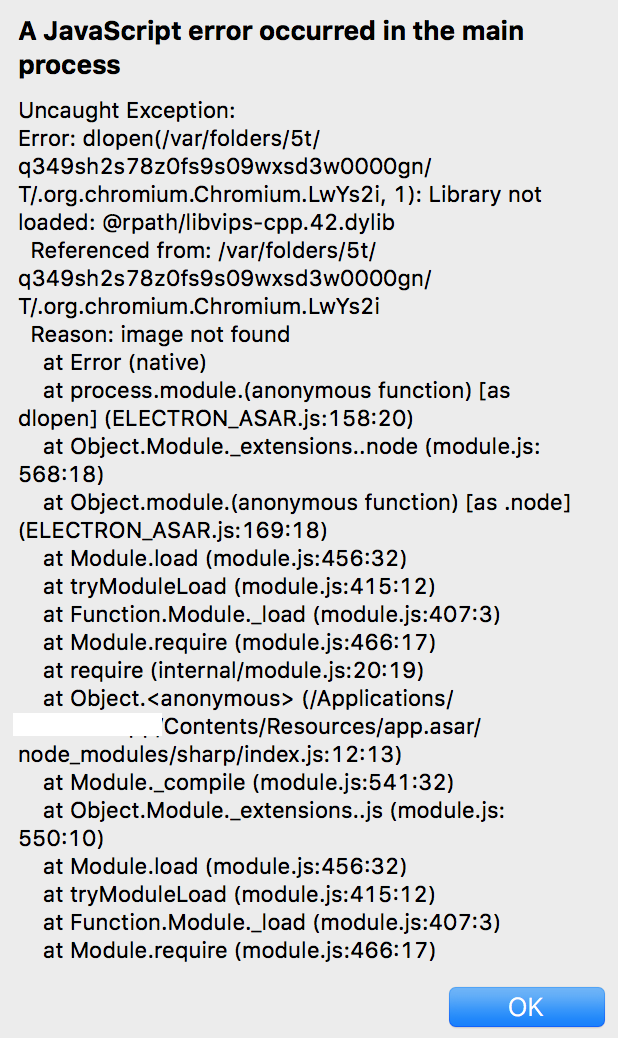
I would like to notice: this solution is working unless your app is packed in asar (which is default in electron-bootstrap). In my case it caused errors because nodejs can't resolve libraries inside app.asar, so I unpack to app/ and it fixed this issue.
lovell commentedon Jul 26, 2016
Commit 36bfbde on the
pencil(v0.16.0) branch adds the use of pre-compiled binaries for OS X.https://travis-ci.org/lovell/sharp/jobs/147224162
AlekzZz commentedon Jul 28, 2016
I get the following error during installation:
npm install -S lovell/sharp#osx-binariesnpm ERR! git rev-list -n1 osx-binaries: fatal: ambiguous argument 'osx-binaries': unknown revision or path not in the working tree.
npm ERR! git rev-list -n1 osx-binaries: Use '--' to separate paths from revisions, like this:
npm ERR! git rev-list -n1 osx-binaries: 'git [...] -- [...]'
npm ERR! git rev-list -n1 osx-binaries:
npm ERR! git rev-list -n1 osx-binaries: fatal: ambiguous argument 'osx-binaries': unknown revision or path not in the working tree.
npm ERR! git rev-list -n1 osx-binaries: Use '--' to separate paths from revisions, like this:
npm ERR! git rev-list -n1 osx-binaries: 'git [...] -- [...]'
npm ERR! git rev-list -n1 osx-binaries:
npm ERR! Darwin 15.6.0
npm ERR! argv "/usr/local/Cellar/node/6.3.1/bin/node" "/usr/local/bin/npm" "install" "-S" "lovell/sharp#osx-binaries"
npm ERR! node v6.3.1
npm ERR! npm v3.10.5
npm ERR! code 128
lovell commentedon Jul 28, 2016
@AlekzZz Please use
npm install lovell/sharp#pencil(I've updated my comment too, sorry).digital-flowers commentedon Aug 1, 2016
if i use "npm install lovell/sharp#pencil" i had the following errors:
clang: error: no such file or directory: 'node_modules/sharp/include'
clang: error: no such file or directory: 'node_modules/sharp/include/glib-2.0'
clang: error: no such file or directory: 'node_modules/sharp/lib/glib-2.0/include'
do i need to add these files manually ?
lovell commentedon Aug 1, 2016
@digital-flowers Those should be created for you. Are you able to share the full npm install log?
digital-flowers commentedon Aug 1, 2016
after trials i have found that this only happened if the project directory has space in it is name, i renamed the folder and it is working now
digital-flowers commentedon Aug 1, 2016
so project folder should have no spaces to make this work
lovell commentedon Aug 1, 2016
@digital-flowers Thanks, it looks like you ran into nodejs/node-gyp#65
digital-flowers commentedon Aug 1, 2016
exactly thank you :)
digital-flowers commentedon Aug 1, 2016
is there any chance to include image magick in this prebuild version? i need it only because of bmp file format.
lovell commentedon Aug 1, 2016
@digital-flowers The pre-built binaries only include shared libraries I'm willing to support and *magick is a security nightmare. Please install vips yourself if you need to use extra libraries and take your own precautions if using untrusted images.
digital-flowers commentedon Aug 1, 2016
yes i understand thank you
lovell commentedon Aug 1, 2016
@digital-flowers Commit da0dc28 on the
pencilbranch might help workaround the spaces-in-path problem.lovell commentedon Aug 18, 2016
v0.16.0 is now available via npm, providing pre-compiled shared library binaries for OS X.